
Is the Zero Trust client app a different app from WARP? 


Open MalwareTips from your Home Screen or desktop. Follow discussions, find answers and pick up where you left off.
If you cannot find an install option, update your browser or use its bookmark option to keep MalwareTips close.
After installation, open the app and sign in. Enable push notifications in Preferences if you want alerts. On iPhone and iPad, push requires a Home Screen web app and iOS or iPadOS 16.4 or later.
Sign in to manage notificationsInstallation is optional. Your notification settings stay under your control.

For Zero Trust, you need to use Cloudflare One app. Currently the situation is messy. On Windows, there's Cloudflare One app for WARP and Zero Trust. On Android, WARP and Zero Trust have different apps (1.1.1.1 for WARP, Cloudflare One for Zero Trust).Is the Zero Trust client app a different app from WARP?

It connects fine for me. That's how I have been using for a long time. Not sure what's wrong on your endWeird, when I delete DNS line entirely, WARP fails to work. It only starts working when I enter DNS in the config. And yes, I did replace endpoint fromengage.cloudflareclient.com:2408to162.159.192.1:2408but it still doesn't connect without DNS field.
 Maybe conflict with something else? Just now I even tried it on the WireGuard Android app and it works here also. It's also not necessary to replace the engage cloudflare domain to an IP for this.
Did the logs show any errors on your side? On my end, errors still appear, but everything works as expected with no slowdowns or false positives.I set log to errors only now, we'll see how much errors I get surfing the web.
I'm currently not using YogaDNS as I'm testing DoH support built-in Windows, but yeah, I too sometimes get errors with QUIC and DoH3.Did the logs show any errors on your side? On my end, errors still appear, but everything works as expected with no slowdowns or false positives.

I first switched to AdGuard Home as SeriousHoax recommended, adding all the DNS filters I had tested in YogaDNS along with Cloudflare Zero Trust DNS to compare their speeds simultaneously. I used the AdGuard DNS filter and Hagezi Pro as block lists, and everything worked as expected. However, I noticed that Control D was generally about 5ms slower than Cloudflare from my location, based on AdGuard Home's 24-hour reports. Consequently, I switched back to using Control D with Hagezi Pro DNS through YogaDNS. I may eventually move to Windows built-in settings once the YogaDNS trial period ends.What DNS are you using now? Did you stick with Control D, Cloudflare or something else?
Did Control D support ever got back to your regarding routing?I first switched to AdGuard Home as SeriousHoax recommended, adding all the DNS filters I had tested in YogaDNS along with Cloudflare Zero Trust DNS to compare their speeds simultaneously. I used the AdGuard DNS filter and Hagezi Pro as block lists, and everything worked as expected. However, I noticed that Control D was generally about 5ms slower than Cloudflare from my location, based on AdGuard Home's 24-hour reports. Consequently, I switched back to using Control D with Hagezi Pro DNS through YogaDNS. I may eventually move to Windows built-in settings once the YogaDNS trial period ends.
No, they don't, but I'm glad I don't notice any slowdowns during my daily browsing.Did Control D support ever got back to your regarding routing?
I'm considering using Windows' built-in settings as well, but for third-party software, I think I'll go with AdGuard Home—the option to configure multiple DNS servers in parallel is brilliant.I think I'll keep using Windows built-in setting because now I have the option not to fallback to plain DNS. I only installed YogaDNS because I haven't had that option available in settings at all.
I found an alternative called "Technitium DNS Server". Have you tried it?I like AdGuard Home, but I wish it was more of an app for Windows, not same variant like for the server.
Nah. I don't need it. Windows built-in DoH is enough for me. Keep in mind using software to create local DNS server on your PC only increases CPU usage because your PC has to resolve all the requested domains AND search them in the blocklists you chose.I found an alternative called "Technitium DNS Server". Have you tried it?

Nah. I don't need it. Windows built-in DoH is enough for me. Keep in mind using software to create local DNS server on your PC only increases CPU usage because your PC has to resolve all the requested domains AND search them in the blocklists you chose.
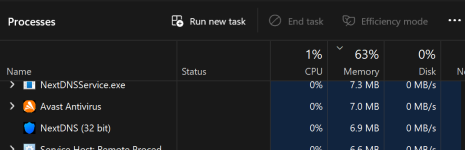
He is referring to DNS servers rather than DNS clients, so NextDNS and YogaDNS are not affected by this issue.In NextDNS case, maybe very little? Or, am I off track for where the conversation was?
View attachment 299787
What I'm talking about are apps/programs like Pi-Hole, AdGuard Home running on the PC rather than server. They create local DNS server on device with blocklists you choose; basically local instance of NextDNS for that one device.In NextDNS case, maybe very little? Or, am I off track for where the conversation was?
View attachment 299787
I have used it. It's much more powerful than AdGuard Home, as it's a full-blown DNS server. It can be used as a recursive DNS resolver, which is its default, but it can be used as a forwarder, similar to AdGuard Home.I found an alternative called "Technitium DNS Server". Have you tried it?


Both AdGuard Home and Technitium can also be used as a forwarder, without any local blocklist.AdGuard Home works as a local DNS server. The device itself handles the DNS requests and applies the blocklists, so it uses some CPU and memory.
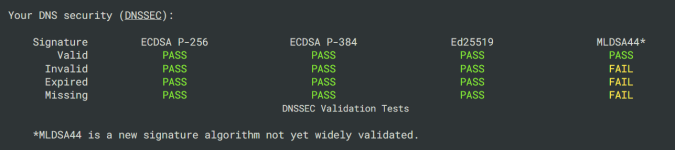
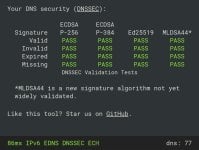
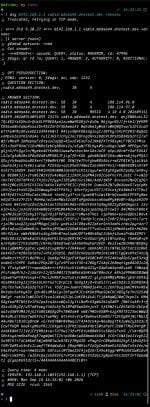
I read the Cloudflare's article about it a couple of days ago. Cloudflare supports it. It's the post-quantum DNSSEC. They even gave a dig query verification method in the article which I verified.

Members who viewed this thread in the last 5 minutes

