New Update Bitdefender - BDTS updates

The profiles perform very light optimisations like switching alerts off, postponing Windows updates and modifying the sleep/screen shutdown & brightness settings. They are more meant to eliminate annoyances than to boost anything.

Nothing that can’t be achieved manually.
I can’t stand when AV’s manipulate the OS (power plan, system updates, etc). I happily ran BD without their “annoyance optimizations”. They could better explain what these profiles do upfront just as you did.
 
I can’t stand when AV’s manipulate the OS (power plan, system updates, etc). I happily ran BD without their “annoyance optimizations”. They could better explain what these profiles do upfront just as you did.
An attempt to explain them has been made on this page which vaguely touches the feature. Every individual profile is then provided as a link and a tl;dr explanation has been provided there.

As far as I remember, this feature is off by default but recommended by Auto-Pilot to be used. I was never a fan. I don’t like that applications are shown as msword.exe (example) and not Microsoft Office Word. I am a bit of a perfectionist and these small gaffs annoy me.
 
All these profiles are absolutely unnecessary. Most products turn off updates when you run a program in full screen. It's so simple, easy and effective. Windows's own game mode turn off Windows updates when you're gaming, so AV's don't need to do anything about it.
One other thing they may do is to turn off AV update when Windows game mode is active. Some gamers out there run their game in windowed mode instead of full screen. So this method will work better in such cases.
 
Minor update release Build 26.0.35.169

bd update.png
 
Lost track of this one, posted on May 4th.

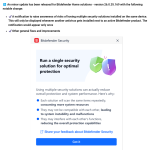
🔄 An update has been released for Bitdefender Home solutions - version 26.0.35.174 with the following notable changes:

  • ✔️ Fixed: In case of large hosts file, when the scan hosts file feature is on, internet looses connectivity for a few seconds after boot
  • ✔️ Other general fixes and improvements
 
An update has been released for Bitdefender Home solutions - version 26.0.36.193 with the following notable changes:

  • ✔️Fixed: Safepay shows message that virtual printers are not supported even if a physical printer is set as default
  • ✔️Other general fixes and improvements
 
I just did a manual update but it still shows the earlier version. I rebooted my laptop but still the same earlier version :rolleyes:
Or I update via system tray BD icon is only for engine update?

1686576470448.png
 
Last edited:
I just did a manual update but it still shows the earlier version. I rebooted my laptop but still the same earlier version :rolleyes:
Or I update via system tray BD icon is only for engine update?
BD does same like Kaspersky for new version updates: gradual rollout to users, depends also on users region/countries... We just have to wait, usually 5-10 days.
 
Exactly as silversurfer posted. I was usually around 7-8 days later (Scott) U.S. as well as a member RedsFan of Belgium Europe.
This can be an interesting thread to keep up with, as some of us would post issues there that were maybe (if it wasn't an isolated incident) happening on our ends before an update fix was pushed out.

 
Last edited:
still 26.0.36.193 on 30days trial Bitdefender Premium Security (with vpn)
vpn dissaster speed !
same server with windscribe, windscribe 800 mbps/bitdefender 250 mbps ,wow :)
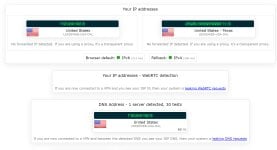
Yes, the speeds are almost in 1/2, especially on desktop. Do me a favor, just to see. With VPN enabled, go to ipleak.net and see if you only have one server connection, or if it keeps connecting to multiple servers.