Advice Request Browsing Profiles

Please provide comments and solutions that are helpful to the author of this topic.

Back3

Level 14
Thread author
Verified
Top Poster
Forum Veteran
Apr 14, 2019
675
3,731
1,269
Canada
My basic security setup: W11 64 bit, UAC default, F-Secure Safe, Simple Windows Hardening, Firewall Hardening, Norton Power Eraser and SophosScanandClean as second opinion scanners, O&O Shutup10, Macrium Home and Syncback free, Sumo, Process Explorer and Autoruns.

Browsing profile for my secure surfing (mostly 25 sites like MalwareTips):
Chrome or Edge, Cira DNS for Canadians, F-Secure Browsing Protection and Adguard Ext. Bitwarden

Browsing profile for insecure browsing:
Enable a VPN ( Windscribe or Surfshark), Activate Sandboxie Plus and use Librewolf (uBlock Origin).

Do you guys use different browsers or different browser profiles to accommodate your surfing habits?
 
Last edited:
For banking and buying I use a different profile in MS Edge with strict security settings. The only extension is Adguard Browser Assistent, which is the link to the interface from Adguard for Windows. This improves the tracker protection and adds Google Safe Browsing (for what's worth). Next DNS is the last link in the security chain.
 
Last edited:
What's the advantage over Brave? I can't find documentation about it.
It has better tab management. For example, it can open every address entered in a new tab rather than the current tab and you can get it open new tabs to right of the current tab. Also, it is based on newer builds of Chromium than Brave is.
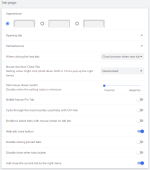
Catsxp 2.png
 
What's the advantage over Brave? I can't find documentation about it.
It's made in PRC and there is no information about who is making it and there is no contact information. The FAQ about privacy states as follows....
Strictly abide by the "Regulations on the protection of computer software" of the people's Republic of China, will not collect your personal information for any reason, and will not send them to the server or any third party server. Fully comply with the principles stated in the privacy white paper of Google Chrome, and can only be enhanced on this basis, but not weakened. In the future, it is possible to send usage statistics and crash reports to the server with the authorization of users. In addition, no data will be sent to the server.
 
What bloat does Brave have? I've been using Catsxp daily for quite some time, but have very little experience with Brave.
The crypto wallets, and VPN. All can be disabled. Personally I prefer Vivaldi's approach where the browser asks you what features to enable in the welcome screen right after you install the browser.
 
  • Like
Reactions: jamey910111
Indeed, catsxp does not seem to be bloated like brave is!

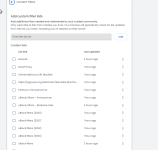
I installed the portable version, already installed ublock origin on it. Apparently, catsxps's own blocker is not the best/not the same as brave, but it is possible to add custom lists to catsxp's blocker like in the attached screenshot (also see this page (link fixed): https://catsxp.com/forum/viewtopic.php?t=339) - although since i installed ublock origin i unchecked that list as u can see in the screenshot because it's redundant. Based on roger_m advice I also turned off webrtc. I also left the secure dns to use os default as is to prevent leaks. If anyone has any other suggestions for tweaking this browser it's appreciaed. I will continue to use the portable version of catsxp over the installed as I see no disadvantages with portable, unless there is one.

1724425326704.png
 
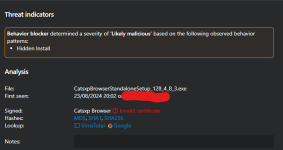
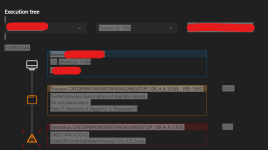
So I have tried installing Catsxp browser, but Emsisoft detected it as Malware.HiddenInstaller by BB component. It seems that there is a problem with the digital signature as Microsoft Smart Screen waned about Unknown Publisher too. I have submitted the detection to Emsisoft.

Screenshot 2024-08-23 200442.pngScreenshot 2024-08-23 200527.png
 
So I have tried installing Catsxp browser, but Emsisoft detected it as Malware.HiddenInstaller by BB component. It seems that there is a problem with the digital signature as Microsoft Smart Screen waned about Unknown Publisher too. I have submitted the detection to Emsisoft.

View attachment 285086View attachment 285087
I restored the installation file and added it to exclusions, but still Emsisoft detected it.
 
So I have tried installing Catsxp browser, but Emsisoft detected it as Malware.HiddenInstaller by BB component. It seems that there is a problem with the digital signature as Microsoft Smart Screen waned about Unknown Publisher too. I have submitted the detection to Emsisoft.

View attachment 285086View attachment 285087

I scanned with Kaspersky, as well as Kaspersky Opentip, as well as Virustotal - I scanned each and every file in the portable version - no flags btw - except one file from one anti-virus:

The rest were clean on both kaspersky, kaspersky open tip, and virus total, and the single one flagged above (chrome.dll on virus total with a single detection) is probably a false-positive.

Although you scanned the installation .exe ; i scanned the portable (all individual files of the portable too not only the zip); to be clear this is what I scanned, the 64-bit portable: https://www.catsxp.com/forum/viewtopic.php?t=1&ver=128.4.8.3
 
Also I scanned the Standalone executable on virustotal and kaspersky, no flags (https://catsxp.oss-cn-hongkong.aliyuncs.com/x64/CatsxpBrowserStandaloneSetup_128_4_8_3.exe):


Here is the kaspersky it comes as clean overall. All the Extracted files (70) come out as clean, as do all the Network activities (all 6 come clean as well). But in terms of suspicious activity there is 9 high, 3 medium, and low 63.
 

You may also like...