

The MalwareTips app
Your community, one tap away.
Open MalwareTips from your Home Screen or desktop. Follow discussions, find answers and pick up where you left off.
- Home Screen access
- Optional push alerts
- Your community
You're ready to explore.Explore what's new
Installation instructions
iPhone & iPad
- Open MalwareTips in Safari and tap Share. You may need to open the Page Menu first.
- Choose Add to Home Screen. If it is not listed, use Edit Actions to add it.
- Keep Open as Web App enabled if shown, then tap Add.
Android
- Open MalwareTips in Chrome or another browser that supports app installation.
- Open the browser menu and look for Install app, Install and create shortcut, or Add to Home screen.
- Choose Install and confirm. Wording varies by browser.
Desktop
- Chrome: use the install icon in the address bar, or the menu under Cast, save and share.
- Edge: open the menu, then More tools, Apps and Install this site as an app.
- Safari on Mac: choose Share or File, then Add to Dock. Firefox on Windows: look for the web apps button in the address bar.
If you cannot find an install option, update your browser or use its bookmark option to keep MalwareTips close.
Keep up with your conversations
After installation, open the app and sign in. Enable push notifications in Preferences if you want alerts. On iPhone and iPad, push requires a Home Screen web app and iOS or iPadOS 16.4 or later.
Sign in to manage notificationsInstallation is optional. Your notification settings stay under your control.
You are using an out of date browser. It may not display this or other websites correctly.
You should upgrade or use an alternative browser.
You should upgrade or use an alternative browser.
Troubleshooting BSOD
-
 Thread starter
JB007
Thread starter
JB007
- Start date
- 18 Replies
- 3,910 Views
As long as Windows was able to save a crash dump file when computer crashed, then BlueScreenView will most likely be able to locate the cause of the crash.
Blue screen of death (STOP error) information in dump files.
Displays information about blue screen crashes occured on your system. (MiniDump Reader)
www.nirsoft.net
Upvote
0


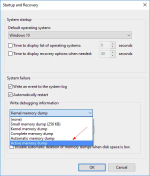
This is probably because a full memory dump in C:\Windows\MEMORY.DMP folder was not created, You must change settings to "Complete Memory Dump" for the next BSOD 
Upvote
0

Thanks @harlan4096This is probably because a full memory dump in C:\Windows\MEMORY.DMP folder was not created, You must change settings to "Complete Memory Dump" for the next BSOD
View attachment 246483

I modified the settings and wait with faith the next BSOD
Upvote
0

I know your PC is a DELL, but just in case;
To temporarily mitigate this problem, edit the device UEFI configuration (in the Security > Virtualization section) to disable Enhanced Windows Biometric Security. This change disables the restrictions that are enabled by the SDEV table and VBS.
https://support.microsoft.com/en-us...kpad-that-has-kb4568831-or-a-later-update-and
Stop error on Lenovo ThinkPad that has KB4568831 or a later update and Enhanced Windows Biometric Security enabled in UEFI
Applies to: Windows 10, version 2004, all editions
To temporarily mitigate this problem, edit the device UEFI configuration (in the Security > Virtualization section) to disable Enhanced Windows Biometric Security. This change disables the restrictions that are enabled by the SDEV table and VBS.
https://support.microsoft.com/en-us...kpad-that-has-kb4568831-or-a-later-update-and
Stop error on Lenovo ThinkPad that has KB4568831 or a later update and Enhanced Windows Biometric Security enabled in UEFI
Applies to: Windows 10, version 2004, all editions
Last edited:
Upvote
0
Upvote
0
You probably already google it, but this is a good page with recommendations for your error:
 softwarekeep.com
Fixed “Netio.sys” Blue Screen Errors on Windows 10 | SoftwareKeep
Getting "netio.sys" errors on Windows 10? Click here to fix this error using 5 methods to restore your system.
softwarekeep.com
Upvote
0
Thanks @Freud2004You probably already google it, but this is a good page with recommendations for your error:
Fixed “Netio.sys” Blue Screen Errors on Windows 10 | SoftwareKeep
Getting "netio.sys" errors on Windows 10? Click here to fix this error using 5 methods to restore your system.
These 2 BSOD occured on 2 PC on which I recently (8 days ago) installed the trial version of "Zone Alarm Extreme Security".
Do you think that ZAES could have caused these 2 BSOD ?
Upvote
0

Gandalf_The_Grey
Level 86
Verified
Honorary Member
Top Poster
Content Creator
Well-known
Forum Veteran
Could be an option.Thanks @Freud2004
These 2 BSOD occured on 2 PC on which I recently (8 days ago) installed the trial version of "Zone Alarm Extreme Security".
Do you think that ZAES could have caused these 2 BSOD ?
Because it's a trial I would uninstall ZoneAlarm and see if the BSOD's are over.
Upvote
0
Thanks @Freud2004
These 2 BSOD occured on 2 PC on which I recently (8 days ago) installed the trial version of "Zone Alarm Extreme Security".
Do you think that ZAES could have caused these 2 BSOD ?
I don't know, but is one of the recommendations from the text.
I find this on the internet:
"I uninstalled Zone Alarm Free Firewall but did not "restart" immediately. I received the same stop/restart NETIO.SYS blue screen. The good news is after 2 days from restarting, no Blue Screens! "
Upvote
0
Could be an option.
Because it's a trial I would uninstall ZoneAlarm and see if the BSOD's are over.
Thanks @Gandalf_The_Grey and @Freud2004I don't know, but is one of the recommendations from the text.
I find this on the internet:
"I uninstalled Zone Alarm Free Firewall but did not "restart" immediately. I received the same stop/restart NETIO.SYS blue screen. The good news is after 2 days from restarting, no Blue Screens! "
On the other hand I have only 1 BSOD for 1 PC for 8 days........ (= 2 BSOD/2 PC/8 days).
@Gandalf_The_Grey , it is a trial but a stable version (15.8.125.18466) and not a beta.
Upvote
0
Gandalf_The_Grey
Level 86
Verified
Honorary Member
Top Poster
Content Creator
Well-known
Forum Veteran
I understand that. It's a trial of a stable version, but that stable version seems to cause issues on your systems.@Gandalf_The_Grey , it is a trial but a stable version (15.8.125.18466) and not a beta.
Time to remove and try another security solution.
If you have no more BSOD's than ZoneAlarm was the culprit.
Upvote
0
I think you are right @Gandalf_The_Grey because before the installation of ZAES I never had BSOD on these 2 PC (7 years and 3 years).I understand that. It's a trial of a stable version, but that stable version seems to cause issues on your systems.
Time to remove and try another security solution.
If you have no more BSOD's than ZoneAlarm was the culprit.
Upvote
0
Recently browsing
Members who viewed this thread in the last 5 minutes
You may also like...
-
 Advice Request Adguard for Windows causing BSOD?
 -

-
 Troubleshooting Trying to get OSRS to run Post MD block
 -
 Advice Request Windows Sandbox for Malware testing?
 -
