Troubleshooting Change dedicated video memory to 512mb?

RVS2

Level 3
Verified
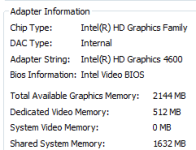
I wanted to increase my dedicated video memory from 256mb to 512mb, for playing games. What i did :

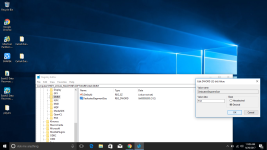
regedit - hkey local machine - created GMM folder - selected dword(32)bitvalue - named the folder DedicatedSegmentSize - entered 512 mb - and restarted.
--With a 4gb ram, 512mb was the highest recommended value--

But instead of giving 512 mb it put 1536 mb instead.
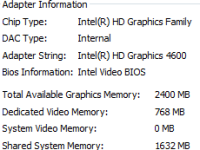
I then again changed it to 256 mb, but it shows 768 mb.

How should i reduce it to 512mb?
Untitled.png
 
Normaly you Dedicate the Memory for it over at the Bios / UEFI

No need for Registry Hack ;)

There you can regulate it accordingly with no issues and hardships.

But never forget:

Windows OS 64Bit needs about 1.2 - 1.6 GB Overhead plus applications that start up - The rest is for other applications to use!

Example: Windows OS 64bit 1.6 GB + 150 MB for AV and Startup Apps + 256 MB Video (Will be noted as Reserved on SystemInfo)= 2,006 GB Reserved 1,994 GB Free to use.

lmportant: On Windows 32bit RAM use max 3,2 GB - 3,6 GB depending on Mainboard and Windows OS Version

Rule: Since Windows 7 - 10 RAM gets calculated in MeBiByte - Here is a Converter for help: Convert mebibyte to megabyte - Conversion of Measurement Units (General Info)

Best regards
Val.
 
Upvote 0
Normaly you Dedicate the Memory for it over at the Bios / UEFI

No need for Registry Hack ;)

There you can regulate it accordingly with no issues and hardships.

But never forget:

Windows OS 64Bit needs about 1.2 - 1.6 GB Overhead plus applications that start up - The rest is for other applications to use!

Example: Windows OS 64bit 1.6 GB + 150 MB for AV and Startup Apps + 256 MB Video (Will be noted as Reserved on SystemInfo)= 2,006 GB Reserved 1,994 GB Free to use.

lmportant: On Windows 32bit RAM use max 3,2 GB - 3,6 GB depending on Mainboard and Windows OS Version

Rule: Since Windows 7 - 10 RAM gets calculated in MeBiByte - Here is a Converter for help: Convert mebibyte to megabyte - Conversion of Measurement Units (General Info)

Best regards
Val.
I opened the bios but couldn't find these settings. I did the registry job after that .
 
Upvote 0
I opened the bios but couldn't find these settings. I did the registry job after that .

I can help you with that. :D What type of computer do you use: Laptop / PC - Make and Modell of Mainboard or Laptop

I can lookup were the settings are for you ;)

Best regards
Val.

P.S. Little Pointer
To view this content we will need your consent to set third party cookies.
For more detailed information, see our cookies page.
:D
 
Upvote 0
I'm not sure if this is applicable to you:
  • Dedicated Memory Reporting

The graphics driver now reports some amount of fictitious “dedicated” graphics memory to the operating system (128MB by default) to work around applications issues in a number of games. These games incorrectly look for some amount of “dedicated” graphics memory because they weren’t coded with the unified memory architecture for processor graphics.

The amount reported can be modified or disabled if desired by changing the following registry value:


HKEY_LOCAL_MACHINE\Software\Intel\GMM, create a REG_DWORD value named “DedicatedSegmentSize”. The value is interpreted as number of MB to report (0-512MB). A value of 0 disables reporting the dummy memory segment. If the registry key/value is not found, the driver will report the default 128MB.
- - NEW- Intel® Iris™, Iris™ Pro, and HD Graphics Driver update posted for Haswell and Broadwell version 15.36.21.4222
 
Upvote 0
You have to change the value type from hexa decimal to decimal then you will see everything normal. Its simple xD
Cheers
AK47 ING H
 

Attachments

  • Untitled.png
    Untitled.png
    415.3 KB · Views: 3,047
Upvote 0
I wanted to increase my dedicated video memory from 256mb to 512mb, for playing games. What i did :

regedit - hkey local machine - created GMM folder - selected dword(32)bitvalue - named the folder DedicatedSegmentSize - entered 512 mb - and restarted.
--With a 4gb ram, 512mb was the highest recommended value--

But instead of giving 512 mb it put 1536 mb instead.
I then again changed it to 256 mb, but it shows 768 mb.

How should i reduce it to 512mb?

View attachment 142484
Hi. You set the amount with a hexadecimal value. You just need to correct it with a decimal value go to registery setting again and check the decimal option first , then set to 512, the program will set hexadecimal number automatically. Gl
 
Upvote 0

MalwareTips community

Join the discussion

Create a free account to reply to this thread, ask your own questions and get help from the community.

  • Reply and ask questions
  • Get alerts when someone answers
  • Free malware removal help
Create free account
or continue with

Recently browsing

Members who viewed this thread in the last 5 minutes

Back
Top