Serious Discussion Cloudflare Gateway Free Plan

@Marko :), You get a free legacy plan with a maximum of 3 locations when you create an account with no payment info. The updated free plan provides 50 locations and additional features and requires payment details.

I believe you kept the defaults when creating locations. You can disable IPv4 and IPv6 if you plan to use DoH and DoT. Cloudflare evaluates policies from top to bottom; it applies the first policy a query matches, and evaluation stops.

I suggest using the mrrfv repo; its guide is simple and quicker than using AIs. You can experiment once you get the overall feel of the process.

Cloudflare email, API token with Zero Trust read and edit permissions, and account ID.

Running in GitHub Actions​

These scripts can be run using GitHub Actions so your filters will be automatically updated and pushed to Cloudflare Gateway. This is useful if you are using a frequently updated blocklist.

Please note that:

  • GitHub Actions wasn't intended to be used for this purpose, therefore the local options are recommended.
  • the GitHub Action downloads the recommended blocklists and whitelist by default. You can change this behavior by setting Actions variables.
  1. Create a new empty, private repository. Forking or public repositories are discouraged, but supported - although the script never leaks your API keys and GitHub Actions secrets are automatically redacted from the logs, it's better to be safe than sorry. There is no need to use the "Sync fork" button if you're doing that! The GitHub Action downloads the latest code regardless of what's in your forked repository.
  2. Create the following GitHub Actions secrets in your repository settings:
    • CLOUDFLARE_API_TOKEN: Your Cloudflare API Token with Zero Trust read and edit permissions
    • CLOUDFLARE_ACCOUNT_ID: Your Cloudflare account ID
    • CLOUDFLARE_LIST_ITEM_LIMIT: The maximum number of blocked domains allowed for your Cloudflare Zero Trust plan. Default to 300,000. Optional if you are using the free plan.
    • PING_URL: /Optional/ The HTTP(S) URL to ping (using curl) after the GitHub Action has successfully updated your filters. Useful for monitoring.
    • DISCORD_WEBHOOK_URL: /Optional/ The Discord (or similar) webhook URL to send notifications to. Good for monitoring as well.
  3. Create the following GitHub Actions variables in your repository settings if you desire:
    • ALLOWLIST_URLS: Uses your own allowlists. One URL per line. Recommended allowlists will be used if this variable is not provided.
    • BLOCKLIST_URLS: Uses your own blocklists. One URL per line. Recommended blocklists will be used if this variable is not provided.
    • BLOCK_PAGE_ENABLED: Enable showing block page if host is blocked.
  4. Create a new file in the repository named .github/workflows/main.yml with the contents of auto_update_github_action.yml found in this repository. The default settings will update your filters every week at 3 AM UTC. You can change this by editing the schedule property.
  5. Enable GitHub Actions in your repository settings.
 
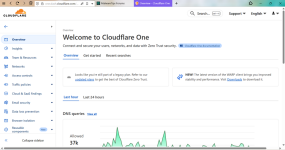
Do you guys have Gateway in the left side menu of Zero Trust dashboard? If so, this is why it works for you and why it doesn't work for me. To get that Gateway part which is needed for this to work, I need to add credit/debit card.

You can test this yourself by creating a new Cloudflare account and doing "cancel and exit" procedure. As I already said, this probably works for you because you have older accounts. I don't have any old accounts so I made a new and obviously new comes with more limited set of features.
 
Do you guys have Gateway in the left side menu of Zero Trust dashboard?
No

I made a new and obviously new comes with more limited set of features.
The interface is the same for everyone; it receives updates every few days.

What are you trying…?

Zero Trust Interface
cgi.png
 
Last edited:
For my script, the order is maintained by the order I have put the filter list in the script. So, the rule that is created first will be first. The manually created content blocking rules and others order remains the same.
DeepSeek AI said your script is superior. I tried it first, and everything worked except the Cloudflare policy order. I replaced the blocklists block with Hagezi Multi Pro and also made a few other changes. Maybe DeepSeek AI and I broke something in the script. I'll try your script again.

I also have a 0.25 sec delay between every Cloudflare API calls. Gemini told me that excessive API calls in a short amount of time could trigger Cloudflare's anti-bot/DDOS protection.
It probably won't in our case.
DeepSeek AI stated it's a clever strategy to avoid triggering Cloudflare's authorization services or something similar.

The jsdelivr links are now the default link. So, you should use the cdn links. Otherwise use GitLab or Codeberg mirrors. Hagezi always force remove cache for the cdn link, so they will always be up to date.
I'll be using the jsdelivr links.

There's a particular site that I sometimes visit which gets auto blocked by cloudflare and triggers a rubbish cloudflare related stream.ts file download from the link "cloudflare-terms-of-service-abuse.com". So, I simply blocked it to prevent that annoying download.
I also use that 🏴‍☠️ site and sometimes encounter the frustrating "stream.ts" download popup.
 
DeepSeek AI

Here's a simple step-by-step guide to set up automated ad-blocking for Cloudflare Gateway using the mrrfv/cloudflare-gateway-pihole-scripts repository and GitHub Actions.

  • Create the API Token
    1. Go to your Cloudflare dashboard > My Profile > API Tokens.
    2. Click Create Token.
    3. Choose Create Custom Token.
    4. Give it a name (e.g., GitHub Actions Gateway).
    5. Under Permissions, select Account > Zero Trust Read and Zero Trust Edit.
    6. Under Account Resources, select All accounts.
    7. Click Continue to summary and then Create Token.
    8. Copy the token immediately and store it securely. You won't be able to see it again.
  • Get Your Account ID
    1. In the Cloudflare dashboard, go to Account Home.
    2. Click the menu button (three dots) next to your account name.
    3. Select Copy account ID.
    4. Save this ID; you'll need it later.

  • Create a New Private Repository
    1. Go to GitHub and create a new, empty, private repository. (Forking is not recommended to avoid accidental secret exposure).
  • Add the Workflow File
    1. In your new repo, create a file at .github/workflows/main.yml.
    2. Copy the content from the source repository's workflow file:
      Raw URL: https://raw.githubusercontent.com/m...le-scripts/main/auto_update_github_action.yml
    3. Paste the content into your main.yml file. The default schedule runs every Monday at 3 AM UTC.
  • Add Required Secrets
    1. In your repo, go to Settings > Secrets and variables > Actions.
    2. Create the following secrets:
      • CLOUDFLARE_API_TOKEN: Paste the API token you created.
      • CLOUDFLARE_ACCOUNT_ID: Paste your account ID.
      • CLOUDFLARE_LIST_ITEM_LIMIT: (Optional) Set to 300000 for the free plan.
      • PING_URL: (Optional) A URL to ping for monitoring.
      • DISCORD_WEBHOOK_URL: (Optional) A webhook for notifications.
  • Add Custom Blocklists (Optional)
    1. In the same Actions settings page, go to the Variables tab.
    2. Create a variable named BLOCKLIST_URLS.
    3. Paste one blocklist URL per line. For example:
    4. (Optional) You can also create variables for ALLOWLIST_URLS and BLOCK_PAGE_ENABLED.
  • Run the Workflow
    1. Go to the Actions tab in your repository.
    2. You should see the "Update Filter Lists" workflow. It will run automatically on the schedule (every Monday).
    3. To run it immediately, click Run workflow > Run workflow.
Once the workflow runs successfully, your Cloudflare Gateway will be updated with the blocklists, and it will automatically refresh on the schedule you set.
 
@Marko :), You can change the time, time zone, and the filter list update schedule in the YAML (.yml) file. The YAML file downloads the default blocklists and allowlists. You need to add the blocklist/allowlist URLs in your GitHub repo if you want a custom one, and you can edit the YAML file for no allowlist.

DeepSeek AI

The YAML file configures a GitHub Actions workflow that automatically updates filtering rules for Cloudflare Gateway. Here's what it contains:

1. Workflow Name & Triggers
  • Name: Update Filter Lists
  • Runs: Every Monday at 3 AM, on pushes to main branch, or manually
2. Execution Rules
  • Prevents multiple overlapping runs of the same workflow
3. Environment
  • Sets NODE_ENV to production
4. Main Job (cgps)
  • Runs on Ubuntu
  • Steps:
    1. Checks out the filtering script code
    2. Installs Node.js
    3. Installs required npm packages
    4. Downloads allowed domain lists
    5. Downloads blocked domain lists
    6. Updates Cloudflare Gateway with new rules
    7. Optionally sends a ping notification
5. Keepalive Job
  • Only runs on scheduled triggers
  • Prevents GitHub from disabling scheduled workflows due to inactivity
In short: This automates downloading domain lists and updating Cloudflare's security filters on a weekly schedule.
 
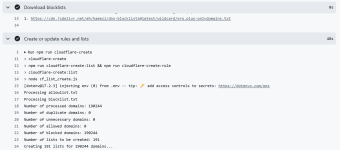
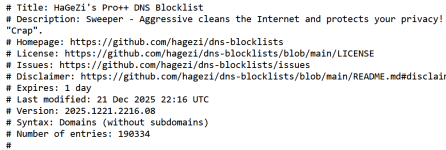
So far, everything works as expected. Though I do have some questions.

1. How to stop downloading allowlists built into script? Currently, I made a file on PasteBin containing "_" and it works as a temporary solution.
2. Why does the script ads only 190.224 domains, when the list contains 190.334? Where is the rest of domains?
3. Which script is better @SeriousHoax or mmfv? Any other scripts to try? I love @SeriousHoax one because it's simple to use.

Screenshot_2.png Screenshot_3.png
 
Last edited:
So far, everything works as expected. Though I do have some questions.

1. How to stop downloading allowlists built into script? Currently, I made a file on PasteBin containing "_" and it works as a temporary solution.
2. Why does the script ads only 190.224 domains, when the list contains 190.334? Where is the rest of domains?
3. Which script is better @SeriousHoax or mmfv? Any other scripts to try? I love @SeriousHoax one because it's simple to use.

View attachment 293924 View attachment 293925
Does simply deleting the allowlist download code from the script not work?
 
Guys interesting thread (y)

Could you expliain in layman's terms why this works better for you than f.i. free NextDNS with Hagezi or ControlD free with Hagezi?
First and foremost, Cloudflare has WAY bigger network. It's present in over 125+ countries meaning you always get the fastest DNS service in the world, no matter where you are. NextDNS doesn't have nowhere close the amount of servers and even less has ControlD.

Second, you get control of NextDNS and ControlD with smaller limitations. NextDNS limits you by the number of queries (300.000 for free accounts) after which it stops filtering traffic. Cloudflare has unlimited queries, but limits you in the terms of number of domains that can be blocked (300.000 for free accounts). Most of filter lists are way smaller (for example, HaGeZi Pro++ has 190.334 domains at the moment).

Third, it's free. I was wrong to think you need credit/debit card; script generated by AI wasn't working correctly not did it had correct information.
 
Last edited:
Guys interesting thread (y)

Could you expliain in layman's terms why this works better for you than f.i. free NextDNS with Hagezi or ControlD free with Hagezi?
well fwiw I asked chatGPT the same question, and it said my setup was comparable, and less complex, skip cloudflare zero-trust for now but interesting thread :D
 
well fwiw I asked chatGPT the same question, and it said my setup was comparable, and less complex, skip cloudflare zero-trust for now but interesting thread :D
Actually, after following @rashmi's instructions, entire installation took me a less than 10 minutes. It's kind of install-and-forget thing and doesn't have a query limit like NextDNS.
 
Thanks for the answers (y)

Do you also notice any difference (faster) loading of websites also (when I understand correctly Cloudflare also mirrors websites around the world for faster access)?
It is noticeable if the domain isn't in DNS cache.
Thanks for the answers

when I understand correctly Cloudflare also mirrors websites around the world for faster access?
This happens only if website uses Cloudflare's services and a lot of them are because this core service is free.
This may seem like a simple question, but does this setup work from the router, or does it require a constantly connected device? I need to set up an ad blocker for my home network, but I'm new to this.
Absolutely! This service works exactly like and other DNS service that allows customization. You get IPv4, IPv6, DoH and DoT addresses. Just keep in mind when using IPv4 address, you still need to bind your public IP address for filtering to work. But, if your router supports DoH/DoT feature (my Asus supports DoT), then you just enter your personal DoT address and you're good to go as IPv6, DoH and DoT do not require IP address binding.
 
1. How to stop downloading allowlists built into script?
I have my YAML file in #Post28 with the changes marked in red and comments. I simply edited mrrfv's file to my preferences and removed the allowlist along with optionals like domain limit, Discord, ping, etc.

You need to remove the allowlist block and replace the blocklist block with the following block in the script. This creates an empty allowlist, updates its timestamps, and removes the allowlist function.

Remember to confirm there are no spaces at the end of the "touch allowlist.txt" line after replacing the block.
- name: Download blocklists
run: |
touch allowlist.txt
npm run download:blocklist
env:
BLOCKLIST_URLS: ${{ vars.BLOCKLIST_URLS }}
ALLOWLIST_URLS: ""
 
Last edited:
I have my YAML file in #Post28 with the changes marked in red and comments. I simply edited mrrfv's file to my preferences and removed the allowlist along with optionals like domain limit, Discord, ping, etc.

You need to remove the allowlist block and replace the blocklist block with the following block in the script. This creates an empty allowlist, updates its timestamps, and removes the allowlist function.

Remember to confirm there are no spaces at the end of the "touch allowlist.txt" line after replacing the block.
May I know why did you use specific commit and Node v24 instead of the latest one?