Serious Discussion Cloudflare Gateway Free Plan

Although I have a Bachelor in IT (but only worked 1,5 year as programmer, 3.5 year as designer before becoming a program manager and have not done anything in IT for at least 35 years) and a Master in Business Administration, it took me an hour to configure cloudflare zero trust. There are so many options to choose from and offers so much granular control that I am very impressed by the members who have set it up in just 10 minutes. :oops:
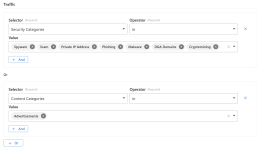
Oh, yeah. Don't forget to make use of Cloudflare policies to increase security and block ads. I added HaGeZi Pro++ along these.

Screenshot_1.png


After testing, with my own Cloudflare Gateway I can confirm websites open much faster for me than with ControlD.
 
Well the hour spend was also triggered by "that is an interesting option, how does that work?" and spending some time reading documentation or watching videos.

My ISP, Quad9, ControlD and NextDNS take 14 to 15 msec in speedtest to connect, while Cloudflare does it below 9 msec. I don't notice any difference. The City I live in is a hub in the Dutch internet backbone, so I normally don't see connecting speed difference in dowload speed benchmarks. Cloudflare beating them with a substantial difference is remarkeable (but I don't notice the difference). Quad9 always showed around 8 servers, Cloudflare shows 4, the others only 2.
 
Last edited:
@rashmi An update...

I asked mrrfv how to stop importing allowlist, the solution is to replace
The block for the allowlist I provided you also creates an empty list; I'm unsure why it didn't work for you. Anyway, I replaced the block with the one from mrrfv.

Don't forget to make use of Cloudflare policies to increase security and block ads.
You should use the "OR" logic. The "ADD" logic applies to domains classified as both categories, for example, malware "and" advertisements, and "OR" applies to domains classified as either category, for example, malware "or" advertisements. Test with this domain and check Cloudflare logs: acceptable.a-ads.com. Cloudflare Radar classifies it as "Advertisements."
 
The block for the allowlist I provided you also creates an empty list; I'm unsure why it didn't work for you. Anyway, I replaced the block with the one from mrrfv.
Yeah, I don't know why your code didn't work, but this one works well. I also asked mrrfv how to see domains that weren't sent to Cloudflare, I'll reply once he answers.
The block for the allowlist I provided you also creates an empty list; I'm unsure why it didn't work for you. Anyway, I replaced the block with the one from mrrfv.


You should use the "OR" logic. The "ADD" logic applies to domains classified as both categories, for example, malware "and" advertisements, and "OR" applies to domains classified as either category, for example, malware "or" advertisements. Test with this domain and check Cloudflare logs: acceptable.a-ads.com. Cloudflare Radar classifies it as "Advertisements."
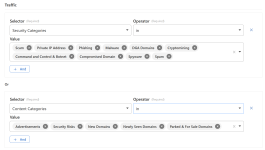
Thank you! I changed logic to "OR". I tested this and the website was blocked by CGPS Filter Lists (HaGeZi Pro++), but it was classified as
Business & Economy, Advertisements, Cryptocurrency.

Screenshot_2.png

EDIT: I went through entire list and found more categories to be blocked. 😂

Screenshot_3.png
 
Last edited:
Here is a YAML file to delete file lists in Cloudflare Gateway using GitHub Actions.
You need your Cloudflare token and account ID in GitHub secrets and variables.
You don't need to edit the file list name in the YAML file, but you can enter it on the fly.

You get a field option to enter the file list name when you click Run Workflow.
It is case-sensitive, so make sure you enter the name precisely.
You can delete file lists of any name.

For file list names, here are a few examples. The default value in the field is Adblock_; replace it.
CGPS List - Chunk 1, CGPS List - Chunk 2, and so on—Enter CGPS List - Chunk
CGPS List - Chunk_1, CGPS List - Chunk_2, and so on—Enter CGPS List - Chunk_
CGPS List_1, CGPS List_2, and so on—Enter CGPS List_
CGPS_1, CGPS_2, and so on—Enter CGPS_

You need to delete the policy first. Ensure the proper alignment of symbols and other text when you paste the script.

Gemini AI
name: Delete File Lists

on:
workflow_dispatch:
inputs:
list_prefix:
description: 'Prefix of lists to delete (e.g., Adblock_)'
required: true
default: 'Adblock_'
type: string

jobs:
lists:
runs-on: ubuntu-latest
steps:
- name: Fetch and Delete Gateway Lists
run: |
PREFIX="${{ github.event.inputs.list_prefix }}"
echo "Target prefix: $PREFIX"

PAGE=1
PER_PAGE=100

while : ; do
echo "Fetching page $PAGE..."

RESPONSE_DATA=$(curl -s -X GET "https://api.cloudflare.com/client/v4/accounts/${{ secrets.CLOUDFLARE_ACCOUNT_ID }}/gateway/lists?page=$PAGE&per_page=$PER_PAGE" \
-H "Authorization: Bearer ${{ secrets.CLOUDFLARE_API_TOKEN }}" \
-H "Content-Type: application/json")

COUNT=$(echo "$RESPONSE_DATA" | jq '.result | length')
if [ "$COUNT" -eq 0 ]; then
echo "No more lists found."
break
fi

echo "$RESPONSE_DATA" | jq -c --arg PRE "$PREFIX" '.result[] | select(.name | startswith($PRE))' | while read -r list; do
LIST_ID=$(echo "$list" | jq -r '.id')
LIST_NAME=$(echo "$list" | jq -r '.name')

echo "Attempting to delete: $LIST_NAME ($LIST_ID)"

DELETE_RES=$(curl -s -X DELETE "https://api.cloudflare.com/client/v4/accounts/${{ secrets.CLOUDFLARE_ACCOUNT_ID }}/gateway/lists/$LIST_ID" \
-H "Authorization: Bearer ${{ secrets.CLOUDFLARE_API_TOKEN }}" \
-H "Content-Type: application/json")

if echo "$DELETE_RES" | jq -e '.success' > /dev/null; then
echo "✅ Successfully deleted $LIST_NAME"
else
ERR=$(echo "$DELETE_RES" | jq -r '.errors[0].message')
echo "❌ Failed to delete $LIST_NAME: $ERR"
fi
done

# Move to next page
PAGE=$((PAGE + 1))
done
 
Last edited:
@Marko :)

Consider also blocking "no content" domains (I asked AI)

Yes, there are numerous reports of misuse involving domains with no active content, particularly parked or expired domains. These domains are frequently exploited for malicious purposes such as phishing, malware distribution, and malvertising.
 
@SeriousHoax, It appears you updated the script with hashes for blocklists, etc.

I had also tried hashes for blocklists (with no JSON file) in your script with Gemini and DeepSeek; it worked, but the updates skipped if you deleted a file list or a failed update left a few. I deleted a few file lists, and the update skipped.

Later today, I'll try the Cloudflare policy "description" method, which Gemini said is the best and doesn't require a JSON file or SSH.

I prefer your standalone script to other methods' dependent scripts and will switch to using it once I get a functional script with my preferences.
 
How do I allow certain domains in Cloudflare dashboard?

I created Allowlist in Firewall policy, Selector: Domain -> Operator: is -> domain.com, but it doesn't work; I still can't access the domain.

EDIT: Fixed. The Allowlist policy needs to be first in order, above all other policies.
 
Last edited:
Here is a YAML file to delete file lists in Cloudflare Gateway using GitHub Actions.
You need your Cloudflare token and account ID in GitHub secrets and variables.
You don't need to edit the file list name in the YAML file, but you can enter it on the fly.

You get a field option to enter the file list name when you click Run Workflow.
It is case-sensitive, so make sure you enter the name precisely.
You can delete file lists of any name.

For file list names, here are a few examples. The default value in the field is Adblock_; replace it.
CGPS List - Chunk 1, CGPS List - Chunk 2, and so on—Enter CGPS List - Chunk
CGPS List - Chunk_1, CGPS List - Chunk_2, and so on—Enter CGPS List - Chunk_
CGPS List_1, CGPS List_2, and so on—Enter CGPS List_
CGPS_1, CGPS_2, and so on—Enter CGPS_

Gemini AI
Didn't work for me; syntax errors. 🤷‍♂️

This one did though:
Code:
name: Delete File Lists

on:
  workflow_dispatch:
    inputs:
      list_prefix:
        description: 'Prefix of lists to delete (e.g., Adblock_)'
        required: true
        default: 'CGPS List - Chunk'
        type: string

jobs:
  lists:
    runs-on: ubuntu-latest
    steps:
      - name: Fetch and Delete Gateway Lists
        run: |
          PREFIX="${{ github.event.inputs.list_prefix }}"
          echo "Target prefix: $PREFIX"

          PAGE=1
          PER_PAGE=100

          while : ; do
            echo "Fetching page $PAGE..."

            RESPONSE_DATA=$(curl -s -X GET \
              "https://api.cloudflare.com/client/v4/accounts/${{ secrets.CLOUDFLARE_ACCOUNT_ID }}/gateway/lists?page=$PAGE&per_page=$PER_PAGE" \
              -H "Authorization: Bearer ${{ secrets.CLOUDFLARE_API_TOKEN }}" \
              -H "Content-Type: application/json")

            COUNT=$(echo "$RESPONSE_DATA" | jq '.result | length')
            if [ "$COUNT" -eq 0 ]; then
              echo "No more lists found."
              break
            fi

            echo "$RESPONSE_DATA" \
              | jq -c --arg PRE "$PREFIX" '.result[] | select(.name | startswith($PRE))' \
              | while read -r list; do

                LIST_ID=$(echo "$list" | jq -r '.id')
                LIST_NAME=$(echo "$list" | jq -r '.name')

                echo "Attempting to delete: $LIST_NAME ($LIST_ID)"

                DELETE_RES=$(curl -s -X DELETE \
                  "https://api.cloudflare.com/client/v4/accounts/${{ secrets.CLOUDFLARE_ACCOUNT_ID }}/gateway/lists/$LIST_ID" \
                  -H "Authorization: Bearer ${{ secrets.CLOUDFLARE_API_TOKEN }}" \
                  -H "Content-Type: application/json")

                if echo "$DELETE_RES" | jq -e '.success' > /dev/null; then
                  echo "✅ Successfully deleted $LIST_NAME"
                else
                  ERR=$(echo "$DELETE_RES" | jq -r '.errors[0].message // "Unknown error"')
                  echo "❌ Failed to delete $LIST_NAME: $ERR"
                fi
              done

            PAGE=$((PAGE + 1))
          done

This is the main.yml I use:
Code:
name: Update Filter Lists

on:
  schedule:
    - cron: "0 */4 * * *"
  push:
    branches:
      - main
  workflow_dispatch:

concurrency:
  group: ${{ github.workflow }}-${{ github.ref }}
  cancel-in-progress: true

env:
  NODE_ENV: production

jobs:
  cgps:
    runs-on: ubuntu-latest
    steps:
      - name: Checkout
        uses: actions/checkout@v6
        with:
          repository: "mrrfv/cloudflare-gateway-pihole-scripts"
          ref: "v1"

      - name: Install Node.js
        uses: actions/setup-node@v6
        with:
          node-version-file: ".node-version"

      - name: Install npm dependencies
        run: npm ci

      - name: Create empty allowlist
        run: echo '' > allowlist.txt

      - name: Download blocklists
        run: npm run download:blocklist
        env:
          BLOCKLIST_URLS: ${{ vars.BLOCKLIST_URLS }}

      - name: Create or update rules and lists
        run: npm run cloudflare-create
        env:
          BLOCK_PAGE_ENABLED: ${{ vars.BLOCK_PAGE_ENABLED }}
          CLOUDFLARE_API_TOKEN: ${{ secrets.CLOUDFLARE_API_TOKEN }}
          CLOUDFLARE_ACCOUNT_ID: ${{ secrets.CLOUDFLARE_ACCOUNT_ID }}
          CLOUDFLARE_LIST_ITEM_LIMIT: ${{ secrets.CLOUDFLARE_LIST_ITEM_LIMIT }}
          
      - name: Send ping request
        if: env.PING_URL != ''
        run: |
          curl "${{ env.PING_URL }}"
        env:
          PING_URL: ${{ secrets.PING_URL }}

  keepalive:
    if: github.event_name == 'schedule'
    runs-on: ubuntu-latest
    permissions:
      actions: write
    steps:
      - uses: liskin/gh-workflow-keepalive@v1
 
It works successfully every time for me; I'm testing @SeriousHoax's script, so I use it frequently. I forgot to mention that you need to delete the policy first. Ensure the proper alignment of all symbols and other text when you paste the script.
I ran the script through ChatGPT to fix the syntax and it said the script was missing something, I don't understand why. It also formatted it nicely.

Yes, I had to delete policy first. 😄
 
@SeriousHoax, It appears you updated the script with hashes for blocklists, etc.
Yeah, I made quite a few changes to my script. Even a couple of more changes since your comment, I think.
It's now many times faster. For updating Hagezi Pro++ alone it's taking 31 seconds, 32 seconds, 28 seconds at the moment.
It now only updates if there's a new version of the filter available.
It now sets priority to each created policy so their order will always remain accurate.
I had also tried hashes for blocklists (with no JSON file) in your script with Gemini and DeepSeek; it worked, but the updates skipped if you deleted a file list or a failed update left a few. I deleted a few file lists, and the update skipped.
Not hash to be exact, I'm using the version info available in every Hagezi filter. GitHub action bot is automatically saving the version info in a JSON file in my repo because it's easy to simply edit the version info in this JSON file to force a full update without touching my main script or action yml. There's a force update flag in the script itself also but editing the JSON file is preferable to me. BTW, on local device, a temporary environment variable can be set in a Powershell session for my script to force update which doesn't need any file modification.

I don't worry about a failed update leaving behind lists because if I remember correctly, in 2 months, a scheduled update failed only once with my previous slower script. When an update fails, I immediately receive an email so I would be able to run the workflow manually. I use the Cloudflare Gateway on my own devices only so I would always know.
Later today, I'll try the Cloudflare policy "description" method, which Gemini said is the best and doesn't require a JSON file or SSH.
Have you tried it? Is it working?
Yeah, the SSH part is of course totally unnecessary. I just like seeing the "verified" tag on each commit for which signing via a SSH or GPG key is necessary.
I mostly maintain my GitHub repos using VS Code so locally on device I also have SSH singing via git enabled. So, I thought of adding it for this function also.

The updating process can be sped up even more but under 40 second is already very fast. I may do more experiments though. Let me know how non JSON method goes for you.
 
Last edited:
Weird question: does Cloudflare Zero Trust still provides filtering while GitHub Actions script is running and replacing lists or does filtering stop for the moment?
If your script deletes all rules before creating new ones then you lose filtering in that period. With my current script, that non-filtering window seems to be 7-10 seconds. It could be more if there are any unexpected delays while creating rules.
 
If your script deletes all rules before creating new ones then you lose filtering in that period. With my current script, that non-filtering window seems to be 7-10 seconds. It could be more if there are any unexpected delays while creating rules.
I uploaded your and mrrfv's script to ChatGPT to see which one is better. ChatGPT mentioned that.

TL;DR​

The better script for Cloudflare Zero Trust DNS in production is:
👉 mrrfv / cloudflare-gateway-pihole-scripts

The other script (Cloudflare-Gateway-Adblock-Updater) works, but has architectural risks that mrrfv’s script explicitly avoids.

1️⃣ Update architecture (the most important difference)​

🟢 mrrfv script​

  • Uses PATCH (append / remove) operations
  • Performs incremental updates
  • Does not delete active lists (by default)
  • No moment where the list is empty or missing
➡️ Zero Trust DNS filtering remains continuously active

🔴 Cloudflare-Gateway-Adblock-Updater​

  • Uses:
    • DELETE on existing lists or
    • full PUT / POST replacement
  • The list is:
    • deleted
    • recreated
    • then repopulated
➡️ This creates a real window where:
  • the list does not exist, or
  • the list is empty,
  • while the policy still references it
📌 This is logical downtime, even though DNS itself is still working.

2️⃣ Failure safety (API errors, rate limits)​

🟢 mrrfv​

  • If a PATCH fails:
    • the previous list remains intact
  • The job may fail,
  • but filtering stays active
Fail-safe behavior

🔴 Adblock-Updater​

If an error occurs:
  1. the list has already been deleted
  2. the new list is not fully created
Result:
  • DNS resolution still works
  • blocking is weakened or completely disabled
This is the worst possible failure mode for a security system.

3️⃣ Performance and scalability​

AspectmrrfvAdblock-Updater
Large lists🟢 good🔴 poor
API calls🟢 diff-based🔴 full uploads
Scalability🟢 linear🔴 exponential
Rate limits🟢 rare🔴 frequent
With lists larger than ~50k domains:
  • Adblock-Updater often fails
  • mrrfv remains stable

4️⃣ Alignment with Cloudflare best practices​

Cloudflare explicitly recommends:
  • PATCH-based list updates
  • avoiding DELETE in production
  • incremental changes
➡️ mrrfv follows this model exactly
➡️ the other script does not

5️⃣ GitHub Actions suitability​

🟢 mrrfv​

  • Designed for GitHub Actions
  • Idempotent
  • Safe for scheduled cron runs

🔴 Adblock-Updater​

  • “run-once” mindset
  • No protection against partial failures
  • Poor fit for automation

6️⃣ Security perspective (the key question)​

Ask yourself:
What happens if the workflow fails at the worst possible moment?
mrrfv:
✔ nothing bad — existing lists keep filtering
Adblock-Updater:
❌ policies reference empty or missing lists

Final verdict​

✅ Recommendation​

Stick with mrrfv’s script.
It is:
  • safer
  • more resilient
  • faster at scale
  • purpose-built for Cloudflare Zero Trust Gateway

❌ The alternative script​

  • acceptable for testing or labs
  • not recommendedfor:
    • production environments
    • Zero Trust DNS
    • automated updates
 
I uploaded your and mrrfv's script to ChatGPT to see which one is better. ChatGPT mentioned that.

Excellent analysis, ChatGPT is great for analyzing these differences.(y)

It doesn't understand anything about filter lists, even at the DNS level, that could be improved upon compared to the ones we already use.
It may happen that one day it recommends (a) and the next day (z).
When choosing DNS-level filter lists + adblock filter lists, we need to use our own experience.
 
Excellent analysis, ChatGPT is great for analyzing these differences.(y)

It doesn't understand anything about filter lists, even at the DNS level, that could be improved upon compared to the ones we already use.
It may happen that one day it recommends (a) and the next day (z).
When choosing DNS-level filter lists + adblock filter lists, we need to use our own experience.
I agree. Before creating my own DNS with Zero Trust, I tested HaGeZi Ultimate and Pro++ filter in uBlock Origin. Ultimate did block waaay more legit stuff than Pro++ while I found only two FPs on Pro++ that were promptly fixed so I sticked with it.

I like Cloudflare's service so I decided to add the card in order to get Free plan as legacy one might be gone soon. Nothing was billed and I removed card afterwards just to be safe.
 
Last edited:
I uploaded your and mrrfv's script to ChatGPT to see which one is better. ChatGPT mentioned that.
This analysis of my script is incorrect in many ways, mainly regarding the "Performance and scalability" part, which is total nonsense.
But it's correct about one advantage of mrrfv's diff-based approach, which is slower but good for downtime reduction and a slightly safer approach. For everything else, mine is better. When I tried to create the script first, I thought of the diff approach but later decided not to as I am only auto updating once every 24 hours at the moment, so diff-based approach is not necessary at the moment for me. Besides, on mine the downtime is less than 15 seconds. I can reduce it further if required.
But it's good that you brought this to my attention. I may try to create another separate script that take that approach by modifying my current python script since that approach is downtime friendly.