Advanced Security  (From forum thread)ColonelMal's PC Security Config

Current configurationWindows 11
Version 1Updated
13 replies

Copied from ColonelMal's forum thread – not yet confirmed as current by the owner

Suggestions on the main improvements
Staff assessment Advanced Security· From forum thread

Taken from the forum thread's label. The reviewer and date were not recorded, and staff have not re-checked it against the current setup.

Device & operating system

, 3 answers
Operating system
Windows 11
Main use of this computer
For home and private use
Usage and exposure
Working from home, Visiting familiar websites, Visiting unknown or untrusted websites, Opening email attachments, Online shopping and card payments, Logging into my bank account, Downloading software and files from reputable sites, Streaming audio/video content from trusted sites or paid subscriptions, Streaming from untrusted sites

Protection & updates

, 7 answers
Real-time protection
Microsoft Defender
DefenderUI (Free)
Voodooshield
Sandboxie-Plus
Device firewall
Microsoft Defender Firewall
Security updates
Check for updates and Notify
User Account Control (UAC)
Notify me only when programs try to make changes to my computer
Custom security settings
DefenderUI (Interactive setting)
Periodic malware scanners
As decided by Microsoft?
By Voodooshield as may be necessary
Malware sample testing
I do not participate in malware testing

Browsing, accounts & privacy

, 4 answers
Browsers and extensions
Chrome (uBlock Origin, Cookie Auto-Delete, DuckDuckGo Privacy Essentials)
Firefox (AdBlock Plus, Cookie Auto-Delete, DuckDuckGo Privacy Essentials)
Edge
Secure DNS
None
Desktop VPN
NordVpn
Password and passkey manager
Keepass
Web and some email passwords also saved in Chrome and Firefox

Backup & recovery

, 2 answers
File and photo backups
Macrium Reflect Home Edition
FreeFileSync
Crashplan (Business Edition)
System recovery
Macrium Reflect Home Edition - image backups taken daily
Crashplan (continuous backup)

Apps, specs & notes

, 4 answers
Maintenance tools
None
Computer specs
Dell Inspiron 5482 2-in-1
8GB RAM
Intel i& 8565U
256GB SSD (plus backup data kept on 5 external disks all connected to the laptop)
Notable changes
Added DefenderUI
2022 05 24 Updated DefenderUI to v.1.02
2022 06 17 Added Sandboxie-Plus
2022 06 27 Replaced GoodSync with FreeFileSync
2022 07 03 Replaced Adblock Plus by uBlock Origin in Chrome and updated DefenderUi to v.1.03
Feedback preference
Suggestions on the main improvements

From the original forum post

These answers were copied from the member's forum thread when the setup was imported. They are shown as posted and have not been re-checked by the owner.

Device sign-in security
Biometrics (Windows Hello PIN, TouchID, Face, Iris, Fingerprint)
Community rating

Community rating

How members rate the shared configuration. This is community feedback, not a security test.

Not rated yet
An open invitation for useful feedback.

Sign in to rate this setup

Go to discussion

Copied from the member's forum thread. This is a configuration record, not a device scan.

One of 211 member setups in the Security Setup Hub. Browse setupsGet yours checked

Original discussion fields (as posted in the thread)
Thread details
Last updated
Jul 3, 2022
Main use of this computer
For home and private use
Operating system
Windows 11
On-device encryption
Device sign-in security
    • Windows Hello PIN or biometric sign-in (face / fingerprint / Touch ID)
Security updates
Check for updates and Notify
User Account Control (UAC)
Notify me only when programs try to make changes to my computer
Smart App Control
Network firewall
Real-time protection
Microsoft Defender
DefenderUI (Free)
Voodooshield
Sandboxie-Plus
Device firewall
Microsoft Defender Firewall
Custom security settings
DefenderUI (Interactive setting)
Periodic malware scanners
As decided by Microsoft?
By Voodooshield as may be necessary
Malware sample testing
I do not participate in malware testing
Browsers and extensions
Chrome (uBlock Origin, Cookie Auto-Delete, DuckDuckGo Privacy Essentials)
Firefox (AdBlock Plus, Cookie Auto-Delete, DuckDuckGo Privacy Essentials)
Edge
Secure DNS
None
Desktop VPN
NordVpn
Password and passkey manager
Keepass
Web and some email passwords also saved in Chrome and Firefox
Maintenance tools
None
File and photo backups
Macrium Reflect Home Edition
FreeFileSync
Crashplan (Business Edition)
System recovery
Macrium Reflect Home Edition - image backups taken daily
Crashplan (continuous backup)
Usage and exposure
    • Working from home
    • Visiting familiar websites
    • Visiting unknown or untrusted websites
    • Opening email attachments
    • Online shopping and card payments
    • Logging into my bank account
    • Downloading software and files from reputable sites
    • Streaming audio/video content from trusted sites or paid subscriptions
    • Streaming from untrusted sites
Computer specs
Dell Inspiron 5482 2-in-1
8GB RAM
Intel i& 8565U
256GB SSD (plus backup data kept on 5 external disks all connected to the laptop)
Notable changes
Added DefenderUI
2022 05 24 Updated DefenderUI to v.1.02
2022 06 17 Added Sandboxie-Plus
2022 06 27 Replaced GoodSync with FreeFileSync
2022 07 03 Replaced Adblock Plus by uBlock Origin in Chrome and updated DefenderUi to v.1.03
Feedback preference

Suggestions on the main improvements

Nice config (y)
I have some suggestions:

I would set UAC to always notify to prevent bypasses:
Gebert's straightforward mitigation advice to prevent UAC bypass attacks is setting UAC to "Always Notify." Doing so will always show the user UAC prompts before high-risk applications are executed.
Since you are using VoodooShield and Microsoft Defender you could try DefenderUI from @danb (or ConfigureDefender from @Andy Ful ) for more protection.
For Google Chrome there is a Microsoft Defender Browser Protection extension:
Personally, I would replace AdBlock Plus with uBlock Origin:
 
Last edited:
@ColonelMal I would like to know why you are using AdblockPlus, any user advantage for you personally?
As already mentioned by @Gandalf_The_Grey you may consider either uBlock Origin or even Adguard Browser Extension.
Also use Adblock plus ,
Ublock too hyped and too bloated.
Adguard has Russian ties so a no go for me.

Adblock plus is really great and a good YouTube Adblocker too. And it’s from Germany , GDPR compliant.
 
Also use Adblock plus ,
Ublock too hyped and too bloated.
Adguard has Russian ties so a no go for me.

Adblock plus is really great and a good YouTube Adblocker too. And it’s from Germany , GDPR compliant.
As I am from Germany, I know very well about the history of ABP. My question was more related to features of Adblock Plus and why @ColonelMal prefers using it?
You told us it's good for blocking ads on YT, so that's a valid advantage👍

But I believe we should avoid any political debate about software from Russia, otherwise you know what happens ;)
 
As I am from Germany, I know very well about the history of ABP. My question was more related to features of Adblock Plus and why @ColonelMal prefers using it?
You told us it's good for blocking ads on YT, so that's a valid advantage👍

But I believe we should avoid any political debate about software from Russia, otherwise you know what happens ;)
I’m not starting anything ,
Should I have said I don’t use adguard because I don’t like the logo ? I’m honest and direct I hate turning and twisting.
 
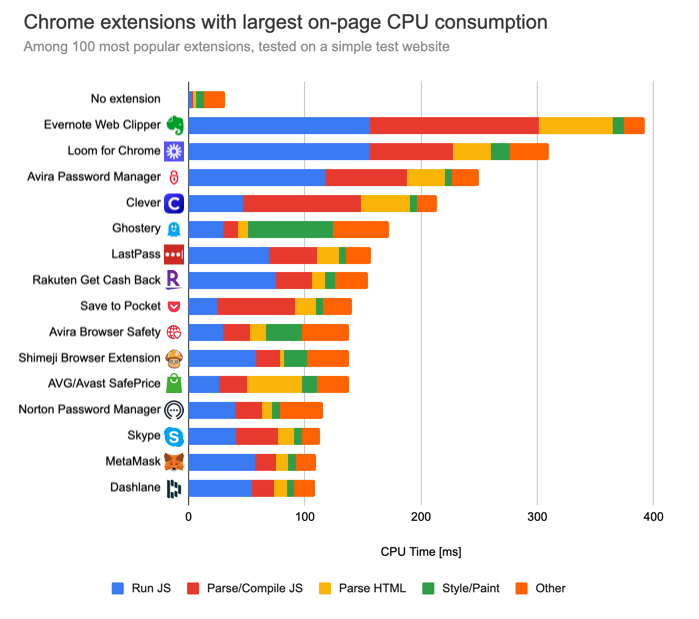
Adblock Plus is much worse in all types of resource consumption from initial CPU usage, background CPU usage, memory usage, web page loading delay, etc. compared to uBlock Origin which additionally is also more effective at blocking ads and trackers.
 
From the setup owner View current setup
@ColonelMal I would like to know why you are using AdblockPlus, any user advantage for you personally?
As already mentioned by @Gandalf_The_Grey you may consider either uBlock Origin or even Adguard Browser Extension.
A few months ago I switched from Firefox to Google Chrome after many years' use of Firefox as my main browser. In setting up Chrome I added AdblockPlus as one of the extensions that I use. This was in contrast to Firefox with which I used uBlock Origin. The decision to change was not based on any in-depth investigation, but was taken based on which user reviews appeared to me to be more convincing!
 
Adblock Plus is much worse in all types of resource consumption from initial CPU usage, background CPU usage, memory usage, web page loading delay, etc. compared to uBlock Origin which additionally is also more effective at blocking ads and trackers.
Dont agree with you, its very light, more than Adguard and Ublock.
 
Dont agree with you, its very light, more than Adguard and Ublock.
It's not really a thing about agreeing or disagreeing. It's a test carefully done which tried to show all the details. In a real world scenario, most users won't notice the difference in page loading speed impact since it's only a few milliseconds and the CPU and ram usage won't be noticed by anybody unless someone checks it by him/herself.

For example, now I don't notice any difference in page loading speed between uBlock Origin and Adguard. But if I open browser task manager then I can see that uBlock Origin uses less CPU and ram.

Anyway, I mentioned the article for everyone to see. uBlock Origin and Adguard are factually the best adblockers out there. In some cases, Adguard works better because they also create and maintain their own filter lists.

BTW, Adguard is not based in Russia anymore. They moved their headquarters to Cyprus in 2017 and fall under EU law.

This is a quote from 2017:

Yep, we've moved the HQ to Cyprus a couple of months ago.

There're quite a few reasons for doing it.

1. Cyprus is in EU and EU privacy laws make us (as an ad blocker) feel much more comfortable than any other place.
2. Currencies conversion. AG is a global product and selling it from Russia leads to losing a lot.
3. Tons of small but annoying limitations and restrictions. For instance, Russian PayPal automatically blocks accounts with more than $10k, you should keep an eye on the balance and withdraw funds to not allow this situation.
4. Relatively (comparing to other EU countries) low taxes for IT companies and IP Box regime.
5. Fewer "KGB" accusations :)
 

Join the discussion

Write your reply below. You'll create a free account or log in before it's posted.

Recently browsing

Members who viewed this thread in the last 5 minutes

Back
Top