


Hmm i used comodo for month again and again. I never saw a disappear bug, ever. And i had tons of rules. Maybe just lucky but comodo was never buggy on my end. It was just a quality product for me.
You are using an out of date browser. It may not display this or other websites correctly.
You should upgrade or use an alternative browser.
You should upgrade or use an alternative browser.
Please provide comments and solutions that are helpful to the author of this topic.
- Status
- Not open for further replies.

So far, so good. I am without trusted vendors, without cloud lookup, and with a humongous trusted files list.I am doing an experiment, I am adding my entire C drive to trusted files, to see what happens............
Yesterday I got a Microsoft update for Office products, and Comodo automatically recognized Microsoft as a trusted installer (this is different from "trusted vendors"). The update went without a hitch.
This is not exactly how Comodo was intended to be used, but if it works, why not?

Right now, I am doing an experiment, I am adding my entire C drive to trusted files, to see what happens............
Like this:
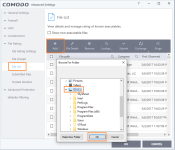
So far, so good. I am without trusted vendors, without cloud lookup, and with a humongous trusted files list.
Like this:
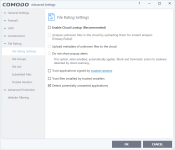
Last edited:
If you untick trusted installers, like you showed, won't you have a problem with Windows updates?
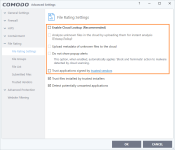
The only difference in my settings is that I left a check by "Trust files installed by trusted installers".If you untick trusted installers, like you showed, won't you have a problem with Windows updates?
If you untick "Trust applications signed by trusted vendors", like shown in your screenshot, then you save yourself the need to delete the entries on the trusted vendors list.
If you want to trust a few vendors, then leave a check by "Trust applications signed by trusted vendors".
And before you add your C drive to trusted files, first set up the trusted vendors list the way you like. This will save time in the end, if you do it in this order.
Yes.

Well I only recently returned to using CFW 10 and I must say in all honesty that it has matured far more than I imagined it ever would become and that is a nice surprise from my end to learn of with this current version.
One item that escapes my understanding though I like cleared up, on the Unblock List, if you Unblock anything in that particular list, CFW declares it will not alert to it again.
Is there some form or fashion to simply just clearing that list without fear that the unblocked item(s) will remain unblocked indefinitely to not be alerted on again and as such be allowed all the time afterwards?
One item that escapes my understanding though I like cleared up, on the Unblock List, if you Unblock anything in that particular list, CFW declares it will not alert to it again.
Is there some form or fashion to simply just clearing that list without fear that the unblocked item(s) will remain unblocked indefinitely to not be alerted on again and as such be allowed all the time afterwards?
People have requested a way to clear the list, I assume that the feature will be included in a coming update of Comodo. At present, the only way to clear it is to click unblock on the items, and then you have to go and manually delete the rules it creates in HIPS and Containment and Firewall, if you don't want those rules. Once the file becomes trusted, the rules are basically superfluous, but on the other hand, they probably won't hurt you.Well I only recently returned to using CFW 10 and I must say in all honesty that it has matured far more than I imagined it ever would become and that is a nice surprise from my end to learn of with this current version.
One item that escapes my understanding though I like cleared up, on the Unblock List, if you Unblock anything in that particular list, CFW declares it will not alert to it again.
Is there some form or fashion to simply just clearing that list without fear that the unblocked item(s) will remain unblocked indefinitely to not be alerted on again and as such be allowed all the time afterwards?
D
Deleted member 178
Thread author
Remember that we have a existing thread for comodo configuration's questions & discussions.
Q&A - Comodo Internet Security v8 Setup/configuration thread
Q&A - Comodo Internet Security v8 Setup/configuration thread
People have requested a way to clear the list, I assume that the feature will be included in a coming update of Comodo. At present, the only way to clear it is to click unblock on the items, and then you have to go and manually delete the rules it creates in HIPS and Containment and Firewall, if you don't want those rules. Once the file becomes trusted, the rules are basically superfluous, but on the other hand, they probably won't hurt you.
Glad my post got moved here where this falls into line much better for addressing this question and other quips.
Ok, not really at this time any issue on this end but was curious if at present there was some setting for that maybe overlooked.
I am not going to be shy about it. I am really hooked on this version and is by far the best in all the times that I ever used it before which if I remember correctly was way back on 5 and 6 as Defense+
Thanks for the reply on that.
@Umbra- That's v.8 and although maybe mostly similar a v.10 rewrite might be a worthy gesture just to keep things current?
Volunteer?
D
Deleted member 178
Thread author
@EASTER and welcome on the forum 
don't be shy here, you can ask noobish and even stupid questions , no one will slap you; except maybe me
don't be shy here, you can ask noobish and even stupid questions , no one will slap you; except maybe me
@EASTER and welcome on the forum
don't be shy here, you can ask noobish and even stupid questions , no one will slap you; except maybe me
Wouldn't expect anything less at this point would you?
Happy to be a part of another forum in MalwareTips here.
Where do you think the draw on some quality inspiration came from to join up?

@Umbra Excuse me, if i want to Share some settings in Comodo, which is the right Thread i can share this?
D
Deleted member 178
Thread author
@Umbra Excuse me, if i want to Share some settings in Comodo, which is the right Thread i can share this?
it will be here : Comodo Internet Security Setup/configuration thread (Setting Only)
but i locked the thread , so you just have to write you setting here, i will copy it there.
i highly recommend to use one of the template made by the other users.
it will be here : Comodo Internet Security Setup/configuration thread (Setting Only)
but i locked the thread , so you just have to write you setting here, i will copy it there.
i highly recommend to use one of the template made by the other users.
Can you explain what is template in this case?

He means look at how they formatted their configuration and copy that format with your settings in this thread.Can you explain what is template in this case?
He means look at how they formatted their configuration and copy that format with your settings in this thread.
Well, i see.. But i don't mean to share the entire settings. Just want to share a few additional Rules in HIPS to protect (lock) some critical Registry keys if a user accidentally set HIPS to allow Malware to run.
D
Deleted member 178
Thread author
so just put your recommendations hereWell, i see.. But i don't mean to share the entire settings. Just want to share a few additional Rules in HIPS to protect (lock) some critical Registry keys if a user accidentally set HIPS to allow Malware to run.
- Status
- Not open for further replies.
You may also like...
-
 Advice Request Help: Comodo 2025 - cmdguard.sys - boot fail with newer Nvidia drivers
- Started by Something-x2
- Replies: 33
-
 Serious Discussion Data Collection Core Principles (Security Software)
- Started by Trident
- Replies: 7
-

-
Anyone Can Buy Data Tracking US Soldiers and Spies to Nuclear Vaults and Brothels in Germany
- Started by oldschool
- Replies: 1
-
Online Behavioral Ads Fuel the Surveillance Industry—Here’s How
- Started by oldschool
- Replies: 2