Comodo no longer contains scripts

Status
Not open for further replies.

FleischmannTV

Level 7
Thread author
Verified
Honorary Member
Well-known
Forum Veteran
Jun 12, 2014
314
1,177
580
43
I have installed and configured CF10 according to @cruelsister 's guide, but it no longer contains .bat, .vbs, .ps1 files and the like. Previously I have tested the correct functioning of auto-containment by creating a simple benign .bat file with the content "ping www.google.de" and it was sandboxed upon execution. This is no longer the case.
 
Not true. Perhaps CF will allow innocuous scripts (which is a good thing) but it certianly still stops malicious ones.

For instance, 1). I have been playing around with a fileless, registry-only powershell malware that sends out locky, and all is still contained.
2). There have been an increasing amount of vbs malware lately, all of which are contained.
3). about bat files- Malware that throws off bat malware are still stopped, including one near and dear to my heart:

Malware scan of cruelsister's rootkit analyzer.exe (Cruelsister's Rootkit Analyzer) 95f9aa76edde6a23ce843c68b36b11eeb33183d3 - herdProtect

And if you want to test yourself, I've PM'd you with a script that really isn't malicious per se, but is a Pain in the Ass.

M
 
I have installed and configured CF10 according to @cruelsister 's guide, but it no longer contains .bat, .vbs, .ps1 files and the like. Previously I have tested the correct functioning of auto-containment by creating a simple benign .bat file with the content "ping www.google.de" and it was sandboxed upon execution. This is no longer the case.
There is a new feature called "embedded code detection", it triggers autocontainment, but only if the command line executes a file etc. For instance, I can open powershell and run the command "date", and it will not trigger autocontainment.
 
Perhaps CF will allow innocuous scripts (which is a good thing) but it certianly still stops malicious ones.

During its previous tenures on my computer CF always used to sandbox script files. Have there been changes under the hood in as to how script files are being handled by auto-containment? Hence I am wondering how it is going to differentiate between innocuous and malicious scripts? For malicious scripts to be sandboxed, doe they now have to be triggered by a malicious .exe file first?
 
During its previous tenures on my computer CF always used to sandbox script files. Have there been changes under the hood in as to how script files are being handled by auto-containment? Hence I am wondering how it is going to differentiate between innocuous and malicious scripts? For malicious scripts to be sandboxed, doe they now have to be triggered by a malicious .exe file first?
If the script runs a file, that file will end up in the sandbox.
If the script does something more subtle, well, that's why we have HIPS.
 
F TV- there was a time when stuff like a batch file restarting/shutting down the computer was allowed in default sandbox mode, but that time has passed. If you have a chance, try the old Hello World batch file:

ECHO OFF
ECHO Hello World
PAUSE

It should be contained on run no matter what sandbox level you choose. Is the the case on your system?
 
  • Like
Reactions: Handsome Recluse
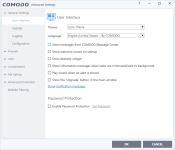
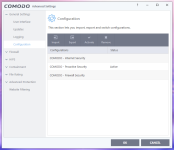
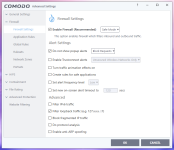
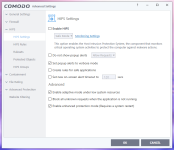
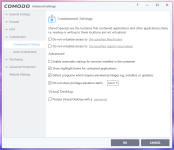
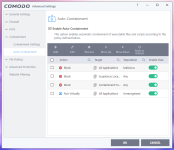
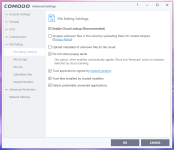
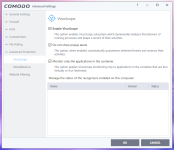
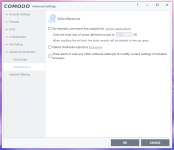
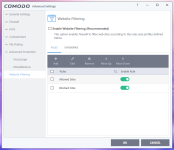
All script files are completely ignored by containment. I've tried VBS, BAT, PS1. These are my settings:

1.PNG 2.PNG 3.PNG 4.PNG 5.PNG 6.PNG 7.PNG 8.PNG 9.PNG 10.PNG

Enabling / Disabling command-line analysis has no effect. I can even run .vbs files with mark of the web. I have tried this on two different computers now and it's the same on both.
 
Last edited:
What OS are you using? I've tried my suggestion to you on both Win 7 and Win10 systems and all batch files are detected and isolated. You really have to discover what is happening!

Shmu- if a script is in containment the HIPS will never react, no matter what the script tries to do.
 
  • Like
Reactions: simmerskool
What OS are you using? I've tried my suggestion to you on both Win 7 and Win10 systems and all batch files are detected and isolated. You really have to discover what is happening!

Doesn't heuristic command line analysis need to be enabled ?

Heuristic command line analysis is not enabled in the GUI images. If I recall correctly, that setting parses for commandlines fed to cmd, wscript, java, javaw.
 
Last edited by a moderator:
  • Like
Reactions: shmu26
I have found the culprit. I used to create a rule to exclude all applications from Detect shellcode injections because I didn't want the guard32 and guard64.dll injected everythere. With this exception enabled, even with heuristic command-line analysis, scripts are no longer contained. Now I've removed it and scripts are contained again. This exeption however has never caused problems in the past.
 
I have found the culprit. I used to create a rule to exclude all applications from Detect shellcode injections because I didn't want the guard32 and guard64.dll injected everythere. With this exception enabled, even with heuristic command-line analysis, scripts are no longer contained. Now I've removed it and scripts are contained again. This exeption however has never caused problems in the past.

That is an unusual protection dependency. Or an unusual settings logic - however a person looks at it.
 
Status
Not open for further replies.