Comodo Portable Sandbox and CCAV for Chrome (Extension) - Beta Release

Status
Not open for further replies.

Ink

Administrator
Thread author
Verified
Jan 8, 2011
22,318
2
55,055
8,379
Warning: Software is a Beta release.

COMODO Cloud Antivirus for Chrome - Features:
  • Total Malware Protection
  • Quarantined environment for potentially harmful files
  • Removal of downloaded file in case of virus
  • Proactive detection of new threats
  • Fast, free and easy to use
"We recommend you to download and install our unique Comodo Portable Sandbox to stay protected from all unknowns. Portable Sandbox is offered by extension when you install it."

Download from Chrome Web Store: COMODO Cloud Antivirus
After installation:
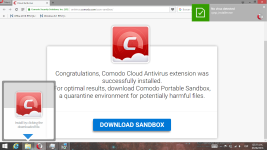
  • Congratulations, Comodo Cloud Antivirus extension was successfully installed. For optimal results, download Comodo Portable Sandbox, a quarantine environment for potentially harmful files.
Download Portable Sandbox Plug-in: Cloud Antivirus
Direct Download: -http://download.comodo.com/cpsp/installers/cpsp_installer.exe-

-------------------------------------------------------------
@yigido is correct, the downloaded plug-in has no GUI, but runs when Chrome.exe is opened, and keep items sandboxed after Chrome has been closed.

I managed to download and run Comodo Portable Sandbox Plug-in and CCAV for Chrome under a virtual environment, and with the limited samples, I was very pleased with the results so far.

Some Beta screenshots
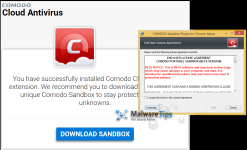
CCAV Plugin 1.png
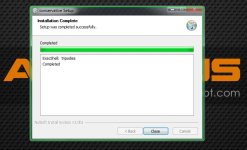
Comodo Portable Sandbox Plug-in installation.
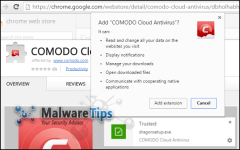
CCAV Plugin 3.png
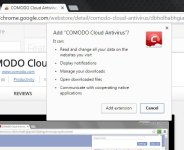
Comodo Cloud Antivirus for Google Chrome, browser extension and permissions.
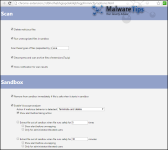
CCAV Plugin 4.png
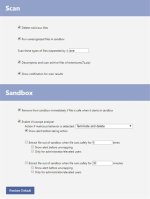
CCAV for Chrome, browser extension settings.
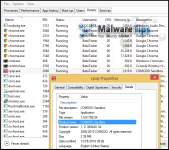
CCAV Plugin 5.png
Comodo Portable Sandbox Plug-in File Properties and version details.
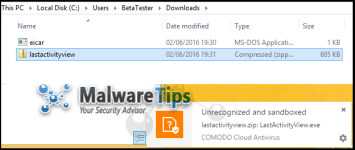
CCAV Plugin 6.png
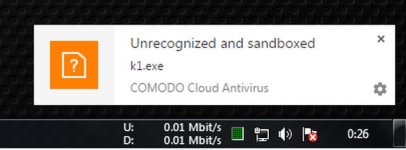
Unrecognised and Sandboxed, using Chrome desktop notification toasts.
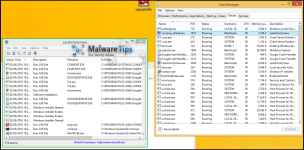
CCAV Plugin 8.png
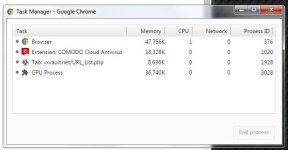
Sandboxed app running in the Sandbox, green border and view of Task Manager.
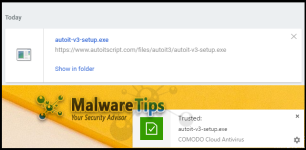
CCAV Plugin 9.png
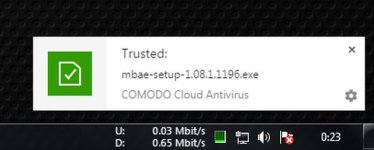
Recognised and Safe download
CCAV Plugin 11.png
Clicked on a fake 'Download' Advert, leads to adware or other unwanted software.
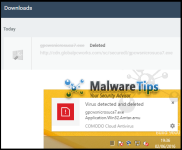
CCAV Plugin 13.png
Virus alert, detected by CCAV for Chrome, extension and deleted from system.
 
Last edited:
if you install this, does chrome run only sandboxed, or do you have the option to easily switch from regular browser to sandboxed browser?
 
  • Like
Reactions: _CyberGhosT_
I have not the most accurate information on-hand, since it's early beta - according to Comodo Forums.

From what I noticed under VM; Google Chrome ran as normal, with Comodo intercepting any Downloads.
  • IF Safe THEN Runs outside Sandbox
  • IF Unrecognised THEN Sandboxed
  • IF Virus/Malware THEN Deleted
I recommend running in a VM to try for yourself, but remember to install both components.

Edit: My post and information may not be accurate.
 
I tried it out. It's like you said. when you download an unknown, and try to run it, it is sandboxed. If you want, you can remove it from sandbox and run it normal.
seems to work pretty smooth.
 
Is there a way for it to always sandbox the downloaded files? like if I wanted to use it instead of Sandboxie? I could then just disable the addon if I wanted to run the file normally and enable it when I want the files sandboxed.
 
This looks very promising. Is this compatible with real time antivirus programs? I'm assuming it is since it is only a extension inside of Chrome. I'm staying away from the Comodo Cloud Antivirus program since it messed up my computer last time and I had to revert back to my factory image. After that I went and found a discount for Norton and have been pretty happy for it. I want to try this extension since it is less likely to mess up my computer again but at the same time it's in beta so it might have more issues.
 
  • Like
Reactions: Oxygen
I'm staying away from the Comodo Cloud Antivirus
Don't get confused about how they have branded their products:
  • Comodo Cloud Antivirus (v1.1)
Current thread topic:
  • Comodo Cloud Antivirus for Chrome
  • Comodo Portable Sandbox (Plug-in)
I would imagine that the CPS would be compatible with Comodo Firewall, but I have not tested or tried this combination. @cruelsister @hjlbx @Umbra @yigido are the Comodo know-it-alls :P

FYI: I am not a Comodo Expert, my information may be inaccurate.
 
Is there a way for it to always sandbox the downloaded files? like if I wanted to use it instead of Sandboxie? I could then just disable the addon if I wanted to run the file normally and enable it when I want the files sandboxed.
it always sandboxes downloads unless it knows for sure they are safe. (if it is known malicious, it blocks.)
you can easily remove downloads from sandbox by clicking on a button in the extension. but if you just drag them to your desktop and try to open them, they will open sandboxed. that's a secure feature.
 
  • Like
Reactions: Butterfly
This looks very promising. Is this compatible with real time antivirus programs? I'm assuming it is since it is only a extension inside of Chrome. I'm staying away from the Comodo Cloud Antivirus program since it messed up my computer last time and I had to revert back to my factory image. After that I went and found a discount for Norton and have been pretty happy for it. I want to try this extension since it is less likely to mess up my computer again but at the same time it's in beta so it might have more issues.
in theory it should be compatible with regular AV. that is how it is meant to be used. It is a light installation, not a heavy-duty one like you would have expected from comodo.
 
like if I wanted to use it instead of Sandboxie?
it is not going to protect you as completely as sandboxie because it is not running the whole browser in sandbox, only the downloads. So if you have an exploit coming in to your browser that runs in memory and doesn't place a file in your download folder, it will get in.
 
in theory it should be compatible with regular AV. that is how it is meant to be used. It is a light installation, not a heavy-duty one like you would have expected from comodo.
That's what I'm thinking too, I'll have a look into it. It seems to be a very interesting concept to say the least to bring it as a extension.
 
it is not going to protect you as completely as sandboxie because it is not running the whole browser in sandbox, only the downloads. So if you have an exploit coming in to your browser that runs in memory and doesn't place a file in your download folder, it will get in.
I know, not talking about sandboxing the browser just sandboxing some downloads that i'm not sure are safe.
 
I know, not talking about sandboxing the browser just sandboxing some downloads that i'm not sure are safe.
that's about what it's good for. And if they behave themselves in the sandbox, comodo will let them out (but you can change that setting)

A glance into the settings reveals that it scans only exe files, at least by default. so it is not exactly bulletproof protection.
 
and dont forget that more and more "samples" drop payload only if they dont detect sandbox so any sandboxing (for file verification purposes ) proces is useless if its not combined with digital signature checking AND some form of real life check ( as Valkayire in Commodo case)
 
  • Like
Reactions: shmu26
Captura de pantalla (254).png
well working just fine in opera, wonder if it will have the same behaviour in a non chrome enviroment... however the idea of a sandbox in a plugin sounds nice!!
 
@Butterfly: By default it will determine based on reputation and detection capabilities, and usually if its likely unrecognized then it will run completely in the sandbox.
 
I tried the extension only and noticed there sometimes is a lag before the rating result is returned from Comodo cloud servers. Does anyone know what action is taken when this "not yet rated" download is executed? Most logical answer would be to run it sandboxed. Anyone tried?
 
Status
Not open for further replies.