

The MalwareTips app
Your community, one tap away.
Open MalwareTips from your Home Screen or desktop. Follow discussions, find answers and pick up where you left off.
- Home Screen access
- Optional push alerts
- Your community
You're ready to explore.Explore what's new
Installation instructions
iPhone & iPad
- Open MalwareTips in Safari and tap Share. You may need to open the Page Menu first.
- Choose Add to Home Screen. If it is not listed, use Edit Actions to add it.
- Keep Open as Web App enabled if shown, then tap Add.
Android
- Open MalwareTips in Chrome or another browser that supports app installation.
- Open the browser menu and look for Install app, Install and create shortcut, or Add to Home screen.
- Choose Install and confirm. Wording varies by browser.
Desktop
- Chrome: use the install icon in the address bar, or the menu under Cast, save and share.
- Edge: open the menu, then More tools, Apps and Install this site as an app.
- Safari on Mac: choose Share or File, then Add to Dock. Firefox on Windows: look for the web apps button in the address bar.
If you cannot find an install option, update your browser or use its bookmark option to keep MalwareTips close.
Keep up with your conversations
After installation, open the app and sign in. Enable push notifications in Preferences if you want alerts. On iPhone and iPad, push requires a Home Screen web app and iOS or iPadOS 16.4 or later.
Sign in to manage notificationsInstallation is optional. Your notification settings stay under your control.
You are using an out of date browser. It may not display this or other websites correctly.
You should upgrade or use an alternative browser.
You should upgrade or use an alternative browser.
ConfigureDefender utility for Windows 10/11
-
 Thread starter
Andy Ful
Thread starter
Andy Ful
- Start date
- 1,904 Replies
- 573,735 Views

Andy Ful
From Hard_Configurator Tools
Verified
Honorary Member
Top Poster
Developer
Well-known
Forum Veteran
Which options do not work well in your opinion?Hi guys I like to know if configure defender work well whith 19h1. I know some options does not work well but i see everything enabled. ¿what problems have with configure defender and windows 19h1?
Hi, i do not know, because for me all appear to work well. When i run your software in my machine i only see it freezes but then then when i open it again all options appears to be enabled. I read some coments who says have to disable tampper protection but i do not understand why. Can you explain me? (not english native). I really like your tool because defender go smoth and i see a increse in security. I think, include, your soft make windows more secure than another softwares. I am emsisoft loyal user and feel mnore secure whith defender and high seetings. I have one simple cuestion.
If i use config defender and not disable tampper protection what risk or problems or loss protection can i expect?
If i use config defender and not disable tampper protection what risk or problems or loss protection can i expect?
Andy Ful
From Hard_Configurator Tools
Verified
Honorary Member
Top Poster
Developer
Well-known
Forum Veteran
WD Tamper Protection blocks disabling two ConfigureDefender options which should not be disabled by the user anyway. So, this is not an issue. You can use ConfigureDefender without any problem....I read some coments who says have to disable tampper protection but i do not understand why. Can you explain me? (not english native).
ConfigureDefender uses PowerShell cmdlets for compatibility with Windows. Those cmdlets are not fast, so the user can sometimes feel that ConfigureDefender freezes - just be patient, and everything will be all right.
The only problem can happen when you use another security that restricts PowerShell or ConfigureDefender from doing their job. This can be seen when you try to change the setting and after using the <Refresh> button, the setting is still unchanged.
None....
I have one simple cuestion.
If i use config defender and not disable tampper protection what risk or problems or loss protection can i expect?

I can see many typing errors in your posts. Why don't you use an extension which could help you correct the errors (like Grammarly)? It is normal for non-native speakers to use such an application.
Last edited:

Hello! I just found out about Windows Firewall Control (binisoft), and it looks like an interesting GUI. Is it compatible with ConfigureDefender?
Thanks!
Yes. They are separate applications. I don't use WFC but you may have to set an exclusion for it, depending on your WD settings. You will know soon enough.
I'm on the older 5.3.1.0 Version of WFC. For this version, I can say it works without any problems for me.Hello! I just found out about Windows Firewall Control (binisoft), and it looks like an interesting GUI. Is it compatible with ConfigureDefender?
Thanks!
@Andy Ful Damn you broke my heart (till I found out the quoted post was not from me
)
Last edited:
Andy Ful
From Hard_Configurator Tools
Verified
Honorary Member
Top Poster
Developer
Well-known
Forum Veteran
Some changes in ConfigureDefender GUI and Help (thanks @oldschool ).
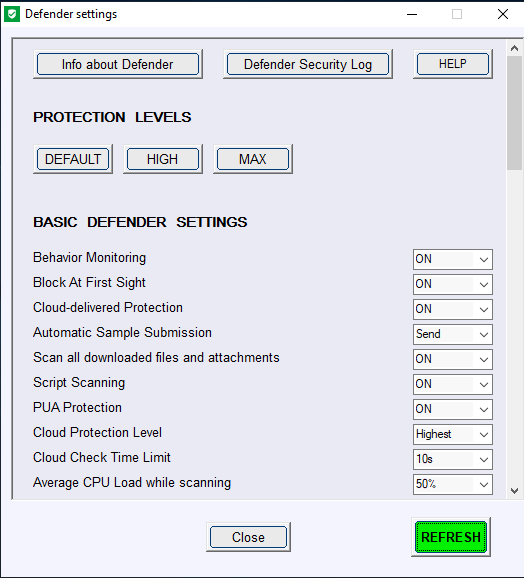
Here is the section added to the new Help:
Most settings available in ConfigureDefender are related to Windows Defender real-time protection and work only when Windows Defender real-time protection is set to "ON".
Important: These two settings (below) should never be changed because important features like "Block at First Sight" and "Cloud Protection Level" will not work properly:
"Cloud-delivered Protection" = "ON"
"Automatic Sample Submission" = "Send"
ConfigureDefender Protection Levels (pre-defined settings):
"DEFAULT"
Microsoft Windows Defender default configuration which is applied automatically when installing the Windows system. It provides basic antivirus protection and can be used to quickly revert any configuration to Windows defaults.
"HIGH"
Enhanced configuration which enables Network Protection and most of Exploit Guard (ASR) features. Three Exploit Guard features and Controlled Folder Access ransomware protection are disabled to avoid false positives. This is the recommended configuration which is appropriate for most users and provides significantly increased security.
"MAX"
This is the most secure protection level which enables all advanced Windows Defender features and hides Windows Security Center. Configuration changes can be made only with the ConfigureDefender user interface. The "MAX" settings are intended to protect children and casual users but can be also used (with some modifications) to maximize the protection. This protection level usually generates more false positives compared to the "HIGH" settings and may require more user knowledge or skill.
ConfigureDefender custom settings:
You may customize your configuration by choosing any of the three protection levels and then change individual features.
How to apply the settings:
Select a Protection Level or custom configuration, press the "Refresh" green button and let ConfigureDefender confirm the changes. ConfigureDefender will alert if any of your changes have been blocked. Reboot to apply chosen protection.
Audit mode:
Many ConfigureDefender options can be set to "Audit". In this setting, Windows Defender will log events and warn the user about processes which would otherwise be blocked with this setting "ON". This feature is available for users to check for software incompatibilities with applied Defender settings. The user can avoid incompatibilities by adding software exclusions for ASR rules and Controlled Folder Access.
Defender Security Log:
This option can gather the last 200 entries from the Windows Defender Antivirus events. These entries are reformated and displayed in the notepad. The following event IDs are included: 1006, 1008, 1015, 1116, 1117, 1118, 1119, 1121, 1122, 1123, 1124, 1125, 1126, 1127, 1128, 3002, 5001, 5004, 5007, 5008, 5010, 5012. Inspecting the log can be useful when a process or file execution has been blocked by Windows Defender Exploit Guard.
The example of the Log:
).Here is the section added to the new Help:
Most settings available in ConfigureDefender are related to Windows Defender real-time protection and work only when Windows Defender real-time protection is set to "ON".
Important: These two settings (below) should never be changed because important features like "Block at First Sight" and "Cloud Protection Level" will not work properly:
"Cloud-delivered Protection" = "ON"
"Automatic Sample Submission" = "Send"
ConfigureDefender Protection Levels (pre-defined settings):
"DEFAULT"
Microsoft Windows Defender default configuration which is applied automatically when installing the Windows system. It provides basic antivirus protection and can be used to quickly revert any configuration to Windows defaults.
"HIGH"
Enhanced configuration which enables Network Protection and most of Exploit Guard (ASR) features. Three Exploit Guard features and Controlled Folder Access ransomware protection are disabled to avoid false positives. This is the recommended configuration which is appropriate for most users and provides significantly increased security.
"MAX"
This is the most secure protection level which enables all advanced Windows Defender features and hides Windows Security Center. Configuration changes can be made only with the ConfigureDefender user interface. The "MAX" settings are intended to protect children and casual users but can be also used (with some modifications) to maximize the protection. This protection level usually generates more false positives compared to the "HIGH" settings and may require more user knowledge or skill.
ConfigureDefender custom settings:
You may customize your configuration by choosing any of the three protection levels and then change individual features.
How to apply the settings:
Select a Protection Level or custom configuration, press the "Refresh" green button and let ConfigureDefender confirm the changes. ConfigureDefender will alert if any of your changes have been blocked. Reboot to apply chosen protection.
Audit mode:
Many ConfigureDefender options can be set to "Audit". In this setting, Windows Defender will log events and warn the user about processes which would otherwise be blocked with this setting "ON". This feature is available for users to check for software incompatibilities with applied Defender settings. The user can avoid incompatibilities by adding software exclusions for ASR rules and Controlled Folder Access.
Defender Security Log:
This option can gather the last 200 entries from the Windows Defender Antivirus events. These entries are reformated and displayed in the notepad. The following event IDs are included: 1006, 1008, 1015, 1116, 1117, 1118, 1119, 1121, 1122, 1123, 1124, 1125, 1126, 1127, 1128, 3002, 5001, 5004, 5007, 5008, 5010, 5012. Inspecting the log can be useful when a process or file execution has been blocked by Windows Defender Exploit Guard.
The example of the Log:
Code:
Event[0]:
*****************************************
*****************************************
  Date: 2019-02-23   Time: 06:36:25.315
  Event ID: 5007
(Changed Windows Defender settings)
*****************************************
*****************************************
  User Name: NT AUTHORITY\SYSTEM
  Computer: DESKTOP-5HUB7VC
  Description:
Windows Defender Antivirus Configuration has changed. If this is an unexpected event you should review the settings as this may be the result of malware.
     Old value: HKLM\SOFTWARE\Microsoft\Windows Defender\InstallLocation = C:\ProgramData\Microsoft\Windows Defender\platform\4.18.1812.3-0\
     New value: HKLM\SOFTWARE\Microsoft\Windows Defender\InstallLocation = C:\ProgramData\Microsoft\Windows Defender\platform\4.18.1902.2-0\


Event[1]:
*****************************************
*****************************************
  Date: 2019-02-23   Time: 06:33:43.581
  Event ID: 1121
(Blocked by ASR rule)
*****************************************
*****************************************
  User Name: NT AUTHORITY\SYSTEM
  Computer: DESKTOP-5HUB7VC
  Description:
Windows Defender Antivirus has blocked an operation that is not allowed by your IT administrator.
For more information please contact your IT administrator.
     ID: d1e49aac-8f56-4280-b9ba-993a6d77406c
     ConfigureDefender option: Block process creations originating from PSExec and WMI commands
     Detection time: 2019-02-23T14:33:43.580Z
     User: NT AUTHORITY\NETWORK SERVICE
     Path: C:\Windows\System32\cmd.exe
     Process Name: C:\Windows\System32\wbem\WmiPrvSE.exe
     Signature Version: 1.287.606.0
     Engine Version: 1.1.15700.8
     Product Version: 4.18.1812.3


Event[2]:
*****************************************
*****************************************
  Date: 2019-02-23   Time: 06:23:54.221
  Event ID: 5007
(Changed Windows Defender settings)
*****************************************
*****************************************
  User Name: NT AUTHORITY\SYSTEM
  Computer: DESKTOP-5HUB7VC
  Description:
Windows Defender Antivirus Configuration has changed. If this is an unexpected event you should review the settings as this may be the result of malware.
     Old value:
     New value: HKLM\SOFTWARE\Microsoft\Windows Defender\Windows Defender Exploit Guard\ASR\Rules\d1e49aac-8f56-4280-b9ba-993a6d77406c
        ConfigureDefender option: Block process creations originating from PSExec and WMI commands = 0x1

Event[3]:
*****************************************
*****************************************
  Date: 2019-02-23   Time: 06:09:15.534
  Event ID: 5004
(Changed Windows Defender settings)
*****************************************
*****************************************
  User Name: NT AUTHORITY\SYSTEM
  Computer: DESKTOP-5HUB7VC
  Description:
Windows Defender Antivirus Real-time Protection feature configuration has changed.
     Feature: Network Inspection System
     Configuration: 0

Event[4]:
*****************************************
*****************************************
  Date: 2019-02-23   Time: 06:09:15.533
  Event ID: 5007
(Changed Windows Defender settings)
*****************************************
*****************************************
  User Name: NT AUTHORITY\SYSTEM
  Computer: DESKTOP-5HUB7VC
  Description:
Windows Defender Antivirus Configuration has changed. If this is an unexpected event you should review the settings as this may be the result of malware.
     Old value: HKLM\SOFTWARE\Microsoft\Windows Defender\NIS\Consumers\IPS\DisableBmNetworkSensor = 0x1
     New value: Default\NIS\Consumers\IPS\DisableBmNetworkSensor = 0x0

Event[5]:
*****************************************
*****************************************
  Date: 2019-02-23   Time: 06:08:55.665
  Event ID: 5004
(Changed Windows Defender settings)
*****************************************
*****************************************
  User Name: NT AUTHORITY\SYSTEM
  Computer: DESKTOP-5HUB7VC
  Description:
Windows Defender Antivirus Real-time Protection feature configuration has changed.
     Feature: Network Inspection System
     Configuration: 1

Event[6]:
*****************************************
*****************************************
  Date: 2019-02-23   Time: 06:08:55.663
  Event ID: 5007
(Changed Windows Defender settings)
*****************************************
*****************************************
  User Name: NT AUTHORITY\SYSTEM
  Computer: DESKTOP-5HUB7VC
  Description:
Windows Defender Antivirus Configuration has changed. If this is an unexpected event you should review the settings as this may be the result of malware.
     Old value: Default\NIS\Consumers\IPS\DisableBmNetworkSensor = 0x0
     New value: HKLM\SOFTWARE\Microsoft\Windows Defender\NIS\Consumers\IPS\DisableBmNetworkSensor = 0x1

Event[7]:
*****************************************
*****************************************
  Date: 2019-02-10   Time: 15:40:51.108
  Event ID: 1122
(Audited by ASR rule)
*****************************************
*****************************************
  User Name: NT AUTHORITY\SYSTEM
  Computer: DESKTOP-5HUB7VC
  Description:
Windows Defender Antivirus audited an operation that is not allowed by your IT administrator.
For more information please contact your IT administrator.
     ID: 9e6c4e1f-7d60-472f-ba1a-a39ef669e4b2
     ConfigureDefender option: Block credential stealing from the Windows local security authority subsystem (lsass.exe)
     Detection time: 2019-02-10T23:40:51.106Z
     User: NT AUTHORITY\SYSTEM
     Path: C:\Windows\System32\lsass.exe
     Process Name: C:\Windows\System32\VBoxService.exe
     Signature Version: 1.285.1306.0
     Engine Version: 1.1.15600.4
     Product Version: 4.18.1812.3
Last edited:
Andy Ful
From Hard_Configurator Tools
Verified
Honorary Member
Top Poster
Developer
Well-known
Forum Veteran
Will be pushed soon (ver. 2.0.0.1)Hey what is the newest version, my infertace not are the same

Andy Ful
From Hard_Configurator Tools
Verified
Honorary Member
Top Poster
Developer
Well-known
Forum Veteran
On my monitor DPI is not a problem (fonts and boxes are rescaled properly), but on monitors with small display size and low screen resolution, it can be a problem with the help window. For example, on a 10-inch monitor, the help window is well visible with resolution 1920x1080 and 100% DPI. On 21 inch monitor, the minimal resolution for 125 DPI will be 800x600. What are your display parameters? Could you also post a screenshot?Does 2.0.0.1 have any DPI improvements? I've noticed that currently CF does not play nice when Windows is set to 125% DPI, which is a pretty common setting for many people. Issues I get are Text getting cutoff and not fitting properly in the boxes.
Hi, for me it works excellent, i only have one cuestion ¿What do you think about the protection level in comparision whith another products?, for me whith high seetings feel very good, i dont see anything extrange. Defender works silently and smooth, i see some alerts when i try to copy text in word from internet files or docs, but, it make me feel secure. I see more protection options than another security products. Can we say Defender high seetings give a protection comparable whith Kaspersky security cloud free or emsisoft antimalware? Do you think use configure defender higth seetings and comodo firewall was a exageration?

It's a good question and I haven't seen any hard test results about it that I can remember. Maybe Andy knows. But a general rule of thumb is that the more alerts you see during normal computer usage, the more aggressive and paranoid your security config is. Accordingly, Windows Defender at high settings is stronger than Kaspersky at default settings.Hi, for me it works excellent, i only have one cuestion ¿What do you think about the protection level in comparision whith another products?, for me whith high seetings feel very good, i dont see anything extrange. Defender works silently and smooth, i see some alerts when i try to copy text in word from internet files or docs, but, it make me feel secure. I see more protection options than another security products. Can we say Defender high seetings give a protection comparable whith Kaspersky security cloud free or emsisoft antimalware? Do you think use configure defender higth seetings and comodo firewall was a exageration?

As for your second question, about Comodo firewall + Defender at high settings: IMO Defender at high settings is better at blocking attacks through MS Office docs and Adobe docs. This is the most dangerous attack vector today. On the other hand, CruelComodo is default-deny, which has great advantages. So I think they are complementary.
Last edited:
Andy Ful
From Hard_Configurator Tools
Verified
Honorary Member
Top Poster
Developer
Well-known
Forum Veteran
WD at high settings will be probably better (due to ASR rules) in the real-world scenario, because most of the real-world threats are delivered via malicious documents and scripts.Hi, for me it works excellent, i only have one cuestion ¿What do you think about the protection level in comparision whith another products?, for me whith high seetings feel very good, i dont see anything extrange. Defender works silently and smooth, i see some alerts when i try to copy text in word from internet files or docs, but, it make me feel secure. I see more protection options than another security products. Can we say Defender high seetings give a protection comparable whith Kaspersky security cloud free or emsisoft antimalware? Do you think use configure defender higth seetings and comodo firewall was a exageration?
In AV-Comparatives real-world tests, Kaspersky and WD on default settings have the same detection scoring over the last year. I am not sure what could be the scoring on Malware Hub for never seen EXE samples - it would be interesting to see how WD can compete in this category with Kaspersky Free (or Cloud free) over a few month tests.
Last edited:
Andy Ful
From Hard_Configurator Tools
Verified
Honorary Member
Top Poster
Developer
Well-known
Forum Veteran
Yes, as you have posted already, the boxes and labels are not rescaled properly. It seems that in your case the DPI rescaling is not fully compatible with AutoIt GUI. Unfortunately, I cannot do much to solve this problem, because it is related to the built-in AutoIt GUI programming features.
My monitors are 1600x1200 @ 125% DPI. As you can see the "Disabled" parts have the "d" cut off as well as the letters that hang such as letters g, p, y. etc.

Setup PCPC setup
Forgive me for my ignorance. I tried to look through this whole thread and on github, but I’m still unsure. Does “Scan all downloaded files and attachments” scan downloads regardless of what browser you use, or does it only work with edge? Or, is it specific to the default download folder?
Andy Ful
From Hard_Configurator Tools
Verified
Honorary Member
Top Poster
Developer
Well-known
Forum Veteran
It is valid for any popular browser.Forgive me for my ignorance. I tried to look through this whole thread and on github, but I’m still unsure. Does “Scan all downloaded files and attachments” scan downloads regardless of what browser you use, or does it only work with edge? Or, is it specific to the default download folder?
Recently browsing
Members who viewed this thread in the last 5 minutes
You may also like...
-
-

-
 Serious Discussion Prepare for Windows Update certificate rotation in 2027
 -

-
