ConfigureDefender utility for Windows 10/11

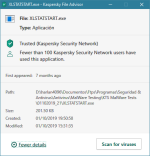
@Andy Ful: what about XLSTATSTART.exe? I got final verdict from KVirusDesk is clean, also appears as Trusted in KSN... :unsure: :emoji_thinking:

I've also tested with KTS2020d (defaults) and :

1570013219324.png1570013370160.png

1570014144212.png1570014168817.png
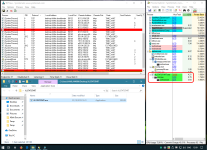
I've tested and triggers cmd.exe -> conhost.exe for about 1 second and auto terminates, it only left a 0 KB file... false positive??
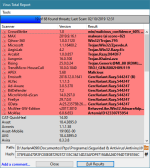
It looks like a crack for XLSTAT (AddinSoft) for Excel.
 
I checked log, there wasn't anything in the log about this sample.
Is there any entry in the Log for blocking via ASR rules (search for 1121 in the Log)? You can also post the Log, I am curious how this malware was mitigated.:giggle:(y)
The payload should be blocked when spawning by WmiPrvSE.exe.
 
Last edited:
How is it offtopic, there is an option in your program and it's labeled ??????, I'm wondering what it does/means/do/supposed to say, etc. just answer the question and this will move on.
 
  • Like
Reactions: [correlate]
How is it offtopic, there is an option in your program and its labled ??????, I'm wondering what it does/means/do/suspose to say, etc. just answer the damned question and this will move on.
Please be kind. Your post :
https://malwaretips.com/threads/configuredefender-utility-for-windows-10.79039/post-837296
is probably displayed improperly. Here what I can see on my computer:
quantas.png

That is why some members completely did not understand what it should mean.
There is one setting ??????? in ConfigureDefender, and it means that the user hid only some features in Windows Security Center by using reg tweaks, GPO, or other software.
 

Attachments

  • quantas.png
    quantas.png
    62.6 KB · Views: 459
Last edited:
Some notes related to the latest test:
https://malwaretips.com/threads/malware-samples-14-2-10-2019.95369/post-837733

4.bat was analyzed here:
https://app.any.run/tasks/310bde9b-a55c-4525-815c-5c0e6566197e/
If successful then it writes autorun entry:
HKEY_CURRENT_USER\Software\Microsoft\Windows\CurrentVersion\Run
msptermsizes = "C:\Users\admin\AppData\Local\msptermsizes\msptermsizes.exe"

DH_695294_7957766861156.vbs was analyzed here:
https://app.any.run/tasks/65743ea0-6e3c-409c-a617-cfdf189501a7/
If successful then it writes autorun entry:
HKEY_CURRENT_USER\Software\Microsoft\Windows\CurrentVersion\Run
wdukuigy = "C:\Users\admin\AppData\Roaming\Microsoft\Zulycjadyc\ytfovlym.exe"

Chrome.Update.cfbe05.js was analyzed here:
https://app.any.run/tasks/79b53a41-6f20-42dd-875f-b8291ab51715/
It is probably a part of some more complex attack - it does not try to do anything dangerous. It can be also that the CnC server is already down.
 
Last edited:
Sorry, but I was getting fusterated with all the non-answers. I have no idea why you are seeing what you see, this is what I posted, and this is the link to said pictures (maybe this'll work)...View attachment 226636View attachment 226637

This was @Andy Ful's reply earlier today:

There is one setting ??????? in ConfigureDefender, and it means that the user hid only some features in Windows Security Center by using reg tweaks, GPO, or other software.
 
Is there any entry in the Log for blocking via ASR rules (search for 1121 in the Log)? You can also post the Log, I am curious how this malware was mitigated.:giggle:(y)
The payload should be blocked when spawning by WmiPrvSE.exe.
There wasn't any. Even in the last malware pack test for the 3 script there wasn't any entry related to those.

@SeriousHoax In your testing with Max settings I guess you haven't had any ransomware make it far enough to be blocked by Controlled Folder Access? :emoji_thinking:
So far, no. All the ransomwares have been blocked by signatures.
 
There wasn't any. Even in the last malware pack test for the 3 script there wasn't any entry related to those.
The two samples from the last test add autorun entries, so I am sure that they were neutralized on your testing system or were already dead. It is also possible that they were stopped by WIndows 10 mitigations. Anyway, we do not know if WD could mitigate/block them.:emoji_thinking:
 
Network Protection not working. Opera&Edge // host&vm

View attachment 226703
The Demo link SmartScreen Test does not work for me too. That happened several times in the past. But, Network Protection still works for the real phishing links. I have just tried this on the one-year-old link and NP works well. If someone wants to check it, then please PM to me.(y)