New Update CyberLock 8.0

As does Cyberlock. At least that's what it displays on the top of the GUI, to the right of "Threats Blocked". I believe that number in both cases was 50k. I'm sure something will be worked out. But remember, tokens are not free. They come at a costs, and I don't think @danb should have to shoulder that. Cyberlock has been improved, that should costs users too.
I really don't want to bash on CyberLock or understate any of his products. I really love them otherwise I wouldn't have purchased CL in the first place. I am just stating that I currently don't see any major difference between the standalone SiriusGPT (free) and CyberLock (paid). So no offence to @danb at all. (y)
 
installed Cyberlock 8.40 (with siriusGPT integrated) over 8.02 on hardware Host, but first stopped and deleted sirusLLM_0.73 which I had been running with CL. Install was a tad bumpy compared to typical as 8.40 installler had a harder time shutting down CL 8.02... post install the WLC icon (white) remains in systray. I am resetting my CL Whitelist as it has been awhile. I see 50,000 tokens at top of Basic window.
PS I see there's an update for DefenderUIPro, but I'm running DefenderUI 1.34 with CL so is there an update to DefenderUI 1.34?
PS2 not sure how it was before install, but post install MS Defender icon has disappeard from systray -- windows security window shows that MSD is running. reboot is a pia as I'd have to shutdown VMware VMs...
nothing obviously broken yet
 
  • Like
Reactions: danb
Am I correct in saying that Cyberlock does not yet incorporate the snapshot scan element of SiriusLLM so the two can still run alongside each other?
 
  • Like
Reactions: danb
Hi @danb,

I already updated Cyberlock to 8.40 and installed it over the top on my Win11 laptop and also on my Win10 Pro desktop. But there's still an issue on the Win10 Pro; it doesn't retain the setting upon a restart, e.g., the Whitelist cloud tray icon and "display simple user and mini prompt." Also did a reinstall, but the issue remains.
 
Am I correct in saying that Cyberlock does not yet incorporate the snapshot scan element of SiriusLLM so the two can still run alongside each other?
Yes, they run great together. At some point we might implement the Sirius Snapshot scan into CyberLock as well.
 
Hi @danb,

I already updated Cyberlock to 8.40 and installed it over the top on my Win11 laptop and also on my Win10 Pro desktop. But there's still an issue on the Win10 Pro; it doesn't retain the setting upon a restart, e.g., the Whitelist cloud tray icon and "display simple user and mini prompt." Also did a reinstall, but the issue remains.
I think the issue is the Synchronize and backup my settings to the cloud option in the Web Management tab. Please install the following version over the top. Then disable that option. Then set your settings how you like. Please let me know if this fixes the issue, thank you!

CyberLock 8.41
SHA-256: 30dc5a14b90d83740d36ad7432231eda7b049cd9dfc4deee46e0d49b5cea969f

This version has a few other small bug fixes as well, like the text color on the user prompts when in Light Mode.

I will catch up on the posts I missed asap, than you guys!
 
CL 8.40 in action: after installing 8.40 I also reset the CL whitelist in settings: later open an unsigned app and did get a popup from CL showing siriusGPT analyzed "safe" and WLC said "not safe" -- so first time I saw CL 8.40 in action and it acted as expected with a somewhat irregular exe.
 
  • Like
Reactions: danb
installed 8.41 over 8.40, it had mini balk again shutting down 8.40 but completed ok, I see I have 48,881 tokens down from 50,000 but I'm not aware of having done an analysis of any specific file with siriusGPT from 8.40 (or even how do one since the integration w/CL)(well I did see an automatic siriusGPT analysis of an unsigned exe so I guess that was it -- ok!)
 
  • Like
Reactions: danb
My moms tells me I'm extra special, to the point where I need to wear a full-time inside helmet with a drool cup, some make of this what you will. I don't see very much of SiriusGPT in Cyberlock 8.* at all. There's no snapshot scan, and even on access-scanning is done by the whitecloud scan. I've enabled "Display simple user and mini prompts" option in the UI Tweaks", but nothing's changed. Am I missing something?
 
  • Like
Reactions: danb
My moms tells me I'm extra special, to the point where I need to wear a full-time inside helmet with a drool cup, some make of this what you will. I don't see very much of SiriusGPT in Cyberlock 8.* at all. There's no snapshot scan, and even on access-scanning is done by the whitecloud scan. I've enabled "Display simple user and mini prompts" option in the UI Tweaks", but nothing's changed. Am I missing something?
Hello,
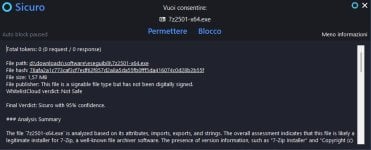
I installed CyberLock 8.40 over 8.02 and I enabled "Display simple user and mini prompts". I ran 7-zip installer and I got the SiriusGPT prompt. SiriusGPT correctly identified it as Safe unlike WhiteListCloud which flagged it as Not Safe. I allowed it and the executable went through.
I must add that in my CyberLock settings the WhiteListCloud feature isn't enabled.

7-Zip installer.jpg

[Edited] However I got a minor issue by using the context menu "CyberLock scan" instead of simply running the executable above: after deleting 7z2501-x64.exe from CyberLock whitelist I right-clicked on the executable and with the context menu "CyberLock scan" I got the SiriusGPT prompt without "Auto block paused" on top left, but clicking on "Allow" did nothing (i.e 7z2501-x64.exe didn't run even if allowing it added the exe to the whitelist). I used the context menu once more but the exe still won't run.
I don't know if this context menu behavior is intended or not. As I wrote above I'm using CyberLock 8.40.
 
Last edited:
  • Like
Reactions: danb
I think the issue is the Synchronize and backup my settings to the cloud option in the Web Management tab. Please install the following version over the top. Then disable that option. Then set your settings how you like. Please let me know if this fixes the issue, thank you!

CyberLock 8.41
SHA-256: 30dc5a14b90d83740d36ad7432231eda7b049cd9dfc4deee46e0d49b5cea969f

This version has a few other small bug fixes as well, like the text color on the user prompts when in Light Mode.

I will catch up on the posts I missed asap, than you guys!
Version 8.41 working great; issues mentioned before were fix. Thanks @danb
 
  • Like
Reactions: danb and ErzCrz
I don't know what sadder; the fact that no one here has a sense of humor or that everyone here assumes I wear and inside helmet with a built-in drool cup. :cautious:
 
  • Like
Reactions: danb
I don't know what sadder; the fact that no one here has a sense of humor or that everyone here assumes I wear and inside helmet with a built-in drool cup. :cautious:
At the moment, the communication atmosphere here in the forum seems a bit strained. Humor is easily misunderstood. Don't worry about it.
 
  • Like
Reactions: danb
Hey Guys!

Here are the latest versions of our software, they should be ready for public release, but if you find any issues please let me know!

The previous versions of DefenderUI Pro and WDAC Lockdown both had issues with the WDAC Lockdown component, but it should be fixed now.

Also, DefenderUI Pro, WDAC Lockdown and SiriusGPT are transitioning to paid products with 15 day trials. The good news is that there is only going to be one license type and it is going to work on all of our paid products. So if you have a license, you will be able to activate any of our paid products with that license.

SiriusGPT 0.84
SHA-256: 92cba67dd86ee13da1c45e75f97757f02f0c27f20ce00c8dc385103a73a84d3c

SiriusLLM 0.84
SHA-256: 880bf292c2d0d09fe4a5d39216534128426307c79560a82d2852e797b94aa81d

CyberLock 8.44
SHA-256: c849787c37ed92699a48bd793eb3a3bec1d36d6cd11c0a402dae4fead2dc4c86

DefenderUI 1.44
SHA-256: 6fab498eefb0c84609f42b28c1539feabe4c4e1d1892ce1a38564d04d985d309

DefenderUIPro 1.44
SHA-256: c3457e3286f220a272ec79c862f2eb07e8ca46cafbbbdb75d32cc61b3671864b

DefenderUISilent 1.44
SHA-256: 751b56d1a75c69b60564022e4ef9699f5d2734e92f9b90ba72f2bca3d28a7c6e

WDAC Lockdown 1.44
SHA-256: f2e357756ac48b6c446309d857919a5e5286f48f751f0e41ae9efb6bdeff9450

I still have several posts that I need to catch up on, hopefully I can do that soon, thank you guys!
 
Last edited:
Hey Guys!

Here are the latest versions of our software, they should be ready for public release, but if you find any issues please let me know!

The previous versions of DefenderUI Pro and WDAC Lockdown both had issues with the WDAC Lockdown component, but it should be fixed now.

Also, DefenderUI Pro, WDAC Lockdown and SiriusGPT are transitioning to paid products with 15 day trials. The good news is that there is only going to be one license type and it is going to work on all of our paid products. So if you have a license, you will be able to activate any of our paid products with that license.

SiriusGPT 0.84
SHA-256: 92cba67dd86ee13da1c45e75f97757f02f0c27f20ce00c8dc385103a73a84d3c

SiriusLLM 0.84
SHA-256: 880bf292c2d0d09fe4a5d39216534128426307c79560a82d2852e797b94aa81d

CyberLock 8.44
SHA-256: c849787c37ed92699a48bd793eb3a3bec1d36d6cd11c0a402dae4fead2dc4c86

DefenderUI 1.44
SHA-256: f734785eeb99c90cd1bac20bf0f297c49a255723bd749cbce3e8fec337a09a10

DefenderUIPro 1.44
SHA-256: c3457e3286f220a272ec79c862f2eb07e8ca46cafbbbdb75d32cc61b3671864b

DefenderUISilent 1.44
SHA-256: 0d972415589f3f24fff6c089dda65cd1b2c613894f604fbb4183fd2f5303191d

WDAC Lockdown 1.44
SHA-256: f2e357756ac48b6c446309d857919a5e5286f48f751f0e41ae9efb6bdeff9450

I still have several posts that I need to catch up on, hopefully I can do that soon, thank you guys!
That awesome. This got to the best deal I ever purchased on a security package. =)
 
Hey Guys!

Here are the latest versions of our software, they should be ready for public release, but if you find any issues please let me know!

The previous versions of DefenderUI Pro and WDAC Lockdown both had issues with the WDAC Lockdown component, but it should be fixed now.

Also, DefenderUI Pro, WDAC Lockdown and SiriusGPT are transitioning to paid products with 15 day trials. The good news is that there is only going to be one license type and it is going to work on all of our paid products. So if you have a license, you will be able to activate any of our paid products with that license.

SiriusGPT 0.84
SHA-256: 92cba67dd86ee13da1c45e75f97757f02f0c27f20ce00c8dc385103a73a84d3c

SiriusLLM 0.84
SHA-256: 880bf292c2d0d09fe4a5d39216534128426307c79560a82d2852e797b94aa81d

CyberLock 8.44
SHA-256: c849787c37ed92699a48bd793eb3a3bec1d36d6cd11c0a402dae4fead2dc4c86

DefenderUI 1.44
SHA-256: 6fab498eefb0c84609f42b28c1539feabe4c4e1d1892ce1a38564d04d985d309

DefenderUIPro 1.44
SHA-256: c3457e3286f220a272ec79c862f2eb07e8ca46cafbbbdb75d32cc61b3671864b

DefenderUISilent 1.44
SHA-256: 751b56d1a75c69b60564022e4ef9699f5d2734e92f9b90ba72f2bca3d28a7c6e

WDAC Lockdown 1.44
SHA-256: f2e357756ac48b6c446309d857919a5e5286f48f751f0e41ae9efb6bdeff9450

I still have several posts that I need to catch up on, hopefully I can do that soon, thank you guys!


The former problem with changing settings in CL reported here before by some users including me, is fixed with this update. Thank you.
 

You may also like...