
New version has been published. There is a number of UI updates which I will not be showing this time-you'll have to find them.
There are detection improvements as well.
There are detection improvements as well.


Open MalwareTips from your Home Screen or desktop. Follow discussions, find answers and pick up where you left off.
If you cannot find an install option, update your browser or use its bookmark option to keep MalwareTips close.
After installation, open the app and sign in. Enable push notifications in Preferences if you want alerts. On iPhone and iPad, push requires a Home Screen web app and iOS or iPadOS 16.4 or later.
Sign in to manage notificationsInstallation is optional. Your notification settings stay under your control.


To be honest, I still can’t believe I made it…A very unique and original UI and arrangement, it is your own, one of a kind, HAWK EYE
I also like the easy to view and follow settings window(s).
Not anytime soon. I already have a full time job, so I am coming home after work and I am spending 6-7 hours working on various features.
Hi @TridentNot anytime soon. I already have a full time job, so I am coming home after work and I am spending 6-7 hours working on various features.
Chasing certifications and VirusTotal presence at the moment is not my priority, my priority is to deliver solutions that work.
There are quite a few innovative features here and that’s not even the main project I am working on.
Everything else is wasting time that I can put into working on the product.

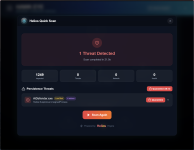
Yeah. That’s a design choice. I am creating a robust exclusions addition system. The scope of the scan was increased to now include processes and modules.The first time the Helios engine detects AiDefender:
View attachment 294312


You will have to disable temporarily to apply your settings and profile, you will see a prompt.This is interesting. I'm considering using this and add Adguard Desktop to ditch 3rd party security.
Do I need to disable MD tamper protection to use this?
That sounds great. So this does exactly like CD but offers extra functionality?You will have to disable temporarily to apply your settings and profile, you will see a prompt.
The Deep Firewall Control and quick scan options are not affected by tamper protection.
Both Configure Defender and Defender Hardening Console will allow you to configure settings which otherwise are hidden in registry and group policies.That sounds great. So this does exactly like CD but offers extra functionality?
It looks fantastic on WindowsI just updated the website to the newer revision, looks incredible on iPhone and Mac


Members who viewed this thread in the last 5 minutes


