Troubleshoot Disk scheduler optimization set to weekly, but it never runs?

SumTingWong

Level 28
Thread author
Verified
Top Poster
Well-known
Apr 2, 2018
1,753
1
5,845
2,668
FLorida
Briefly explain your current issue(s)
Disk scheduler optimization failed to run.
Steps taken to resolve, but have been unsuccessful
none
I set scheduler disk optimization to weekly. It is 7 days now, and the scheduler haven't run yet. The last manually run on all my drives is 7/19/2018. Is it not working?

Task Sheduler service is running automatically.
 
I think you do use SSD... Can it be the problem?

Even my HDDs haven't optimized for 8 days now.
@SumTingWong , it's possible that when windows started the task it determined that optimization was unnecessary and I see @yitworths just asked a good question also.

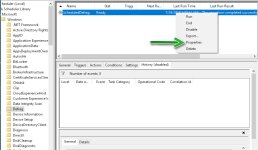
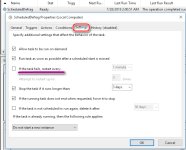
How can I check that Windows did started this task? I don't see nowhere in the Task Scheduler. Disk Scheduler optimization will defrag or optimize the selected disk whether it is need or not when it is enable and choose the time( daily, weekly, or monthly). I even allow it to wake up my computer as well.

Could this be the solution?
Screenshot_8.png


Screenshot_9.png

But when I check Defragment and Optimize Drives, it show the last manual run is last week. I installed and uninstalled a lot of apps in this week.
Screenshot_10.png
 
Last edited:
Upvote 0
Even my HDDs haven't optimized for 8 days now

are you suspecting any bug?

How can I check that Windows did started this task?

you may try 2018-07.jpg2018-07-2.jpg


Disk Scheduler optimization will defrag or optimize the selected disk whether it is need or not when it is enable and choose the time( daily, weekly, or monthly)

How come you jump to that conclusion. If your disk doesn't need any defrag or optimization, it's most likely that windows won't do anything even if it's schduled to. For defragmentation, it analyzes first so if there is any thresold & your disk doesn't meet that then windows ain't gonna do any defragment.
 
Upvote 0
are you suspecting any bug?


you may try View attachment 193754View attachment 193755


How come you jump to that conclusion. If your disk doesn't need any defrag or optimization, it's most likely that windows won't do anything even if it's schduled to. For defragmentation, it analyzes first so if there is any thresold & your disk doesn't meet that then windows ain't gonna do any defragment.

There's no analyze button for my SSD. I just check that it is already automatically run today, but the process terminated unexpectedly?
Screenshot_11.png
 
Upvote 0
There's no analyze button for my SSD. I just check that it is already automatically run today, but the process terminated unexpectedly?
View attachment 193757

As you told your hdd wasn't also defragged, that's why I posted that. What was your pc's state at that moment? btw, which av or realtime protection do you use?
 
Upvote 0
Is it only work in idle?
no, not really. But, the termination could be because of several reasons. But to pinpoint d real reason is difficult. Anyhow, 8 days or 7 days gap can be considered normal,if your disk is in good condition. Can you try a manual start of that process just to check?
 
Last edited:
Upvote 0
no, not really. But, the termination could be because of several reason. But to pinpoint d real reason is difficult. Anyhow, 8 days or 7 days gap can be considered normal,if your disk is in good condition. Can you try a manual start of that process just to check?

Manual defrag my HDD and optmize my SSD through Optimize and Defrag Drive?
 
Upvote 0
Yes, right now I am defragging my two HDDs that the automatic disk scheduler didn't do. The automatic disk scheduler didn't even start at all. My HDDs need defrag.

after defragmentation, run either sfc /verifyonly or sfc /scannow. or, run DISM.exe /Online /Cleanup-image /Scanhealth DISM.exe/Online/Cleanup-image /Restorehealth

If still the scheduled task fail, there can be either an another program interferring with it or a possible bug.
 
Upvote 0
after defragmentation, run either sfc /verifyonly or sfc /scannow. or, run DISM.exe /Online /Cleanup-image /Scanhealth DISM.exe/Online/Cleanup-image /Restorehealth

If still the scheduled task fail, there can be either an another program interferring with it or a possible bug.

Screenshot_16.png
 
  • Like
Reactions: vtqhtr413
Upvote 0