Advice Request Do you allow auto updates of your installed software?

Please provide comments and solutions that are helpful to the author of this topic.
I only have trusted software installed.
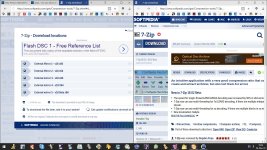
I used to think the same, then this happened ...
I remember the disaster of auto update in C Cleaner...:mad:
... and I ever since I have enabled a firewall to block outbound. There is no such thing as a trusted software, AVs were hijacked, even Windows update servers once.


Simply check if your software need updating with SUMo. And then go the developer's website yourself and download it.
In that case Softpedia works way better for me, changelog and download links are at hand and no need to run an additional software.

TairikuOkami's software subscriptions
 

Attachments

  • capture_03042018_162403.jpg
    capture_03042018_162403.jpg
    261.3 KB · Views: 470
I used to think the same, then this happened ...

... and I ever since I have enabled a firewall to block outbound. There is no such thing as a trusted software, AVs were hijacked, even Windows update servers once.

In that case Softpedia works way better for me, changelog and download links are at hand and no need to run an additional software.

TairikuOkami's software subscriptions

There is no such thing as a trusted software

Well said :) That's why I have set my firewall to block all outgoing requests by default and now use SUMo only to check for updates to my installed software.

I know most people won't do this but I also run my own WSUS (Windows Update) server at home which gives me 100% control over what is approved and installed on my machine and servers at home. I've been doing this for almost 2yrs now and it has worked well.
 
I used to think the same, then this happened ...

... and I ever since I have enabled a firewall to block outbound. There is no such thing as a trusted software, AVs were hijacked, even Windows update servers once.


In that case Softpedia works way better for me, changelog and download links are at hand and no need to run an additional software.

TairikuOkami's software subscriptions
Agreed. I prefer Softpedia or Majorgeeks over using SUMo because you still have to manually download and install updates. Unlike Patch My PC which automatically installs all selected updates at once. Although the number of software available isn't as much as SUMo. I don't have that much software installed anyway. Patch My PC covers most of the apps I have.
Majorgeeks have their own update checker app. I'd rather use that than SUMo.
 
I allow everything to auto update, because life is too short to waste time babysitting my installed applications.

Never had a problem in 25 years. And no I don't use CCleaner or any third-party uninstall software, which tend to do much more harm than good.

However before any major Windows update I always image my system drive with Macrium in case something goes wrong and I need to rollback.
 
Maybe it's an action performed by default for the 'Sync your Settings' options to your Microsoft Account.
https://support.microsoft.com/en-gb/help/4026102/windows-10-about-sync-settings

Where does your SystemSettings.exe connect to?

I don't use a Microsoft account. This only seems to happen when I open the Settings (aka Control Panel) page. It also runs speechruntime.exe even though I have Cortana disabled. The other one that baffles me is that I constantly have block requests in my firewall logs for searchprotocolhost.exe.

Systemsettings.exe connects to:

upload_2018-3-4_16-57-15.png
 
As much as possible, i prefer to be notified first. Then i would make sure to close everything and update the stuffs that need to be updated. Obviously your security software need to be active, except for particular situations, where for example, it's blocking or preventing an important process to work correctly.

I also use Kerish Doctor to analyse installed softwares on my Pc and see if any update is needed. There is a function to check for vulnerabilities too in the product (Kerish Doctor), that i use, and is active in the background. :)
 
Last edited:
I only run trusted applications, but I like a stable system. So I limit what can update itself. If a trusted app gets compromised upstream, at least I will not be the first to notice! ;)

As far as automatic updates go, I like to know when something has changed, in case I encounter problems and need to roll something back. If I can choose the option in application settings, I usually turn off automatic update checks by default, and/or disable outbound in firewall.

Other than Windows, my security software, and my internet facing programs like browsers, I block applications outbound at the firewall once they are installed and activated. I guess I like control and do not accept that everything needs constant access to the cloud, except for cloud AVs. :geek:

Automatic updates:
Windows = no
Antivirus and other security software = yes
Google Chrome = yes
Firefox = check, but don't update
 
  • Like
Reactions: CyberTech
I don't. I prefer to control the updates. Usually I'll take a snapshot first, run the updates, if there's an issue I just roll it back. If I was to auto update then I could be losing out on a day or two's worth of data.
 
Windows and Office: no, only manual after checking and reading about updates.
AV and security: YES, with check.
Other software: manual after some weeks or months in order to be all lined up.

Always backup everything and make system restore points before any update.
 
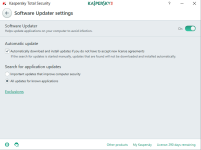
I use KTS software updater. It works well and on a wide range of programs.

You can change it for either: Only update important program updates or all program updates.
 

Attachments

  • Untitled.png
    Untitled.png
    27.6 KB · Views: 457
  • Like
Reactions: harlan4096