

The MalwareTips app
Your community, one tap away.
Open MalwareTips from your Home Screen or desktop. Follow discussions, find answers and pick up where you left off.
- Home Screen access
- Optional push alerts
- Your community
You're ready to explore.Explore what's new
Installation instructions
iPhone & iPad
- Open MalwareTips in Safari and tap Share. You may need to open the Page Menu first.
- Choose Add to Home Screen. If it is not listed, use Edit Actions to add it.
- Keep Open as Web App enabled if shown, then tap Add.
Android
- Open MalwareTips in Chrome or another browser that supports app installation.
- Open the browser menu and look for Install app, Install and create shortcut, or Add to Home screen.
- Choose Install and confirm. Wording varies by browser.
Desktop
- Chrome: use the install icon in the address bar, or the menu under Cast, save and share.
- Edge: open the menu, then More tools, Apps and Install this site as an app.
- Safari on Mac: choose Share or File, then Add to Dock. Firefox on Windows: look for the web apps button in the address bar.
If you cannot find an install option, update your browser or use its bookmark option to keep MalwareTips close.
Keep up with your conversations
After installation, open the app and sign in. Enable push notifications in Preferences if you want alerts. On iPhone and iPad, push requires a Home Screen web app and iOS or iPadOS 16.4 or later.
Sign in to manage notificationsInstallation is optional. Your notification settings stay under your control.
You are using an out of date browser. It may not display this or other websites correctly.
You should upgrade or use an alternative browser.
You should upgrade or use an alternative browser.
Question Does anybody know if indeed SAC can be turned on without reinstalling Windows?
- Thread starter devjitdutta2025
- Start date
- Featured
Windows 11
26 Replies
2,812 Views
Help answer the author's question with clear explanations and useful steps.

Yes; after the latest preview update of Windows; I have turned SAC off and on again with the registry modification.
Before such update, the registry hack did not work.
Before such update, the registry hack did not work.
F
ForgottenSeer 123960
@devjitdutta2025
Affirmative. It's confirmed that the "sterile field" (Clean Install) requirement for Smart App Control (SAC) has been rescinded for Windows 11 versions 24H2 and 25H2.
While registry modifications (likely targeting the VerifiedAndReputablePolicyState) may now function due to this kernel-level policy shift, the official engagement protocol is exposed directly via the UI, navigate to Windows Security > App & Browser Control > Smart App Control to toggle enforcement.
Proceed with caution. Activating SAC on a "dirty" (previously used) system introduces a high probability of immediate "False Positives." Legitimate but unsigned binaries lacking global prevalence will be neutralized (blocked) by the automated Windows Defender Application Control (WDAC) policy. If your environment relies on custom tooling or niche software, anticipate significant operational friction.
Affirmative. It's confirmed that the "sterile field" (Clean Install) requirement for Smart App Control (SAC) has been rescinded for Windows 11 versions 24H2 and 25H2.
While registry modifications (likely targeting the VerifiedAndReputablePolicyState) may now function due to this kernel-level policy shift, the official engagement protocol is exposed directly via the UI, navigate to Windows Security > App & Browser Control > Smart App Control to toggle enforcement.
Proceed with caution. Activating SAC on a "dirty" (previously used) system introduces a high probability of immediate "False Positives." Legitimate but unsigned binaries lacking global prevalence will be neutralized (blocked) by the automated Windows Defender Application Control (WDAC) policy. If your environment relies on custom tooling or niche software, anticipate significant operational friction.
Last edited by a moderator:

Yes.
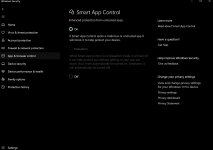
Notice the On/Off switches and no Evaluation Mode (greyed out).
@Parkinsond - no registry modification needed.
Notice the On/Off switches and no Evaluation Mode (greyed out).
@Parkinsond - no registry modification needed.
On my side, after I turned it off, the "on" button was greyed.Yes.
View attachment 295403
Notice the On/Off switches and no Evaluation Mode (greyed out).
@Parkinsond - no registry modification needed.
Could not turn it on again, except with registry.
I'm using W 11 IoT EnT LTSC, not the GAC ones.
I forgot that.I'm using W 11 IoT EnT LTSC, not the GAC ones.
The LTSC tax to be paid.I forgot that.

devjitdutta2025
Level 4
So indeed it seems that SAC now can be turned off safely and then re-enabled again without reinstalling the OS. Good job MS.
One good step, but a further one is needed.So indeed it seems that SAC now can be turned off safely and then re-enabled again without reinstalling the OS. Good job MS.
I get blocked installer, I turn off SAC to finish installation, then turn SAC back on, then try to launch the app, then SAC blocks the app.
Exception will be a welcome addition.
devjitdutta2025
Level 4
How old is the installer? Is it fairly new?One good step, but a further one is needed.
I get blocked installer, I turn off SAC to finish installation, then turn SAC back on, then try to launch the app, then SAC blocks the app.
Exception will be a welcome addition.
Sometime SAC blocks the installer when freshly released, then allow it after days or weeks, as with media player classic.How old is the installer? Is it fairly new?
Sometimes it blocks the installer even if old enough, as the case with peazip.
Sometimes it blocks the installer, but allows the installed app to launch; here turning off SAC is useful to bypass installation block.
Sometimes it blocks both the installer and the installed app after installation; turning off SAC will permit installation, but after turning it on again, launching app will be blocked.

I have the latest updates and for some reason mine is still off with no way to turn on.

One good step, but a further one is needed.
I get blocked installer, I turn off SAC to finish installation, then turn SAC back on, then try to launch the app, then SAC blocks the app.
Exception will be a welcome addition.
Submit through the Feedback Hub and wait a few days, then try again.Sometime SAC blocks the installer when freshly released, then allow it after days or weeks, as with media player classic.
Sometimes it blocks the installer even if old enough, as the case with peazip.
Sometimes it blocks the installer, but allows the installed app to launch; here turning off SAC is useful to bypass installation block.
Sometimes it blocks both the installer and the installed app after installation; turning off SAC will permit installation, but after turning it on again, launching app will be blocked.
@Antimalware18 - what version Windows do you have? What region do you live in? It's probably another controlled rollout by MS.
I rely on someone else will take care of the task, and keep waitingSubmit through the Feedback Hub and wait a few days, then try again.

@Antimalware18 - what version Windows do you have? What region do you live in? It's probably another controlled rollout by MS.
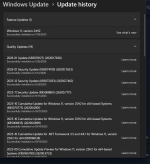
Most recent.
I have the same situation too.
So it's not the issue of LTSC version as I thought.
Forgot to put my location, Southwestern U.S
devjitdutta2025
Level 4
So it looks like there’s some discrepancies regarding SAC. On some PC’s the toggle ON switch is not there while others have it
Controlled rollout.So it looks like there’s some discrepancies regarding SAC. On some PC’s the toggle ON switch is not there while others have it
Recently browsing
Members who viewed this thread in the last 5 minutes

