
Question Enable DNSSEC support on router?

VPN and DNS
3 Replies 2,317 Views
Help answer the author's question with clear explanations and useful steps.

Templarware

Level 11
Verified
Top Poster
Well-known
Forum Veteran
I'm using Quad9 with DNS over TLS. Quado9 says 9.9.9.9 has DNSSEC validation. And when I do the test here: Cloudflare Browser Check the result reports DNSSEC enabled.
What is the router "Enable DNSSEC support" setting for and should I enable it?
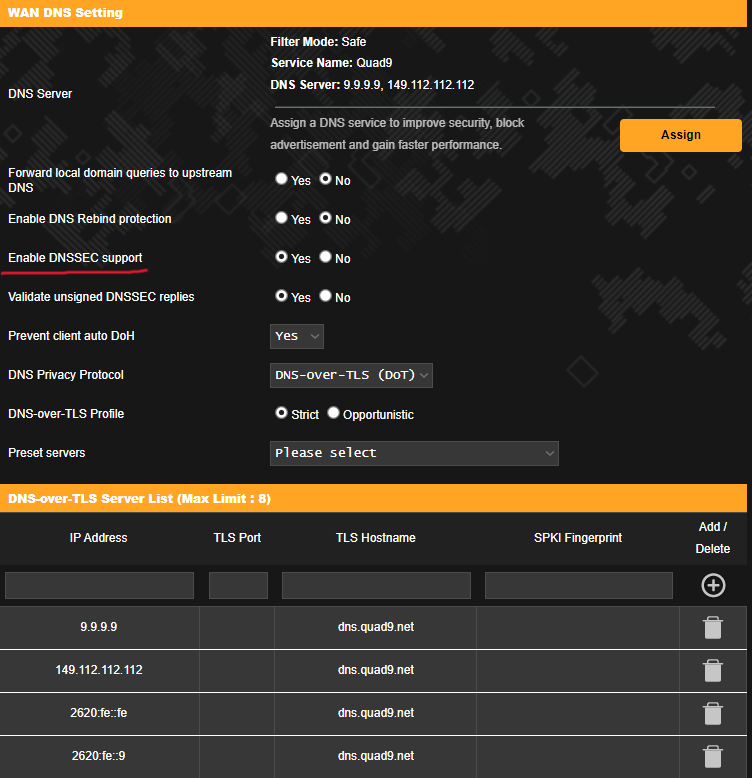
Opera Instantâneo_2024-03-24_163528_router.asus.com.png
 
Last edited:
The "Enable DNSSEC support" setting on your router ensures the DNS responses are secure and not tampered with, which is the main purpose of DNSSEC. Since you're using Quad9 which already has DNSSEC enabled, your DNS queries are already secure. However, enabling DNSSEC on your router would add an extra layer of security. It's not necessary, but it's recommended for optimal security.
 
I would choose a provider that uses DNSSEC (QUAD 9 supports DNSSEC). If the provider supports DNSSEC on their server then they are taking on the processing load of running this and there is no need for you to run it as well. If you run DNSSEC on the router you will see an increased load on processing as your router runs DNSSEC checks. Especially if you are using DoT there is no need for using DNSSEC on your router. They are different, but complimentary functions. Especially since there was recently a bug in DNSSEC on ASUS routers. I never turn this on.
 

Recently browsing

Members who viewed this thread in the last 5 minutes

Back
Top