

The MalwareTips app
Your community, one tap away.
Open MalwareTips from your Home Screen or desktop. Follow discussions, find answers and pick up where you left off.
- Home Screen access
- Optional push alerts
- Your community
You're ready to explore.Explore what's new
Installation instructions
iPhone & iPad
- Open MalwareTips in Safari and tap Share. You may need to open the Page Menu first.
- Choose Add to Home Screen. If it is not listed, use Edit Actions to add it.
- Keep Open as Web App enabled if shown, then tap Add.
Android
- Open MalwareTips in Chrome or another browser that supports app installation.
- Open the browser menu and look for Install app, Install and create shortcut, or Add to Home screen.
- Choose Install and confirm. Wording varies by browser.
Desktop
- Chrome: use the install icon in the address bar, or the menu under Cast, save and share.
- Edge: open the menu, then More tools, Apps and Install this site as an app.
- Safari on Mac: choose Share or File, then Add to Dock. Firefox on Windows: look for the web apps button in the address bar.
If you cannot find an install option, update your browser or use its bookmark option to keep MalwareTips close.
Keep up with your conversations
After installation, open the app and sign in. Enable push notifications in Preferences if you want alerts. On iPhone and iPad, push requires a Home Screen web app and iOS or iPadOS 16.4 or later.
Sign in to manage notificationsInstallation is optional. Your notification settings stay under your control.
You are using an out of date browser. It may not display this or other websites correctly.
You should upgrade or use an alternative browser.
You should upgrade or use an alternative browser.
Help answer the author's question with clear explanations and useful steps.


Bot got this right, since youre asking for better phishing protection both kaspersky and eset are doing kinda equal on against phishingBoth Eset and Kaspersky offer robust protection, including anti-phishing features. Your choice may depend on personal preference, pricing, and the user interface. It's recommended to try out both before making a final decision.
Youre better off choosing the one dependant on your personal preference pricing and ui as the bot mentioned
Bitdefender is the only Android AV that has a behaviour blocker, so you might want to consider it.
Bitdefender...Hands down.
It's very light, efficient & have the best UI among all
It's very light, efficient & have the best UI among all
F
ForgottenSeer 114834
@Bot gave you excellent advice as far as trying each to determine how they fit your knowledge, uses of your phone and needs. Asking here in the forum will return mostly biased answers of products users like and support but may not necessarily be the best fit for you.I used Bitdefender before.
I tried now too.
It starts automatic tests one after the other.
I did not initiate an investigation.
It's supposed to be a bug,this is what customer service wrote.
That's why I don't use it.
I have a six-month code for these:Eset,Kaspersky.

For some, there is also a app lock issue Bitdefender is currently trying to resolve. So not only phishing protection, but app stability would be a concern for me as well.I used Bitdefender before.
I tried now too.
It starts automatic tests one after the other.
I did not initiate an investigation.
It's supposed to be a bug,this is what customer service wrote.
That's why I don't use it.
I have a six-month code for these:Eset,Kaspersky.

Kaspersky has their cloud ML, people should not say Bitdefender is the only one with a behavior blocker! Kaspersky and even ESET have this for Android. whatever you do you should not select Bitdefender, even eset is better than Bitdefender.For some, there is also a app lock issue Bitdefender is currently trying to resolve. So not only phishing protection, but app stability would be a concern for me as well.

I am using Sophos InterceptX and it is free and effective.

Apoca·lypse
Level 1
ESET's nuisance blocker has a whitelist mode (blocks all calls from numbers that are not in your address book), which is very useful at work, I am really fed up with the constant sales calls while I'm at work.

badboy
Level 3
What are your opinions?
Which one should I use on the phone?
For me, protection against phishing is important-so I would use one of them!
I think any reputable antivirus brand now offers good phishing protection. I put ESET for a good promotional price. But to be honest, I'm not really sure I need it because I only shop through trusted sites.

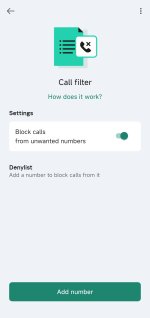
Kaspersky Plus also has this option, its called Call Filter.ESET's nuisance blocker has a whitelist mode (blocks all calls from numbers that are not in your address book), which is very useful at work, I am really fed up with the constant sales calls while I'm at work.

Apoca·lypse
Level 1
But I only see a blacklist mode in Call FilterKaspersky Plus also has this option, its called Call Filter.
Only Plus licenses have a whitelist mode?
Last edited by a moderator:
So far, eset has been very stable without any noticeable battery drain.
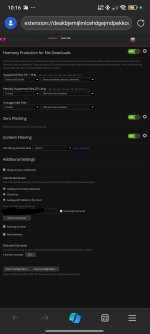
As far as OP's concern, it does cover these browsers:
 support.eset.com
As far as OP's concern, it does cover these browsers:
[KB6380] Enable anti-phishing in ESET mobile products for Android
support.eset.com

I installed RoboKiller last year to answer calls and block scams, works pretty well, but the renewal subscription price increased a lot, I paid it reluctantly as I like filtering calls.Kaspersky Plus also has this option, its called Call Filter.

Eset has pretty good pishing protection better then many brands including gen digital (Norton , avast ) but to be fair Kaspersky detects more pishing pages from what I have seen but since it's userbase got lower over time because of politics I would personally go for eset insteadSo far, eset has been very stable without any noticeable battery drain.
As far as OP's concern, it does cover these browsers:
[KB6380] Enable anti-phishing in ESET mobile products for Android
Btw I recommend using edge on Android since you can install extensions (got checkpoint, Symantec, bitdefender, ublock extensions)
It's actually legitimately pretty goodI am using Sophos InterceptX and it is free and effective.
I would say intercept x and Symantec mobile are the best free av software for Android as there is no bloat and very little resource usage
But some phones especially Chinese ones have multi av engine av pre installed (gen digital + Chinese engines ) so that's a good one too but in general if you install apps only from the play store and popular ones then you probably don't need an av and anything risky you can restrict it via work profiles , other means
Good DNS like quad9, DNSEU zero is the best thing a person can do to add pishing protection secondly there is some free av software like intercept X with phishing protection and edge can install third party extensions (bitdefender, Symantec , checkpoint is a great combo )What are your opinions?
Which one should I use on the phone?
For me, protection against phishing is important-so I would use one of them!
So you can definitely have as good pishing protection as PC users on your phone
Recently browsing
Members who viewed this thread in the last 5 minutes
You may also like...
-

-
 MalwareTips News Android October fixes arrive, but many phones will face delays
 -

-
-
