4.99/month....this is too much


Open MalwareTips from your Home Screen or desktop. Follow discussions, find answers and pick up where you left off.
If you cannot find an install option, update your browser or use its bookmark option to keep MalwareTips close.
After installation, open the app and sign in. Enable push notifications in Preferences if you want alerts. On iPhone and iPad, push requires a Home Screen web app and iOS or iPadOS 16.4 or later.
Sign in to manage notificationsInstallation is optional. Your notification settings stay under your control.
 Thread starter
Lord Ami
Thread starter
Lord Ami
4.99/month....this is too much

Well… they need the revenue.4.99/month....this is too much
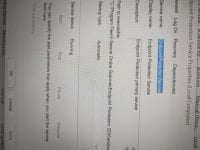
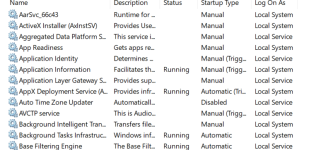
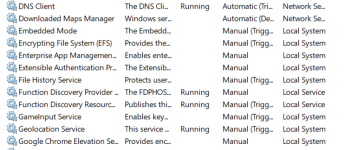
i am using both of them didnot find diffrenceSome screenshots. Seems like it's practically replaced with Avira? Scan was running, thus the high disk usage
Update: After running the scan, the scan summary gives
Version information
Scanning engines:
- Core: 2.0.1.8
- Detection: 8.3.70.44 (2024-10-16T00:00:00Z)
- EPP: 1.0.2410.4113
- ODS: 1.0.2410.1851
- Quarantine: 1.0.2410.1217
- Remediation: 1.0.2410.1677
- VDF: 8.20.38.124 (2024-11-12T14:15:25Z)


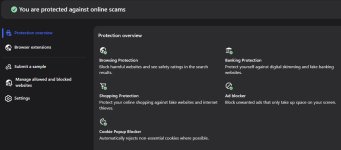
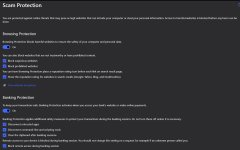
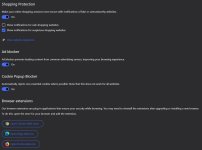
What can be done then, are they a lost cause, stick a fork in them they're done? And yet, a normal common sense user who isn't downloading the internet everyday could be very secure in using this AV, I know I would be. Especially in tandem with GlassWire free, which I used for the notifications and information, as the Firewall module is off, and wouldn't interfere with F-Secure's Firewall sensor.
An issue for me was the performance issue, system impact in opening apps, even Brave. Now if they could do something about that?
I don’t think it’s the antivirus scanner delaying this launch, could be the extensions, hooking, so on.I mentioned it above, and in another post or two regarding the F-Secure and Brave issue of in my case taking up to 5 seconds to load if not longer. It looks like I'm not alone.
Thanks for the reply, but it was more of a Windows 11 issue, seemingly, as on Windows 10 it loads very quickly, normally. And since I uninstalled it from my Windows 11 laptop, I can't follow-up with your good idea(s).I don’t think it’s the antivirus scanner delaying this launch, could be the extensions, hooking, so on.
When launching Brave, are there any processes that have a spike of CPU usage?
Have you tried adding the Brave folder as exclusion (just to check whether the issue is resolved), then removing it?
It is not a good idea adding any software that can be exposed to unsanitary content (browsers, players, document viewers) to exclusions.Thanks for the reply, but it was more of a Windows 11 issue, seemingly, as on Windows 10 it loads very quickly, normally. And since I uninstalled it from my Windows 11 laptop, I can't follow-up with your good idea(s).
On the forum, I replied that I didn't know if adding it into exclusions (permanently) was a good idea, but the OP said it helped.
This was posted by Ville. I'll uninstall Avast and give it a try, out of curiosities sakeI mentioned it above, and in another post or two regarding the F-Secure and Brave issue of in my case taking up to 5 seconds to load if not longer. It looks like I'm not alone.
 I'm still not hip to the idea of disabling a feature that's supposed to be helpful to possibly launch Brave quicker, but I'll also look to see if any processes spike as @Trident mentioned in post #187 above.
Try going into Device Protection settings and disabling "Use firewall sensor". See if that makes any difference.

Native ID Monitoring
Bug fixes
- Task bar button or task preview does not show window content when ID monitoring view is active
- Input field for verification code for phone number
- Spinner for operations that take long time
- Disable input fields when requests are running
- Improve strings
- Improved how new phonenumber verification code can be requested
Known issues:
- Main UI may crash when no network connection (PBL-15521)
- New item doesn't appear in the list of monitored emails in certain flow (PBL-15557)
- Disable Save button when there is no network connection (PBL-15532)
- Error code localizations (PBL-15580/PBL-15564)
- Special error dialog for VPN websites bypass UI when trying to add only top-level-domain (PBL-15548)
- Reset to default filter when current filter has no more items (PBL-15550)
- Fix for social media texts in IDM (PBL-15553)
- Performance improvement for phonenumber countrycode dropdown in IDM (PBL-15565)
- Some breaches were always shown as unseen/unread (PBL-15556)
- Added handling for missing breach types (PBL-15593)
- Main UI may require restart to show correct information about confirmed emails
A lot of fixes for this beta as well as the previous beta release. Not sure what's going on?
But still, nothing of true significance as far as I can tell. Will have to wait and see when the public release version is pushed out.

It's on my end and thanks for confirming.I just ran the scan on my McAfee laptop, and once I closed out of the successful scan, there are no Avira services or task manger processes running, even without a restart?
I just tried a restart, just in case it would load in services or show in task manager, but it didn't.It's on my end and thanks for confirming.
Maybe I'll try on another machine and see.
Could be a glitch with the Fsec Online Scanner.
Members who viewed this thread in the last 5 minutes