FAKE COM Surrogate in task manager (dllhost.exe*32)

Status
Not open for further replies.

JustinG

New Member
Thread author
Oct 22, 2014
9
0
3
39
I have had TwinHeadedEagle help this last week at this link: http://malwaretips.com/threads/fake...dont-even-have-google-chrome-installed.35660/

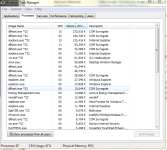
It worked to remove fake google chrome malware, but now I have in the task manager under processes tab, many "dllhost.exe.*32" with description "COM Surrogate" that is basically doing the same thing as the other one. I try and end their process, but they just keep coming back. I tried to download the zoek.exe, and even after I disabled my antivirus, it said my security settings wouldn't allow the download, so I can't run the scan!

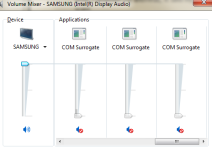
Help! Attached is what it looks like in my task manager and also, what it looks like in volume mixer.
 

Attachments

  • tm.PNG
    tm.PNG
    74.8 KB · Views: 68
  • vm.PNG
    vm.PNG
    31 KB · Views: 158
Hello,


FRST.gif
Scan with Farbar Recovery Scan Tool

Please download Farbar Recovery Scan Tool and save it to your desktop.

Note: You need to run the version compatibale with your system. If you are not sure which version applies to your system download both of them and try to run them.
Only one of them will run on your system, that will be the right version.


  • Double-click to run it. When the tool opens click Yes to disclaimer.
  • Press Scan button.
  • It will make a log (FRST.txt) in the same directory the tool is run. Please attach it to your reply.
  • The first time the tool is run, it makes also another log (Addition.txt). Please attach it to your reply.
 
I'm sorry. I don't understand. In Task Manager, it is still draining my memory and making my pc run super slow. I also see where many others on this site seem to be experiencing the same thing.

So what am I supposed to do? And what do you mean malware isn't active? Thanks.
 
Just tried to download TDSSKiller and I had a popup come up saying my current security settings won't allow me to download anything, this with my Norton temporarily deactivated. I know have 21 different processes now with the name dllhost.exe*32 and description COM Surrogate. It's getting worse. Appreciate your help. Thanks.
 
Just tried to download TDSSKiller and I had a popup come up saying my current security settings won't allow me to download anything, this with my Norton temporarily deactivated. I know have 21 different processes now with the name dllhost.exe*32 and description COM Surrogate. It's getting worse. Appreciate your help. Thanks.
 
Try to download TDSSKiller via other browser.


FRST.gif
Scan with Farbar Recovery Scan Tool

Please re-run Farbar Recovery Scan Tool to give me a fresh look at your system.
  • Right-click on
    FRST.gif
    icon and select
    RunAsAdmin.jpg
    Run as Administrator to start the tool.
    (XP users click run after receipt of Windows Security Warning - Open File).
  • Make sure that Addition option is checked.
  • Press Scan button and wait.
  • The tool will produce two logfiles on your desktop: FRST.txt and Addition.txt.
Please include their content into your next reply.
 
  • Like
Reactions: 12FMSV12
Try to download TDSSKiller via other browser.


FRST.gif
Scan with Farbar Recovery Scan Tool

Please re-run Farbar Recovery Scan Tool to give me a fresh look at your system.
  • Right-click on
    FRST.gif
    icon and select
    RunAsAdmin.jpg
    Run as Administrator to start the tool.
    (XP users click run after receipt of Windows Security Warning - Open File).
  • Make sure that Addition option is checked.
  • Press Scan button and wait.
  • The tool will produce two logfiles on your desktop: FRST.txt and Addition.txt.
Please include their content into your next reply.

Plz, i need to be sure if I have any malwere active. Can you chek it ? Thanks Very much, apreciatte alot your work !
 

Attachments

Status
Not open for further replies.