Accidentally opened fake Microsoft support page — can someone confirm whether it attempted malware execution?

Exist

New Member
Thread author
Aug 17, 2026
2
2
0
Germany
Hi,

I accidentally opened the following URL in Chrome:

<span>hxxps://yelunkerishbendurishugen<span data-placeholder-token="true">[.]</span>blob<span data-placeholder-token="true">[.]</span>core<span data-placeholder-token="true">[.]</span>windows<span data-placeholder-token="true">[.]</span>net/$web/index.html</span>

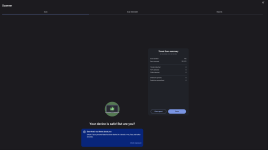
It immediately displayed a fake Microsoft/Windows security warning, went into a very aggressive full-screen style interface, showed fake Command Prompt / antivirus / network activity windows, and displayed a phone number claiming to be Microsoft Support.

I did not call the number, download or run anything, install anything, enter any credentials, or give anyone remote access. I only opened the page and then closed/killed Chrome.

I submitted the exact URL to urlscan.io. The scan showed:

  • 37 HTTP requests
  • 6 domains / 5 IPs
  • Microsoft Azure Blob Storage as the main host
  • Google Analytics / Google Tag Manager
  • Yandex.Metrika and Yandex cookie-sync requests
  • No urlscan classification at the time of scanning
  • JavaScript functions with names such as:
    • <span>startCMDAnimation</span>
    • <span>showVirusNotification</span>
    • <span>detectVirus</span>
    • <span>startAntivirusDetection</span>
    • <span>startNetworkMonitoring</span>
    • <span>startCPUMonitor</span>
    • <span>activateFullscreen</span>
    • <span>startBackgroundAudio</span>
Those functions make it look like the Windows warnings and “network attacks” are simulated by the webpage itself.

My main concern is whether simply loading this page could have attempted a drive-by exploit, malware download, browser exploit, or any code execution outside the browser, even though I did not interact with it beyond opening it.

Would someone experienced be willing to inspect the page / urlscan results and tell me whether it appears to be purely a tech-support/scareware scam, or whether there is any evidence of an actual exploit or malware payload?

I can provide the urlscan report/screenshots and HTTP/Behaviour/Indicators tabs if useful.

Thanks!
 
  • Like
Reactions: Khushal
Hi,

I accidentally opened the following URL in Chrome:

<span>hxxps://yelunkerishbendurishugen<span data-placeholder-token="true">[.]</span>blob<span data-placeholder-token="true">[.]</span>core<span data-placeholder-token="true">[.]</span>windows<span data-placeholder-token="true">[.]</span>net/$web/index.html</span>

It immediately displayed a fake Microsoft/Windows security warning, went into a very aggressive full-screen style interface, showed fake Command Prompt / antivirus / network activity windows, and displayed a phone number claiming to be Microsoft Support.

I did not call the number, download or run anything, install anything, enter any credentials, or give anyone remote access. I only opened the page and then closed/killed Chrome.

I submitted the exact URL to urlscan.io. The scan showed:

  • 37 HTTP requests
  • 6 domains / 5 IPs
  • Microsoft Azure Blob Storage as the main host
  • Google Analytics / Google Tag Manager
  • Yandex.Metrika and Yandex cookie-sync requests
  • No urlscan classification at the time of scanning
  • JavaScript functions with names such as:
    • <span>startCMDAnimation</span>
    • <span>showVirusNotification</span>
    • <span>detectVirus</span>
    • <span>startAntivirusDetection</span>
    • <span>startNetworkMonitoring</span>
    • <span>startCPUMonitor</span>
    • <span>activateFullscreen</span>
    • <span>startBackgroundAudio</span>
Those functions make it look like the Windows warnings and “network attacks” are simulated by the webpage itself.

My main concern is whether simply loading this page could have attempted a drive-by exploit, malware download, browser exploit, or any code execution outside the browser, even though I did not interact with it beyond opening it.

Would someone experienced be willing to inspect the page / urlscan results and tell me whether it appears to be purely a tech-support/scareware scam, or whether there is any evidence of an actual exploit or malware payload?

I can provide the urlscan report/screenshots and HTTP/Behaviour/Indicators tabs if useful.

Thanks!
Assessment

Based on your description, this strongly resembles a browser-based tech-support scam or scareware page. The fake Command Prompt, antivirus, network activity, “virus detected” messages, fullscreen behavior, and phone number are all commonly implemented with JavaScript and HTML to create panic. Function names such as showVirusNotification and activateFullscreen are consistent with simulated page behavior, but names alone do not prove exactly what the code did.

Hosting the page on Azure Blob Storage does not make it legitimate. Cloud storage is frequently abused for scam pages, although the hosting provider itself may be completely legitimate.

Could merely opening it have exploited the computer?

A web page can execute JavaScript inside Chrome simply by being loaded. However, under normal circumstances that code is confined by Chrome’s sandbox and cannot directly install programs, run Command Prompt, access arbitrary files, or control Windows.

For that to happen without downloading and running something, the page would generally need one of the following:

  • A currently unpatched Chrome or operating-system vulnerability
  • A successful exploit against the browser sandbox or another component
  • A download that was subsequently opened or executed
  • A browser extension or other installed software with a relevant vulnerability

Those possibilities cannot be ruled out with absolute certainty from a URL scan alone, but the behavior you described provides no specific evidence of a successful exploit. The JavaScript function names and simulated windows are not evidence of code execution outside the browser.

A page can also attempt downloads, exploit probes, notification abuse, clipboard actions, redirects, or browser-specific attacks without any of those attempts succeeding. A urlscan result may show network activity and page behavior, but it cannot prove that a local exploit did or did not succeed on your particular computer.

Recommended checks

Perform the following low-risk checks:

  1. Update Chrome through Chrome’s About page, then restart it.
  2. Check Chrome’s Downloads page and your normal Downloads folder for files created around the incident. Do not open or run anything unfamiliar.
  3. Review chrome://extensions/ and remove or disable extensions that you do not recognize.
  4. Review Chrome site permissions, particularly notifications, pop-ups, redirects, and downloads, and remove permissions for the site.
  5. Run a scan with Microsoft Defender, including an Offline scan if you want an additional check. A second scan from a reputable security product can also be useful, but multiple real-time antivirus products should not normally be installed together.
  6. Check Windows Security’s Protection history and Chrome’s Safety Check for alerts.
  7. If you entered no credentials, did not download or execute anything, and Chrome and Windows were up to date, the likelihood of compromise is generally low.

Do not call the displayed number. Microsoft does not use unsolicited browser pop-ups to provide an emergency support number.

About the urlscan evidence

The analytics and cookie-sync requests are privacy-relevant but are not, by themselves, evidence of malware. The listed JavaScript names suggest deliberate scareware presentation, but a reliable determination of whether the page contained exploit code would require examining the complete HTML, JavaScript, redirects, downloaded resources, and response headers. Even that would show attempted behavior rather than prove successful execution on your machine.

You can report the abusive page to Microsoft and Azure using their current abuse-reporting channels. If you later find an unknown file, extension, persistent redirect, Defender alert, or other suspicious change, preserve the relevant details and post the logs in the appropriate MalwareTips malware-removal section rather than running random cleanup tools.

Conclusion

From the information provided, this appears much more consistent with a scareware/tech-support scam than with evidence of a successful drive-by infection. Update and scan the system, verify that nothing was downloaded or installed, and treat any unexpected finding as a separate issue requiring further analysis.
 
Hello ..! Welcome to MalwareTips..! :) My name is icotonev and I'm here to help you remove malware ..!
Please follow the instructions in the following link:

 
  • Like
Reactions: Khushal