


The MalwareTips app
Your community, one tap away.
Open MalwareTips from your Home Screen or desktop. Follow discussions, find answers and pick up where you left off.
- Home Screen access
- Optional push alerts
- Your community
You're ready to explore.Explore what's new
Installation instructions
iPhone & iPad
- Open MalwareTips in Safari and tap Share. You may need to open the Page Menu first.
- Choose Add to Home Screen. If it is not listed, use Edit Actions to add it.
- Keep Open as Web App enabled if shown, then tap Add.
Android
- Open MalwareTips in Chrome or another browser that supports app installation.
- Open the browser menu and look for Install app, Install and create shortcut, or Add to Home screen.
- Choose Install and confirm. Wording varies by browser.
Desktop
- Chrome: use the install icon in the address bar, or the menu under Cast, save and share.
- Edge: open the menu, then More tools, Apps and Install this site as an app.
- Safari on Mac: choose Share or File, then Add to Dock. Firefox on Windows: look for the web apps button in the address bar.
If you cannot find an install option, update your browser or use its bookmark option to keep MalwareTips close.
Keep up with your conversations
After installation, open the app and sign in. Enable push notifications in Preferences if you want alerts. On iPhone and iPad, push requires a Home Screen web app and iOS or iPadOS 16.4 or later.
Sign in to manage notificationsInstallation is optional. Your notification settings stay under your control.
You are using an out of date browser. It may not display this or other websites correctly.
You should upgrade or use an alternative browser.
You should upgrade or use an alternative browser.
New Update Firefox Stable Release
- Thread starter silversurfer
- Start date
Firefox
614 Replies
138,480 Views
Firefox 150.0.3 will be ready later today via internal updater...
 www.firefox.com
Firefox
www.firefox.com
- Fixed an issue where characters entered into password fields could appear unmasked in print preview and printed pages.
- Various security fixes.

Regarding GPU drivers, to anyone that doesn't game and has NVIDIA graphics card, I'd recommend using Studio version of the drivers.
These are the most stable and thorougly tested ones and are released once they are proved to be reliable. I myself use them on my Lenovo Legion and never faced any problems.
These are the most stable and thorougly tested ones and are released once they are proved to be reliable. I myself use them on my Lenovo Legion and never faced any problems.

Did you use Windows Update to install the correct driver, or did you install it from the Nvidia website?Regarding GPU drivers, to anyone that doesn't game and has NVIDIA graphics card, I'd recommend using Studio version of the drivers.
These are the most stable and thorougly tested ones and are released once they are proved to be reliable. I myself use them on my Lenovo Legion and never faced any problems.
Installed it from NVIDIA website. This is the safest method. I had a lot of problems with drivers obtained through Windows Update so I avoid them unless it's necessary.Did you use Windows Update to install the correct driver, or did you install it from the Nvidia website?
Firefox 151.0 released:
www.firefox.com
Firefox
www.firefox.com
- Firefox Home (New Tab) has a fresh, new look and feel. The layout and design will enable upcoming features, from widgets to shortcuts improvements, launching between 151 and 152. Included are some new and exciting Wallpapers, such as the one below. Use the pencil icon in the lower right to check them out.
- Private Browsing Mode now allows you to instantly clear all data from your current session without closing the entire window. When you select the End Private Session button (the fire icon) to the right of the URL bar, Firefox will ask you to confirm to clear your session. Once confirmed, it will wipe all of your private browsing data and open a fresh new Private Browsing Mode session for you.
- Firefox now strengthens protection against fingerprinting in Standard Enhanced Tracking Protection, making it harder for websites to track you across sites by limiting the amount of information revealed about your device and browser. This reduces the number of users uniquely identifiable by common fingerprinting techniques by an average of ~14%, and by ~49% on macOS.
Firefox 151.0.1 released, hot fix...
www.firefox.com
- Fixed a crash experienced by users with Intel Raptor Lake CPUs. (Bug 1950764)
- Fixed an issue on Windows where some websites using WebSerial to flash device firmware could fail unexpectedly. (Bug 2040754)
Firefox
www.firefox.com
Firefox 151.0.2 released:
www.firefox.com
- Fixed an issue on macOS where smart cards and security keys could fail to load certificates automatically. (Bug 2041208)
- Fixed an issue where adding another tab to an existing Split View could unexpectedly close it. (Bug 2039795)
- Fixed an issue where Split View would close instead of switching tabs when using the "Switch to Tab" option from the address bar. (Bug 2039787)
- Fixed a crash on Windows that occurred when using the Sogou input method to type Simplified Chinese. (Bug 2039203)
- Fixed an issue where Firefox stopped caching new content once the disk cache was full, causing pages and resources to be re-downloaded from the network on every visit. (Bug 2031577)
- Fixed an issue where some websites could render incorrectly or fail to load when they used JavaScript to insert WebKit-specific style rules. (Bug 2040693)
- Fixed an issue where clicking and selecting text in some input fields and text areas did not work on pages that styled them with certain CSS rules. (Bug 2039504)
- Fixed an issue where the up and down buttons on number input fields could overlap and hide the value when sites sized the field to fit its contents. (Bug 2039315)
- Fixed an issue where sorting strings that include numbers could produce an incorrect order on some websites and web applications. (Bug 2027078)
- Fixed an issue where dropdown menus would not open for <select> elements created inside an iframe and then moved into the parent page. (Bug 2041720)
Firefox
www.firefox.com
Firefox 151.0.3 official release later today
www.firefox.com
Firefox
www.firefox.com
- Fixed an issue where selecting or pasting text in a text field inside a table cell could disrupt the page layout.
- Fixed an issue where the VPN toolbar button icon could appear larger than intended.
Firefox 151.0.4 as planned update coming soon today
www.firefox.com
Firefox
www.firefox.com
- Fixed an issue on Windows where Firefox could become unresponsive when using the back and forward buttons. (Bug 2039866)
- Fixed an issue where Firefox could fall back to software rendering on some older GPUs, reducing graphics performance. (Bug 2043249)
- Fixed a crash on Windows that could occur when Firefox interacted with accessibility services. (Bug 204330)
- Fixed an issue where some text input fields could incorrectly show a resize handle. (Bug 2044051)
Last edited:

Firefox widgets → Client Challenge

Not available here yetFirefox widgets → Client Challenge

Yes, but probably still not available in my country.
No, I don't have such new features there yet:
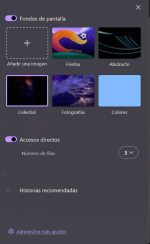
I don't think it is available in all regions. I used to enable the weather feature via
about:config since it was not enabled by default, but after Firefox 151 was released, I can no longer get it to work.
Ok, to get those features You have to enable: Allow Firefox to improve features, performance, and stability between updates. Changes will be applied remotely.
Enabling this I got Widgets management and new VPN Feature, BUT still I get a warning saying Weather data not available at this moment:
And about VPN, I can connect but not surf, not resolving connection...
Also , maybe this  ?
?
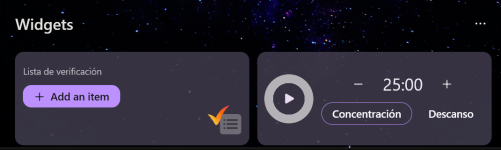
FF → Settings → Firefox Labs → Productivity
" Keep your to-do list top-of-mind when you open a new tab. From packing lists to shopping lists, make your plans in Firefox.
Set a timer to keep you focused, nudge you to stay on track, or remind you to recharge "
?FF → Settings → Firefox Labs → Productivity
" Keep your to-do list top-of-mind when you open a new tab. From packing lists to shopping lists, make your plans in Firefox.
Set a timer to keep you focused, nudge you to stay on track, or remind you to recharge "
Ok, I got these 2 Widgets, but even Having Weather enabled, now I can't see it here :
Only 3 available:
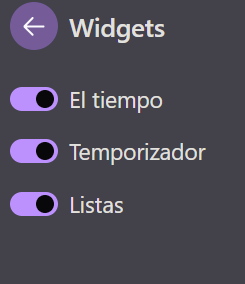
:Only 3 available:
Last edited:
Recently browsing
Members who viewed this thread in the last 5 minutes
You may also like...
-

-

-

-
-
 New Update Microsoft KB5129195 Out-of-band