

The MalwareTips app
Your community, one tap away.
Open MalwareTips from your Home Screen or desktop. Follow discussions, find answers and pick up where you left off.
- Home Screen access
- Optional push alerts
- Your community
You're ready to explore.Explore what's new
Installation instructions
iPhone & iPad
- Open MalwareTips in Safari and tap Share. You may need to open the Page Menu first.
- Choose Add to Home Screen. If it is not listed, use Edit Actions to add it.
- Keep Open as Web App enabled if shown, then tap Add.
Android
- Open MalwareTips in Chrome or another browser that supports app installation.
- Open the browser menu and look for Install app, Install and create shortcut, or Add to Home screen.
- Choose Install and confirm. Wording varies by browser.
Desktop
- Chrome: use the install icon in the address bar, or the menu under Cast, save and share.
- Edge: open the menu, then More tools, Apps and Install this site as an app.
- Safari on Mac: choose Share or File, then Add to Dock. Firefox on Windows: look for the web apps button in the address bar.
If you cannot find an install option, update your browser or use its bookmark option to keep MalwareTips close.
Keep up with your conversations
After installation, open the app and sign in. Enable push notifications in Preferences if you want alerts. On iPhone and iPad, push requires a Home Screen web app and iOS or iPadOS 16.4 or later.
Sign in to manage notificationsInstallation is optional. Your notification settings stay under your control.
You are using an out of date browser. It may not display this or other websites correctly.
You should upgrade or use an alternative browser.
You should upgrade or use an alternative browser.
Software Review G DATA Total Security 2022
-
 Thread starter
L0ckJaw
Thread starter
L0ckJaw
- Start date
- 113 Replies
- 31,196 Views
Reviews reflect the reviewer's setup and methods. Check the evidence and limitations.
Thread details
- Product name
- G DATA Total Security 2022
- Installation (rating)
- 5.00 star(s)
- User interface (rating)
- 4.00 star(s)
- Accessibility notes
- Simple and red. All the options are nicely accessible thru tabs.
- Performance (rating)
- 5.00 star(s)
- Core protection (rating)
- 5.00 star(s)
- Proactive protection (rating)
- 5.00 star(s)
- Protection notes
- It uses the Bitdefender engine and in-house engine and the protection is really good. Every malware sample or phishing website is blocked.
The behavior blocker is one of the best I have ever used.
- Browser protection (rating)
- 5.00 star(s)
- Positives
- Many features
- Low impact on system resources
- Highly configurable
- Easy to use
- Simple and non-intrusive
- Ransomware protection
- Strong and reliable protection
- Detects or blocks in-the-wild malware
- Consistently high test scores
- Accurate results and reliable antivirus engine
- Effective malicious URL blocking
- Virus signatures are updated daily
- Excellent scores in independent tests
- Great value for money
- Effective malware removal
- Clear, easy-to-use interface
- Multiple layers of protection
- Negatives
- Advanced users may want more control
- Time spent using product
- Computer specs
- HP mini tower
i3 ( 2015 )
Nvidia
10GB RAM
250GB Samsung Evo SSD
- Recommended for
- All types of users
- Inexperienced users
- Experienced users
- Multi-user devices
- Financial banking or trading
- High-end or medium spec PCs
- Low spec PCs
- All types of users
- Overall rating
- 5.00 star(s)

Shadowra
Level 42
Verified
Top Poster
Content Creator
Malware Tester
Well-known
High Reputation
Forum Veteran
Past in the time G-Data computer scan was slow as snail. How is it nowadays?
The analysis is fast, but not the removal...
The analysis is fast, but not the removal...
Now when you say it, it might be true that I didn't remember correctly and the actual problem was the removal/actions after scan speed. There isn't any improvements with that?
Shadowra
Level 42
Verified
Top Poster
Content Creator
Malware Tester
Well-known
High Reputation
Forum Veteran
Now when you say it, it might be true that I didn't remember correctly and the actual problem was the removal/actions after scan speed. There isn't any improvements with that?
No, it's been a long time since I've encountered this slowness in deletion...
It's the slowest I've seen from any antivirus. But it wouldn't be an issue if you were only removing a few threats.No, it's been a long time since I've encountered this slowness in deletion...

The reason is what happens in the removal process is that, even though we select "delete" as the recommended option G data first tries to "dis infect" that file if fails -> Delete. If this check occurs on huge pack, then as expected process time would be long.
As of date, i see no trick to bypass this default "dis infect" action.
As of date, i see no trick to bypass this default "dis infect" action.
Last edited:

just grabbed the g-data trial (antivirus only, not the total) on my test VM, installed ok, kind of annoying it needed to update the program after id just installed it by a supposed web installer... and then it had restart apps/service, then 2 minutes later said it needed a windows restart...
anyway, extracted from zip 1800 samples from the past 8-10 days to downloads folder.... it did nothing, didnt spot anything by itself.. (i wasnt running malware, just extract to static folder for static scan)
but then manually ran a scan on the folder, and sure enough it picked up a lot 1712 of the samples, missing 80 or so
i clicked on execute actions to quarantine.... and it just sat there for an hour, doing nothing, restarted machine, same again, it detects and finds the items quick,. but cannot remove them.
I then rebooted again and attempted to uninstall... up popped a website "gdata has been uninstalled", minimized and in the background was this.....
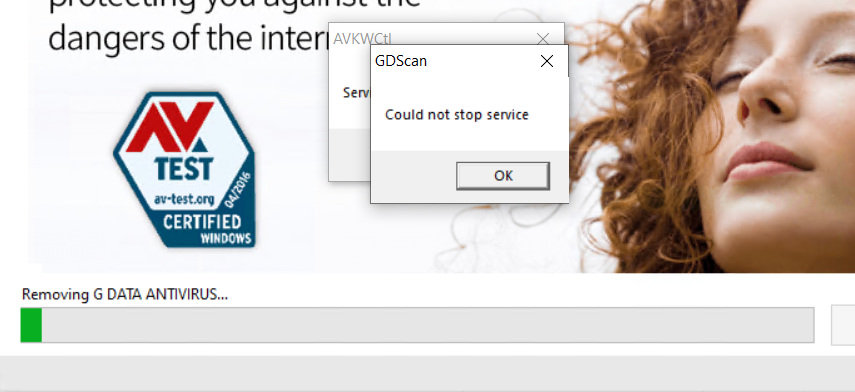
seems pretty slow & buggy.
luckily I just reverted to fresh checkpoint on VM, but if this was a live machine, it could cause someone issues
past few days have tried out sophos/kav/bd/wd/f-secure safe and so far g-data is the only fail (maybe just bugs)
anyway, extracted from zip 1800 samples from the past 8-10 days to downloads folder.... it did nothing, didnt spot anything by itself.. (i wasnt running malware, just extract to static folder for static scan)
but then manually ran a scan on the folder, and sure enough it picked up a lot 1712 of the samples, missing 80 or so
i clicked on execute actions to quarantine.... and it just sat there for an hour, doing nothing, restarted machine, same again, it detects and finds the items quick,. but cannot remove them.
I then rebooted again and attempted to uninstall... up popped a website "gdata has been uninstalled", minimized and in the background was this.....
seems pretty slow & buggy.
luckily I just reverted to fresh checkpoint on VM, but if this was a live machine, it could cause someone issues
past few days have tried out sophos/kav/bd/wd/f-secure safe and so far g-data is the only fail (maybe just bugs)
Last edited:

Seems like something with your system. I test like crazy and all is welljust grabbed the g-data trial (antivirus only, not the total) on my test VM, installed ok, kind of annoying it needed to update the program after id just installed it by a supposed web installer... and then it had restart apps/service, then 2 minutes later said it needed a windows restart...
anyway, extracted from zip 1800 samples from the past 8-10 days to downloads folder.... it did nothing, didnt spot anything by itself.. (i wasnt running malware, just extract to static folder for static scan)
but then manually ran a scan on the folder, and sure enough it picked up a lot 1712 of the samples, missing 80 or so
i clicked on execute actions to quarantine.... and it just sat there for an hour, doing nothing, restarted machine, same again, it detects and finds the items quick,. but cannot remove them.
I then rebooted again and attempted to uninstall... up popped a website "gdata has been uninstalled", minimized and in the background was this.....
seems pretty slow & buggy.
luckily I just reverted to fresh checkpoint on VM, but if this was a live machine, it could cause someone issues
past few days have tried out sophos/kav/bd/wd/f-secure safe and so far g-data is the only fail (maybe just bugs)
nothing with the system, clean updated win10 VM in a HV production checkpoints used to restore back between each product....Seems like something with your system. I test like crazy and all is well
just been doing the same with EmsiSoft, thats also a great solution!
G-Data is just buggy and slow (well more than slow, it failed to remove static samples thats it did correctly identify, and failed to uninstall correctly)
Glad works for you and you are happy with it
Are you the same person as Lothar ?nothing with the system, clean updated win10 VM in a HV production checkpoints used to restore back between each product....
just been doing the same with EmsiSoft, thats also a great solution!
G-Data is just buggy and slow sorry
Bashing is your hobby ?
lol who is lothar?Are you the same person as Lothar ?
Bashing is your hobby ?
I wouldn't go praising something that doesn't work, if your happy with it good! glad it works. Im not "bashing" it either, I just gave it a bsaic test in the same way ive tested a few others in the past few days, the only one to fail has been g-data, thats not a bash, its just what happened, maybe i needed to leave it longer than 1 hour to do something?
Pls get rid of your x86 system and buy something new. You are funnylol who is lothar?
I wouldn't go praising something that doesn't work, if your happy with it good! glad it works. Im not "bashing" it either, I just gave it a bsaic test in the same way ive tested a few others in the past few days, the only one to fail has been g-data, thats not a bash, its just what happened, maybe i needed to leave it longer than 1 hour to do something?
Pls get rid of your x86 system and buy something new. You are funny
 I heard google tried G-data on their quantumcomputer.... took it 128 years to complete a clean
But seriously no need to get so overly defensive about a product, thats fanboy behaviour.... Im glad it works for you
im not the one being overly protective and childish, I just tried the product in a VM doing the same tests ive done in the past few days with exactly the same configuration and G-data stalled when it came to trying to remove, possibly it was too high a count of samples in reality 1800 is a lot for it to process) (but none of the others failed)
Its obviously a good product as it has users out there and it gets great VB tests...G-data have been around for years... It just wouldnt be my choice after that test, its not a BASH, happy it works for you, and keeps you protected.
Its obviously a good product as it has users out there and it gets great VB tests...G-data have been around for years... It just wouldnt be my choice after that test, its not a BASH, happy it works for you, and keeps you protected.


I haven't used G Data for quite some time, so I decided to try it again to see if the speed of quarantining files has improved. The version of G Data installed on my test PC was over a year old and when I checked for product updates, it said there were none. I downloaded the web installer, and it download and installed v25.5.11.316 from July of 2021. When I launched G Data after the upgrade, it found a newer version, but refused to install it because I'm running and old build of Windows 10.The new update from yesterday made the removal fast. They are improving the product everytime
It's a shame that old version of January of 2021 did not find any product updates. Right now I can't upgrade to a newer build of Windows due to there not being enough free disk space. I will resize some partitions to free up space and try again and then see if I can update G Data. I've got nearly 40 other antiviruses installed on the same computer and none of them have issues with running on outdated Windows 10 builds.
Last edited:
I haven't used G Data for quite some time, so I decided to try it again to see if the speed of quarantining files has improved. The version of G Data installed on my test PC was over a year old and when I checked for product updates, it said there were none. I downloaded the web installer, and it download and installed v25.5.11.316 from July of 2021. When I launched G Data after the upgrade, it found a newer version, but refused to install it because I'm running and old build of Windows 10.
It's a shame that old version of January of 2021 did not find any product updates. Right now I can't upgrade to a newer build of Windows due to there not being enough free disk space. I will resize some partitions to free up space and try again and then see if I can update G Data. I've got nearly 40 other antiviruses installed on the same computer and none of them have issues with running on outdated Windows 10 builds.
use this tool after uninstalling GData and reinstall after a reboot again
Thanks. I'm resizing my G Data partition right now and am then going to try to upgrade Windows and then update from within G Data. If that fails I'll uninstall and reinstall.
use this tool after uninstalling GData and reinstall after a reboot again
Recently browsing
Members who viewed this thread in the last 5 minutes


