Malware News GenDigital found a custom Windows backdoor on a single corporate workstation while hunting for unusual WMI persistence.

Khushal

Level 16
Thread author
Verified
Top Poster
Well-known
Apr 4, 2024
692
5,145
1,469
The malware was small, had a limited command set and disguised itself as legitimate Realtek software. Its most unusual feature was its configuration: the address of its command-and-control server was not stored as readable text or encrypted data, but encoded in the number of spaces on each line of a Windows `desktop.ini` file. To a user, and to many automated inspection systems, the file would appear almost empty. To the malware, those spaces spelled out its server address. We found no evidence connecting the backdoor to a known threat actor, and the original infection happened before our protection was installed. However, the implant's custom design, its deployment on only one observed machine and the absence of related samples suggest that this may have been a deliberately targeted operation rather than a failed mass campaign.


An event subscription named "Realtek"​

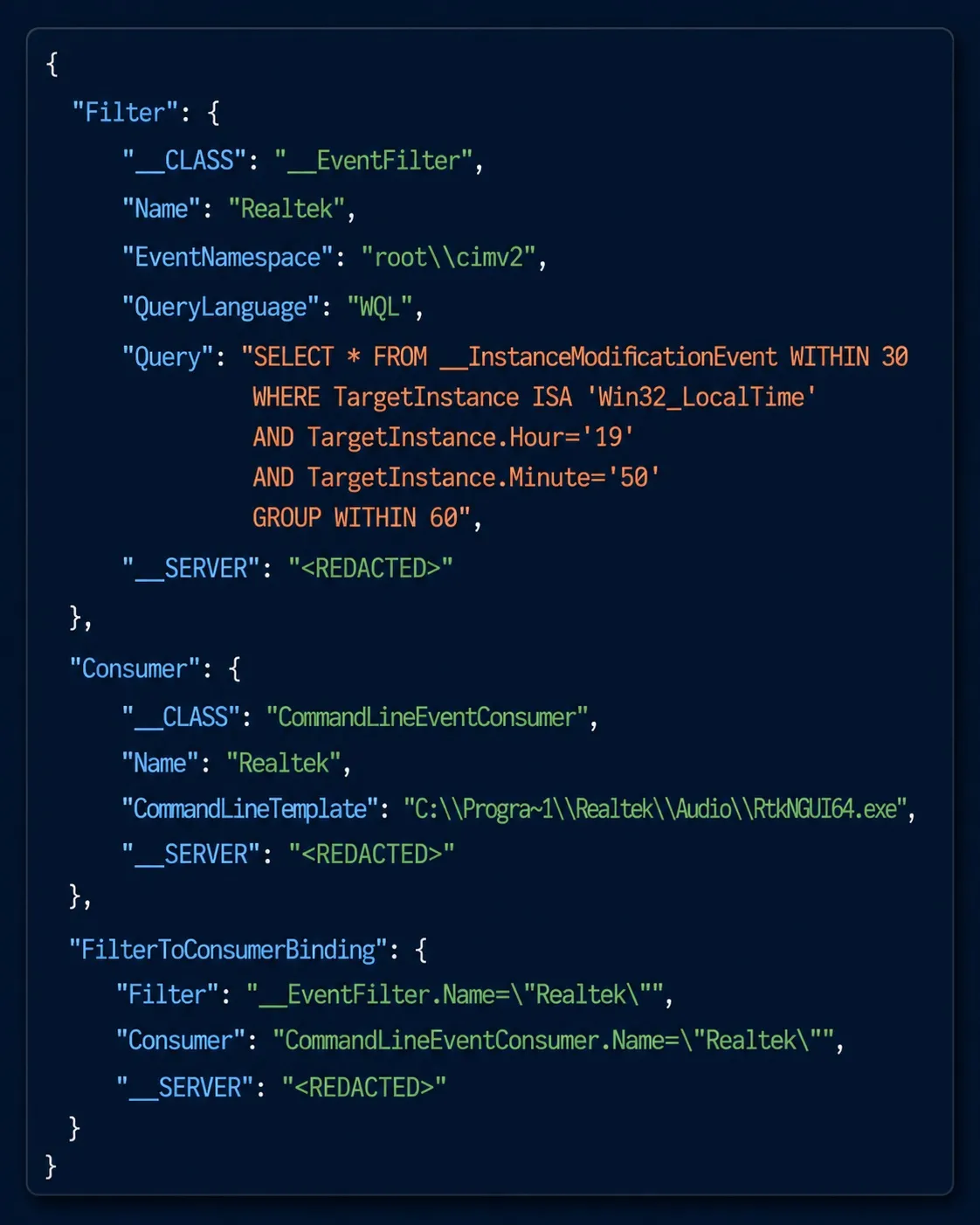
Most malicious WMI subscriptions are easy to spot because the query asks for something no administrator would. This one asked for something an administrator plausibly might, at a very specific time.

Our behavioural engine dumped the subscription it objected to. This is our own export of the WMI objects rather than a file the attacker left on disk, with the host name redacted:

1786807982909.png


This is a notable example of a targeted backdoor using several layers of concealment rather than advanced capabilities.

Important indicators from the report

  • A WMI permanent event subscription named “Realtek,” designed to resemble legitimate hardware-related software.
  • A narrowly timed event query, making the activity appear more plausible than an obviously malicious trigger.
  • A Windows desktop.ini file used to encode the command-and-control address through the number of spaces on each line.
  • A limited command set and deployment observed on only one machine.

The whitespace technique is especially relevant because ordinary text inspection may show the file as empty or uninteresting. Detection should therefore consider file metadata and exact byte content, not only visible characters. Unexpected trailing spaces, unusual desktop.ini locations, and recently modified files associated with WMI activity would justify further investigation.

Recommended defensive checks

  • Review permanent WMI subscriptions, including __EventFilter, CommandLineEventConsumer, and __FilterToConsumerBinding objects.
  • Check whether any WMI objects, services, scheduled tasks, or executables use names resembling Realtek or other installed vendors without matching legitimate installation paths and signatures.
  • Preserve suspicious desktop.ini files before editing or deleting them, since whitespace may contain the relevant evidence.
  • Scan the system with reputable security software and submit suspicious files or hashes to VirusTotal for additional analysis.
  • Review historical process, WMI, DNS, and network telemetry for the affected period.

The report does not establish attribution or prove that every similarly named Realtek component is malicious. A name match alone is insufficient; the file’s signature, path, parent process, WMI registration, and behavior should be evaluated together.
 
  • Like
Reactions: Divine_Barakah
Again this proves my point. Even if you were attacked by a advanced hacker would you even be able to tell? 12kb file? That is so small and hidden in a common .ini file.

No one could of detected this besides very few people would suspect or know, I'd suggest this workstation was reported or forwarded to GenDigital for a scan or analysis because it was suspected infected by the owned. I doubt Norton or any AV picked this up without any further analysis.