
Hard_Configurator - Windows Hardening Configurator

I'll add KVRT didn't load at first when run by SS. It came up with plugin/service error (I forget what was wrong should of saved screenshot). But KVRT refused to work.

So I downloaded a second copy to be sure. I imagine who ever or what ever did not want me to run KVRT, they needed time to remove what ever is on my box.

Weird. Very Weird. :unsure::unsure::unsure: Maybe I'm just paranoid :oops::rolleyes::sneaky:
 
KVRT didn't load at first when run by SS. It came up with plugin/service error (I forget what was wrong...). But KVRT refused to work.

So I downloaded a second copy to be sure. I imagine who ever or what ever did not want me to run KVRT, they needed time to remove what ever is on my box.
Did you check the first download against VT? Did you check or look at the details of the signing certificate? Just curious🦝
 
Hello Andy,


I'm having a problem and wanted to make sure H_C isn't the cause... I've excluded everything, but the problem persists...

In order to open Adobe Acrobat Reader...

See screenshots attached below:
Acrobat_lakw6vzRt7.png


Acrobat_E0LV58pSjN.png

ConfigureDefender_x64_Dfy6fPmcZ1.png

firefox_jtd766QQgl.png


In Firewall Hardening, I disabled the rule; in Configure Defender, I set it to Audit... etc.

But it doesn't work—as soon as I harden the preferences in Adobe, it won't open the app in protected mode...


Could it be Privacy_sexy, perhaps?
Safing Portmaster is off the hook...


Thanks!!
 
Last edited:
Hello and thank you for the wonderful app. One question though. I can't make it work with Keepass 2.6.1 (password manager). Keepass is in portable installation on a secondary disk. If the default deny switch is on, the Hard Configurator won't allow it to execute. Trying the "Smart Screen" way won't work either, because smart screen doesn't recognize it. Tried to put it to autorun with Windows. Same thing, won't load. The only way to make it work, is to disable manually the default deny protection, run it and then enable it again. Or is there another way that I miss? Thanks.
 
Hello and thank you for the wonderful app. One question though. I can't make it work with Keepass 2.6.1 (password manager). Keepass is in portable installation on a secondary disk. If the default deny switch is on, the Hard Configurator won't allow it to execute. Trying the "Smart Screen" way won't work either, because smart screen doesn't recognize it. Tried to put it to autorun with Windows. Same thing, won't load. The only way to make it work, is to disable manually the default deny protection, run it and then enable it again. Or is there another way that I miss? Thanks.

I used H_C in the Recommended Settings and downloaded KeePass from Softpedia:
Installation was done without a problem via "Install By SmartScreen". The application was installed in Program Files, and an application shortcut was added to the Desktop. I can run KeePass via this shortcut.

What do you mean by: "Trying the "Smart Screen" way won't work either, because smart screen doesn't recognize it." ? Could you post more detailed information?
 
I used H_C in the Recommended Settings and downloaded KeePass from Softpedia:
Installation was done without a problem via "Install By SmartScreen". The application was installed in Program Files, and an application shortcut was added to the Desktop. I can run KeePass via this shortcut.

What do you mean by: "Trying the "Smart Screen" way won't work either, because smart screen doesn't recognize it." ? Could you post more detailed information?

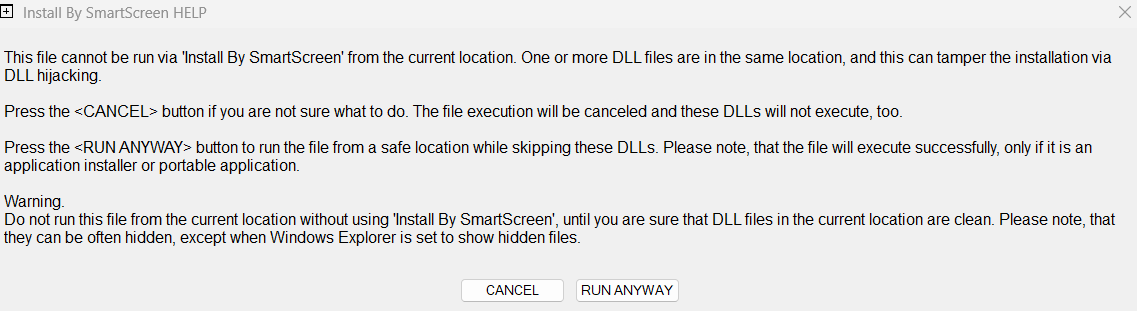
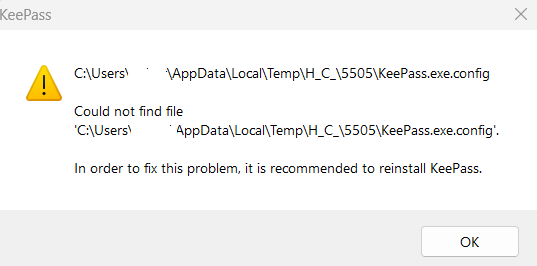
Ah, from what I understand, you used the installer. I use the portable version from here: Downloads - KeePass And I unzip it in another disk (ex. D:). In this case, it's blocked by HC Configurator. If I right click on the executable and try to install via the Smartscreen contect menu, I get a warning. See attachments. But anyway, I might install it with the installer on C: at this point. I preferred to keep it on another disk as portable, so that when I format, I don't forget to save the password database first. But I can live with that.Thanks for the time and help! Great app!
 
Last edited:
  • Like
Reactions: Andy Ful
I use the portable version from here: Downloads - KeePass And I unzip it in another disk (ex. D:). In this case, it's blocked by HC Configurator. If I right click on the executable and try to install via the Smartscreen contect menu, I get a warning.

You cannot run applications in this way. The simplest solution is whitelisting the application folder or whitelisting only *.exe files in this folder.(y)