New Update Hawk Eye Website Analysis Showcase

You mean this? ;) :) I uninstalled the other version then installed the new update. Is that how we should do it, or can they be installed on top of each other?

View attachment 293222
Yeah. After last night the entire stack (bloom list, local heuristics, cloud verdict and so on) had to be rearrange to add the 4 protection levels. This caused the AI and all other verdct to be overridden by the low quality host warning. It was resolved today so all verdicts are back
 
Yeah. After last night the entire stack (bloom list, local heuristics, cloud verdict and so on) had to be rearrange to add the 4 protection levels. This caused the AI and all other verdct to be overridden by the low quality host warning. It was resolved today so all verdicts are back
So at this time, it's better to uninstall and reinstall the, a clean update version. No problem, as it goes quickly :)
 
The number of times I reloaded the extension 🤣🤣🤣
@Trident, but re-clarification: IIRC firefox version is not ready for prime time yet, correct? right now it's Chrome & its affiliates. But this fedora does have ungoogled chromium, your extension be good for it?
 
  • Like
Reactions: Trident
@Trident, but re-clarification: IIRC firefox version is not ready for prime time yet, correct? right now it's Chrome & its affiliates. But this fedora does have ungoogled chromium, your extension be good for it?
It will work on Chrome/Chromium under any platform, including Chrome OS, Mac and Linux. Firefox version requires very minor adaptations. Next will be Safari on Mac…
 
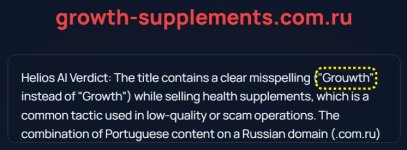
PhishTank -- https://growth-supplements.com.ru/
372.jpg
 
Last edited:
custom tuned spell-check!? :)
Not all of the blocks are spell-check, it happened on this domain that there is misspelling, for most of the websites this is not the case nowadays. They use AI now to compose the texts. It was particularly good at identifying scam stores as well based on their layout.

Because I’ve fed it a good bunch of them.

But from programmatic point of view, implementing a check for grouth vs growth will require a dictionary (with thousands of words) and will need to compare every word from the title against words in close proximity (meaning it will probably have to use minhash and other hashing techniques) and then calculate the Levenshtein distance between the hashes. It will be a whole thing to implement it.
AI makes it way easier and more accurate, and it understands the context too.

Furthermore, the heavy lifting is all on the cloud. What would take over a thousand loops, takes 4-5 operations in total.

So it is a big win.
 
Last edited:
"Grouwth"
Grouwth vs growth, the Levenshtein distance is 2… so programatically without AI, detecting Levenshtein distance of 2 is a nightmare. Even with 1, dumb Levenshtein-based blocker will believe Mike (mike-blogs.com) could be an impersonation attempt of Nike (where distance is only 1).

It’s one of these things that at first sight look rudimentary and child play to implement, but when you apply it in practice, it is a disaster and you quickly gotta kill it.
 
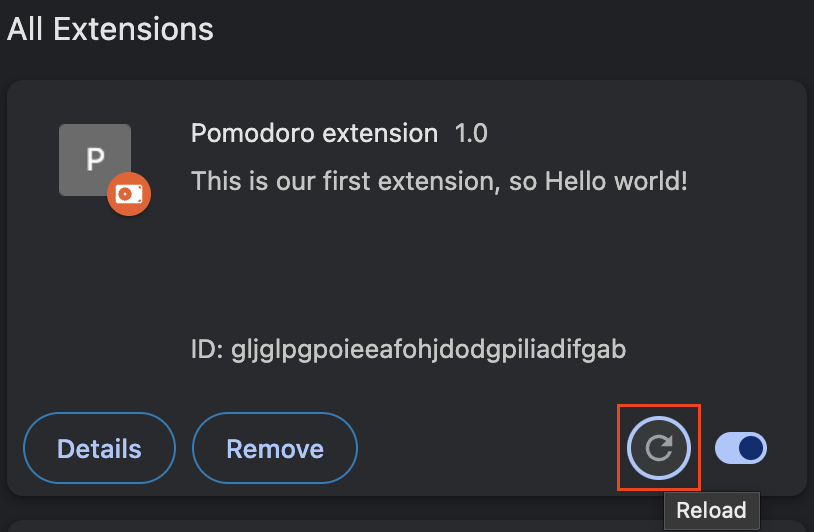
New version pushed and it is a big update. Because there is a change in manifest.json, after replacing the files you must click "reload". Turning the extension on and off won't work.

Redefined download protection: download protection previously suffered a problem many extensions historically have suffered - direct download link.
This resulted in the malicious file being written. Safety Net now intercepts these downloads.

1763869675604.png
1763869704316.png
1763869757171.png


Improved stability and speed of blocks, thanks to @EASTER for error conditions report.

 
after replacing the files you must click "reload".
Could you please explain this a bit more? How do we replace the files? Download the new version to the folder where the older version is and then delete the old version? And I can't find any option or button that says "reload". Thanks Trident.
 
Could you please explain this a bit more? How do we replace the files? Download the new version to the folder where the older version is and then delete the old version? And I can't find any option or button that says "reload". Thanks Trident.
The easiest way is, replace the folder with the new one.

Then go extensions, you should see a button like this

Step-by-Step Guide to Chrome Extension Development


Used to be an arrow, now it’s just text (reload).

The new version will load, all settings and reports are preserved.