
Imeant the site is not back. Thank you for your concern.i have directly confirmed with two ordinary ppl in parts of iran that their internet is restored - if it's not back for you it means then it's probably not yet restored for everyone.


Open MalwareTips from your Home Screen or desktop. Follow discussions, find answers and pick up where you left off.
If you cannot find an install option, update your browser or use its bookmark option to keep MalwareTips close.
After installation, open the app and sign in. Enable push notifications in Preferences if you want alerts. On iPhone and iPad, push requires a Home Screen web app and iOS or iPadOS 16.4 or later.
Sign in to manage notificationsInstallation is optional. Your notification settings stay under your control.
Imeant the site is not back. Thank you for your concern.i have directly confirmed with two ordinary ppl in parts of iran that their internet is restored - if it's not back for you it means then it's probably not yet restored for everyone.

Good to know. Ty!The following is the info i got when conversing with him some days ago:
On Wed, Jun 18, 2025 at 3:11 P<xxxxxxxxxxx> wrote:
So the fact that the site is down should be due to the goverment shutdown.
HiBit Uninstaller 3.2.70 (2025-08-24)
Improved speed and accuracy of advanced cleaner in the Junk Files Cleaner tool.
Improved cleaning of Chromium-based browser cache in the Junk Files Cleaner tool.
Improved leftovers search algorithm.
Fixed minor bugs.

I have recently tested number of uninstallers (BCUninstaller, HiBit Uninstaller, Revo Free, Soft Organizer) and based on the results, I found that Revo Free and Soft Organizer founds more leftovers related to the deleted software, but if you use the HiBit Uninstaller Registry Cleaner it will found everything it missed in the uninstallation process.IMHO the best uninstaller I've used, could teach the paid or free Revo a thing or two.
HiBit Uninstaller Changelog
-------------------------------------
HiBit Uninstaller 4.0.10 (2026-02-10)
Added a File & Registry Finder tool.
Added a Duplicate File Finder tool.
Added a Disk Analyzer tool.
Added Connection Manager tool.
Added tree view for leftovers search results.
Added support for custom folders in the Empty Folder Cleaner and Shortcuts Cleaner tools.
Added a donation feature to support our work.
Redesigned and added new features to the Process Manager tool.
Improved the performance of Installation Monitoring.
Improved the Windows Store Apps Manager performance.
Improved the speed and accuracy of the Junk Files Cleaner tool.
Improved the leftovers search algorithm, achieving 30% faster performance.
Improved user interface.
Fixed all known bugs.
Iranian developed software, Iranian registered site. Understand now?Has anyone noticed the unavailability of the HiBit Uninstaller website?


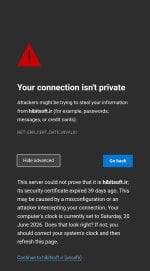
Certificate needs to be updated thoughHiBit Uninstaller website back online. Looks like the Great (Oppressive) Persian Firewall has burnt up.


Members who viewed this thread in the last 5 minutes


