
Advice Request How can I keep cookies for specific sites when I close Microsoft Edge?

Share practical recommendations that address the author's needs.

amirr

Level 27
Verified
Top Poster
Well-known
As it says on Microsoft Edge Canary allows to keep cookies for specific sites when you close the browser

But when I clear the history of Edge ( not the cookies) it deletes the Allow list. Anyone having the same issue?
Here are my settings:
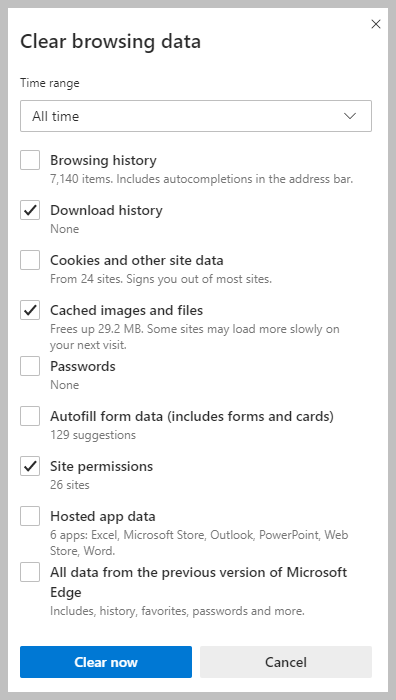
1592459321077.png
 
Thank you,SMG, I did uncheck it. Also in edge://settings/clearBrowsingDataOnClose
Site permissions are turned off.
View attachment 242940
I think you have to add those sites where you want to keep your data in Site permissions / Cookies and site data at Allow:
You've allowed the following sites to save and read cookies on your device. Cookies for these sites won't be cleared when you exit the browser.
Aantekening 2020-06-18 160906.png
 
I already added.
Found it:
Go to edge://settings/clearBrowsingDataOnClose
At Cookies and other site data you have the option to add the sites.
Uncheck Site permissions or those sites will be cleared.
See screenshot where I added 4 sites (and under site permissions you also see 4 sites).
This works for me with Edge Stable.
Aantekening 2020-06-18 165021.png
 
I added in another format, I deleted the [*.] and just put the URL. Is that a big deal?
View attachment 242990
That also works, but with for example for Wilders Security Forums wilderssecurity.com didn't work.
www.wilderssecurity.com works and [*.]wilderssecurity.com works.
malwaretips.com works and [*.]malwaretips.com works.
So, it depends on the website?
 
That also works, but with for example for Wilders Security Forums wilderssecurity.com didn't work.
www.wilderssecurity.com works and [*.]wilderssecurity.com works.
malwaretips.com works and [*.]malwaretips.com works.
So, it depends on the website?
I visit the site and check in "See all cookies and site data" which cookie has been set and use that. This has worked well on the few cookies I save, without using wildcards.
 
Last edited:

Recently browsing

Members who viewed this thread in the last 5 minutes

Back
Top