

The MalwareTips app
Your community, one tap away.
Open MalwareTips from your Home Screen or desktop. Follow discussions, find answers and pick up where you left off.
- Home Screen access
- Optional push alerts
- Your community
You're ready to explore.Explore what's new
Installation instructions
iPhone & iPad
- Open MalwareTips in Safari and tap Share. You may need to open the Page Menu first.
- Choose Add to Home Screen. If it is not listed, use Edit Actions to add it.
- Keep Open as Web App enabled if shown, then tap Add.
Android
- Open MalwareTips in Chrome or another browser that supports app installation.
- Open the browser menu and look for Install app, Install and create shortcut, or Add to Home screen.
- Choose Install and confirm. Wording varies by browser.
Desktop
- Chrome: use the install icon in the address bar, or the menu under Cast, save and share.
- Edge: open the menu, then More tools, Apps and Install this site as an app.
- Safari on Mac: choose Share or File, then Add to Dock. Firefox on Windows: look for the web apps button in the address bar.
If you cannot find an install option, update your browser or use its bookmark option to keep MalwareTips close.
Keep up with your conversations
After installation, open the app and sign in. Enable push notifications in Preferences if you want alerts. On iPhone and iPad, push requires a Home Screen web app and iOS or iPadOS 16.4 or later.
Sign in to manage notificationsInstallation is optional. Your notification settings stay under your control.
You are using an out of date browser. It may not display this or other websites correctly.
You should upgrade or use an alternative browser.
You should upgrade or use an alternative browser.
Troubleshooting How to create system image backup in windows 8.1???
-
 Thread starter
Ajay123
Thread starter
Ajay123
- Start date
- 18 Replies
- 4,039 Views

Simply go to Control Panel then search System Image Backup, follow those wizard procedure.
You need an external hard drive to obtain a backup copy of your OS and other recovery tools.
When all are set up then its prepared for having a system image and done!
You need an external hard drive to obtain a backup copy of your OS and other recovery tools.
When all are set up then its prepared for having a system image and done!
Last edited:
Upvote
0

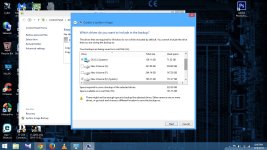
I've tried this ..but i cant deselect E drive from the selection panel as i only need C drive ..I've attached a screenshot could you plz take a look...Simply go to Control Panel then search System Image Backup, follow those wizard procedure.
You need an external hard drive to obtain a backup copy of your OS and other recovery tools.
When all are set up then its prepared for having a system image and done!
Thank you
Attachments
Upvote
0
E drive mostly includes games nd all....What does E drive contains? Since its been likely included to your working OS, does it partition for recovery tools?
Upvote
0
Seems they are few report where a partition hard drive doesn't contains any loader operating system includes to be check mark gray out on system image backup.
Try this:
serverfault.com/questions/276076/how-can-i-un-mark-a-partition-as-active
Or another step is go to Control Panel then Disk Management, then remove the partition ( backup your games and files).
Try this:
1.) Start>Run..
2.) “CMD”
3.) “diskpart” to load up the utility
4.) “list disk” to list all the disks
5.) “Select disk X” where X is the desired disk
6.) “list partition” to list partitions on the selected disk
7.) “select partition X” where X is the desired partition that is currently marked active
8.) “inactive”
serverfault.com/questions/276076/how-can-i-un-mark-a-partition-as-active
Or another step is go to Control Panel then Disk Management, then remove the partition ( backup your games and files).
Upvote
0
Its not working...showing some kind of error.Seems they are few report where a partition hard drive doesn't contains any loader operating system includes to be check mark gray out on system image backup.
Try this:
serverfault.com/questions/276076/how-can-i-un-mark-a-partition-as-active
Or another step is go to Control Panel then Disk Management, then remove the partition ( backup your games and files).

Upvote
0
not removed the partition since i dnt hve an extrernal hd for backupWhat error? Did you try to remove the local disk E by backing up the files and proceed to system image backup?
...Is ther any othr way to deactivate E ??....When i used the cmd method its showing some errror...
Upvote
0
Yes
Actually the problem on the built in backup of Windows makes a solution for others to try 3rd party backup programs.
Just check other informations on their FAQ:
https://www.runtime.org/driveimage_faq.htm#restore
Actually the problem on the built in backup of Windows makes a solution for others to try 3rd party backup programs.
Just check other informations on their FAQ:
https://www.runtime.org/driveimage_faq.htm#restore
Upvote
0
can i use EaseUS todo backup free to create a system image backup file??...Which one is better image XML or EaseUS??Yes
Actually the problem on the built in backup of Windows makes a solution for others to try 3rd party backup programs.
Just check other informations on their FAQ:
https://www.runtime.org/driveimage_faq.htm#restore
Upvote
0
eset is not allowing me to install EaseUS kept showing that the dll file is Win 32...So alast i had to remove the partition E...This time it worked and took backup....What error? Did you try to remove the local disk E by backing up the files and proceed to system image backup?
Thank you for your help @jamescv7 ..

Upvote
0

Thank you.This a very good free backup solution that i use. http://www.macrium.com/reflectfree.aspx
....I would like to know about PrivaZer...Is it safe to use??..
Upvote
0
How to Create a System Image:
http://malwaretips.com/threads/how-to-create-a-system-image-on-windows-8-1-update-1.26426/
Why does the E:/ drive contain System files? I would check using the Disk Management tool in Windows.
http://www.7tutorials.com/how-manage-your-disks-using-disk-management-utility
It would be a good idea to rename those partitions, if you use them for non-OS things, ie. Media, Recovery, Video Copy
http://malwaretips.com/threads/how-to-create-a-system-image-on-windows-8-1-update-1.26426/
Why does the E:/ drive contain System files? I would check using the Disk Management tool in Windows.
http://www.7tutorials.com/how-manage-your-disks-using-disk-management-utility
It would be a good idea to rename those partitions, if you use them for non-OS things, ie. Media, Recovery, Video Copy
Upvote
0
Recently browsing
Members who viewed this thread in the last 5 minutes


