

The MalwareTips app
Your community, one tap away.
Open MalwareTips from your Home Screen or desktop. Follow discussions, find answers and pick up where you left off.
- Home Screen access
- Optional push alerts
- Your community
You're ready to explore.Explore what's new
Installation instructions
iPhone & iPad
- Open MalwareTips in Safari and tap Share. You may need to open the Page Menu first.
- Choose Add to Home Screen. If it is not listed, use Edit Actions to add it.
- Keep Open as Web App enabled if shown, then tap Add.
Android
- Open MalwareTips in Chrome or another browser that supports app installation.
- Open the browser menu and look for Install app, Install and create shortcut, or Add to Home screen.
- Choose Install and confirm. Wording varies by browser.
Desktop
- Chrome: use the install icon in the address bar, or the menu under Cast, save and share.
- Edge: open the menu, then More tools, Apps and Install this site as an app.
- Safari on Mac: choose Share or File, then Add to Dock. Firefox on Windows: look for the web apps button in the address bar.
If you cannot find an install option, update your browser or use its bookmark option to keep MalwareTips close.
Keep up with your conversations
After installation, open the app and sign in. Enable push notifications in Preferences if you want alerts. On iPhone and iPad, push requires a Home Screen web app and iOS or iPadOS 16.4 or later.
Sign in to manage notificationsInstallation is optional. Your notification settings stay under your control.
You are using an out of date browser. It may not display this or other websites correctly.
You should upgrade or use an alternative browser.
You should upgrade or use an alternative browser.
Troubleshooting How to disable Cortana ?
-
 Thread starter
JB007
Thread starter
JB007
- Start date
- 23 Replies
- 9,255 Views


Cortana Is Windows search
Thanks @Paul Lee and @ticklemefeetCortana replies, I am sorry Dave, you can't do that.

And if I install "Classic Shell" ?
Upvote
0
F
ForgottenSeer 69673
Yes you could install classic shell. That would work but I guess you would have to try it and see cortana remains in task manager or not.
From the forum it appears cortana remains after installing classic shell
Classic Shell • View topic - How to access Cortana from Classic Start Menu
From the forum it appears cortana remains after installing classic shell
Classic Shell • View topic -
How to access Cortana from Classic Start Menu
Upvote
0

There are several tools which do that and even powershell scripts.
But I guess will be reinstalled at every "feature update".
You could even break some "modern" feature doing that. (I like mods, so I know MS don't like them).
And the windows search, according to comments above.
Classic shell is not developed anymore, due to frequent MS updates. (but it still works. For now).
But I guess will be reinstalled at every "feature update".
You could even break some "modern" feature doing that. (I like mods, so I know MS don't like them).
And the windows search, according to comments above.
Classic shell is not developed anymore, due to frequent MS updates. (but it still works. For now).
Last edited:
Upvote
0

Upvote
0
Thanks @harlan4096This tool has an option to disable Cortana, without disabling Windows searches: WPD
Please can you post some screen shots ?
Upvote
0
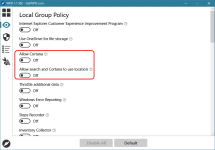
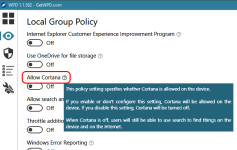
That tool does not change Start menu, it allows You to disable W10 telemetry and other unnecessary services
Upvote
0

I have used O&O Shut up in the past with good results. Plain and FREE, but effective.
O&O ShutUp10: download free antispy tool for Windows 10
O&O ShutUp10: download free antispy tool for Windows 10
Attachments
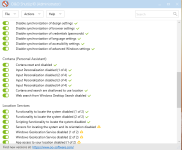
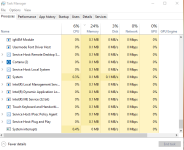
Last edited:
Upvote
0
That tool does not change Start menu, it allows You to disable W10 telemetry and other unnecessary services
Thanks @harlan4096 , now I understand how it works
I have used O&O Shut up in the past with good results. Plain but effective.
O&O ShutUp10: download free antispy tool for Windows 10
Thanks @BigWrench
I will give a look at O&O...
Upvote
0
Actually have it running on 6 pc's, running win10. Once in a while you have to look at it to make sure your settings are still intact...... Can't speak for any other privacy programs. O&O is the only one I've ever tried.
Upvote
0
Installing Classic Shell will bring back the orginal windows search , look at the search bar at the bottom
I also have a setting backup file which makes classic shell look exactly like windows 7 start menu. I like it a lot more
import the file by using "backup -> load from XML files..."
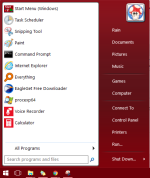
Dropbox - classic shell Menu Settings.xml
I also use O&O Shutup + WPD to disable some windows telemetry and cortana + hosts file
, look at the search bar at the bottomI also have a setting backup file which makes classic shell look exactly like windows 7 start menu. I like it a lot more
import the file by using "backup -> load from XML files..."
Dropbox - classic shell Menu Settings.xml
I also use O&O Shutup + WPD to disable some windows telemetry and cortana + hosts file
Last edited:
Upvote
0


I just remove it. It break Start, search and maybe Settings, but I do not like potentially exploitable processes running.
Code:
rem Remove Cortana (SearchUI.exe)
takeown /f "%WinDir%\SystemApps\Microsoft.Windows.Cortana_cw5n1h2txyewy" /a /r /d y
icacls "%WinDir%\SystemApps\Microsoft.Windows.Cortana_cw5n1h2txyewy" /inheritance:r /grant:r Administrators:(OI)(CI)F /t /l /q /c
taskkill /im SearchUI.exe /f
rd "%WinDir%\SystemApps\Microsoft.Windows.Cortana_cw5n1h2txyewy" /s /q

rem Disable Cortana
reg add "HKCU\Software\Microsoft\Windows\CurrentVersion\Search" /v "AllowCortana" /t REG_DWORD /d "0" /f
reg add "HKCU\Software\Microsoft\Windows\CurrentVersion\Search" /v "CortanaCapabilities" /t REG_SZ /d "" /f
reg add "HKCU\Software\Microsoft\Windows\CurrentVersion\Search" /v "CortanaConsent" /t REG_DWORD /d "0" /f
reg add "HKCU\Software\Microsoft\Windows\CurrentVersion\Search" /v "DeviceHistoryEnabled" /t REG_DWORD /d "0" /f
reg add "HKCU\Software\Microsoft\Windows\CurrentVersion\Search" /v "IsAssignedAccess" /t REG_DWORD /d "0" /f
reg add "HKCU\Software\Microsoft\Windows\CurrentVersion\Search" /v "IsWindowsHelloActive" /t REG_DWORD /d "0" /f
reg add "HKLM\Software\Microsoft\PolicyManager\default\Experience\AllowCortana" /v "value" /t REG_DWORD /d "0" /f
reg add "HKLM\Software\Policies\Microsoft\SearchCompanion" /v "DisableContentFileUpdates" /t REG_DWORD /d "1" /f
reg add "HKLM\Software\Policies\Microsoft\Windows\Windows Search" /v "AllowCloudSearch" /t REG_DWORD /d "0" /f
reg add "HKLM\Software\Policies\Microsoft\Windows\Windows Search" /v "AllowCortana" /t REG_DWORD /d "0" /f
reg add "HKLM\Software\Policies\Microsoft\Windows\Windows Search" /v "AllowCortanaAboveLock" /t REG_DWORD /d "0" /f
reg add "HKLM\Software\Policies\Microsoft\Windows\Windows Search" /v "AllowSearchToUseLocation" /t REG_DWORD /d "0" /f
reg add "HKLM\Software\Policies\Microsoft\Windows\Windows Search" /v "DisableWebSearch" /t REG_DWORD /d "1" /f
reg add "HKLM\Software\Policies\Microsoft\Windows\Windows Search" /v "DoNotUseWebResults" /t REG_DWORD /d "1" /f
reg add "HKLM\Software\Policies\Microsoft\Windows\Windows Search" /v "ConnectedSearchPrivacy" /t REG_DWORD /d "3" /f
reg add "HKLM\Software\Policies\Microsoft\Windows\Windows Search" /v "ConnectedSearchUseWeb" /t REG_DWORD /d "0" /f
reg add "HKLM\Software\Policies\Microsoft\Windows\Windows Search" /v "ConnectedSearchUseWebOverMeteredConnections" /t REG_DWORD /d "0" /f

rem 1 - Let Cortana respond to "Hey Cortana"
reg add "HKCU\Software\Microsoft\Speech_OneCore\Preferences" /v "VoiceActivationOn" /t REG_DWORD /d "0" /f

rem 1- Let Cortana listen for my commands when I press Windows key + C
reg add "HKCU\Software\Microsoft\Windows\CurrentVersion\Search" /v "VoiceShortcut" /t REG_DWORD /d "0" /f

rem 1 - Use Cortana even when my device is locked
reg add "HKCU\Software\Microsoft\Speech_OneCore\Preferences" /v "VoiceActivationEnableAboveLockscreen" /t REG_DWORD /d "0" /f
Attachments
Upvote
0

Recently browsing
Members who viewed this thread in the last 5 minutes
You may also like...
-

-

-

- S
-