

The MalwareTips app
Your community, one tap away.
Open MalwareTips from your Home Screen or desktop. Follow discussions, find answers and pick up where you left off.
- Home Screen access
- Optional push alerts
- Your community
You're ready to explore.Explore what's new
Installation instructions
iPhone & iPad
- Open MalwareTips in Safari and tap Share. You may need to open the Page Menu first.
- Choose Add to Home Screen. If it is not listed, use Edit Actions to add it.
- Keep Open as Web App enabled if shown, then tap Add.
Android
- Open MalwareTips in Chrome or another browser that supports app installation.
- Open the browser menu and look for Install app, Install and create shortcut, or Add to Home screen.
- Choose Install and confirm. Wording varies by browser.
Desktop
- Chrome: use the install icon in the address bar, or the menu under Cast, save and share.
- Edge: open the menu, then More tools, Apps and Install this site as an app.
- Safari on Mac: choose Share or File, then Add to Dock. Firefox on Windows: look for the web apps button in the address bar.
If you cannot find an install option, update your browser or use its bookmark option to keep MalwareTips close.
Keep up with your conversations
After installation, open the app and sign in. Enable push notifications in Preferences if you want alerts. On iPhone and iPad, push requires a Home Screen web app and iOS or iPadOS 16.4 or later.
Sign in to manage notificationsInstallation is optional. Your notification settings stay under your control.
You are using an out of date browser. It may not display this or other websites correctly.
You should upgrade or use an alternative browser.
You should upgrade or use an alternative browser.
Solved How to remove .ddl? files?
-
 Thread starter
Xsjx
Thread starter
Xsjx
- Start date
- 36 Replies
- 10,916 Views
- Status
- Not open for further replies.

It was just a mod for a gameCould you provide more information?
E.g.
What program was it?
What steps have you taken to delete the .dll files?
Have you used the application uninstaller to uninstall the program in question?
I have tried in cmd ( cant find the files ) Revo uninstaller windows uninstaller Winzip uninstal... etc
There isnt an aplication uninstaller it just was a mod that can be placed in a game );
I think for sure it spyware or something... But vt doenst detect anything zemana doenst Avira doenst...
Upvote
0
Cant remove, its opened in javaw.exeIf you try to open the context menu (Right Click) And deleting it, what does it say?
Upvote
0


Hi Xsjx,So i got some ddl with a program that i installed how to uninstall it?
First, restart your system, that should stop javaw.exe
Then, please download and run Everything Search 1.3.4.686 Portable Zip
Download either x64 or x86 zip, extract the files from the zip and run it as administrator
Then search your mod or the folder it is in and delete.
Upvote
0


FileASSASSIN - Free Software to Delete Locked Files
this helped me in the past, maybe it could solve your situation as well
this helped me in the past, maybe it could solve your situation as well
Upvote
0

^This.have you tried deleting in safe mode.
is there any entry in start-up
To check startup: Task Manager - Startup - Disable program
To go into safe mode: Hold Shift whilst going to the shutdown options on your screen then click restart and select start in safe mode.
Upvote
0

thanks for elaborating I am too lazy to type^This.
To check startup: Task Manager - Startup - Disable program
To go into safe mode: Hold Shift whilst going to the shutdown options on your screen then click restart and select start in safe mode.
Upvote
0
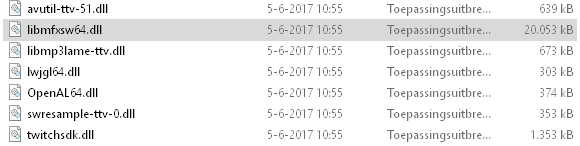
Ok Keep us updated!Ok thx for the replys, I am going to try it now. here under are the ddls if that helps
Upvote
0

You can use process explorer, than CTRL-F, to find DLL or exe loaded in memory.
Than, right click - kill, than delete.
https://technet.microsoft.com/en-us/sysinternals/processexplorer.aspx
Than, right click - kill, than delete.
https://technet.microsoft.com/en-us/sysinternals/processexplorer.aspx
Upvote
0
Thx! all! it has been removed i am now scanning with Zemana to see if there are any hidden thingsOk Keep us updated!

Upvote
0
On behalf of everyone in this thread, You're welcome :^) And yes, A scan would be beneficial.Thx! all! it has been removed i am now scanning with Zemana to see if there are any hidden things
Upvote
0
Glad you got it solved, just curious, which solution helped?Thx! all! it has been removed i am now scanning with Zemana to see if there are any hidden things
Upvote
0
Booting safe mode disable java startup and then delete itGlad you got it solved, just curious, which solution helped?
Upvote
0
- Status
- Not open for further replies.
Recently browsing
Members who viewed this thread in the last 5 minutes
You may also like...
-
 Troubleshooting Trying to get OSRS to run Post MD block
 -

-

-
Serious Discussion Did Microsoft Defender change the way it responds to file downloads?
-
