Advice Request How to stop auto driver download in Windows 10 22H2

Share practical recommendations that address the author's needs.

Kuttz

Level 13
Verified
Top Poster
Well-known
Forum Veteran
Hi all,

I just updated my AMD GPU driver by manually uninstalled current driver and installed latest driver using Factory defaults option checked in at installer for a clean installation. After successful driver installation, Windows 10 is now downloading another version of it own through Windows Update (as if its a smart action). I currently paused Windows Update to stop Windows Update from downloading and installing its version of GPU driver. I tried clearing contents in C:\Windows\SoftwareDistribution\Download but it doesn't worked. Is there anyway I can clear the currently downloading GPU driver through windows update ?

Its sickening when you realize how idoits these software developers are at Microsoft to implement windows updates like this.

Regards
 
Last edited:
Optimizer has a setting to exclude drivers from updates:

 
Hi there,

To stop Windows 10 from automatically downloading drivers, you can try the following steps:

1. Press Windows key + X and click on System.
2. Click on Advanced system settings on the left-hand side.
3. Click on the Hardware tab, and then click on Device Installation Settings.
4. Choose the No (your device might not work as expected) option and click Save Changes.

This should stop Windows Update from downloading and installing drivers automatically. However, keep in mind that Windows Update may still download critical updates related to your hardware, which may include driver updates.

If you want to completely block driver updates through Windows Update, you can use the Group Policy Editor by following these steps:

1. Press Windows key + R and type in gpedit.msc.
2. Navigate to Computer Configuration > Administrative Templates > Windows Components > Windows Update.
3. Select the Do not include drivers with Windows Updates policy, and then enable it.

I hope this helps!
 
Hello,
I have a similar problem on W11 pro ; an old hardware working only with an old driver and recently W11 pro updates automatically this driver ; so I have to uninstall it and reinstall the old one two or three times per week.
I do not want to stop the update of all the drivers ; what is the solution ?
 
Hello,
I have a similar problem on W11 pro ; an old hardware working only with an old driver and recently W11 pro updates automatically this driver ; so I have to uninstall it and reinstall the old one two or three times per week.
I do not want to stop the update of all the drivers ; what is the solution ?
 
Thanks @roger_m
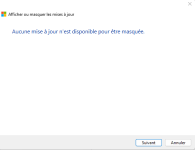
Alas with "Troubleshooter" I find nothing :unsure:
Capture d’écran 2023-03-30 143237.png
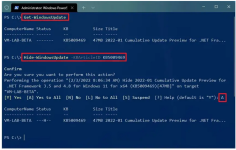
and with "PowerShell" I cannot try because the update I want to hide did not have a KB number... :unsure:
Capture d’écran 2023-03-30 151215.png


Capture d’écran 2023-03-30 150713.png
 
Hello. I also had this issue and I tried a lot of "fixes", but the ONLY one that really worked was @TairikuOkami solution that I found on Reddit 2 years ago:


Code:
reg add "HKLM\Software\Microsoft\Windows\CurrentVersion\DriverSearching" /v "SearchOrderConfig" /t REG_DWORD /d "0" /f

reg add "HKLM\Software\Microsoft\Windows\CurrentVersion\DriverSearching" /v "DontSearchWindowsUpdate" /t REG_DWORD /d "1" /f

reg add "HKLM\Software\Microsoft\Windows\CurrentVersion\DriverSearching" /v "DriverUpdateWizardWuSearchEnabled" /t REG_DWORD /d "0" /f

reg add "HKLM\Software\Microsoft\PolicyManager\current\device\Update" /v "ExcludeWUDriversInQualityUpdate" /t REG_DWORD /d "1" /f

reg add "HKLM\Software\Microsoft\PolicyManager\default\device\Update" /v "ExcludeWUDriversInQualityUpdate" /t REG_DWORD /d "1" /f

reg add "HKLM\Software\Microsoft\WindowsUpdate\UX\Settings" /v "ExcludeWUDriversInQualityUpdate" /t REG_DWORD /d "1" /f

reg add "HKLM\Software\Policies\Microsoft\Windows\WindowsUpdate" /v "ExcludeWUDriversInQualityUpdate" /t REG_DWORD /d "1" /f

Hope it helps you! And btw, thank you @TairikuOkami!
 
Last edited:

Recently browsing

Members who viewed this thread in the last 5 minutes

Back
Top