
Can anyone help me about memtest86


Open MalwareTips from your Home Screen or desktop. Follow discussions, find answers and pick up where you left off.
If you cannot find an install option, update your browser or use its bookmark option to keep MalwareTips close.
After installation, open the app and sign in. Enable push notifications in Preferences if you want alerts. On iPhone and iPad, push requires a Home Screen web app and iOS or iPadOS 16.4 or later.
Sign in to manage notificationsInstallation is optional. Your notification settings stay under your control.
 Thread starter
karthic1998
Thread starter
karthic1998
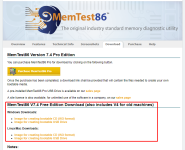
It doesn’t go to download pageIt seems to be paid software, I am not sure if anyone else here will be using it. I went to the Download page within a VM and it enforces payment before I can download.
I already booted up and it gives the various optionsmake sure you select USB pendrive as boot device during bootup.
Ah I understand what it is for now. Sorry I am not sure, I don't have experience with this content.It doesn’t go to download page

There is free version as well.It seems to be paid software, I am not sure if anyone else here will be using it. I went to the Download page within a VM and it enforces payment before I can download.


My pc is in un bootable stateI prefer MemTest Download - it found errors within minutes, while memtest86 reported everything OK after several hours scan.
It can be run from within Windows, but you have to run one instance for each 2GB of RAM, a limitation of free version. Still worth it.

Memtest86 is an amazing program... I have been using it the last 15+ years, and it has helped fix a lot of computers, here is a quick and dirty tutorial.Can anyone help me about memtest86
Members who viewed this thread in the last 5 minutes


