

The MalwareTips app
Your community, one tap away.
Open MalwareTips from your Home Screen or desktop. Follow discussions, find answers and pick up where you left off.
- Home Screen access
- Optional push alerts
- Your community
You're ready to explore.Explore what's new
Installation instructions
iPhone & iPad
- Open MalwareTips in Safari and tap Share. You may need to open the Page Menu first.
- Choose Add to Home Screen. If it is not listed, use Edit Actions to add it.
- Keep Open as Web App enabled if shown, then tap Add.
Android
- Open MalwareTips in Chrome or another browser that supports app installation.
- Open the browser menu and look for Install app, Install and create shortcut, or Add to Home screen.
- Choose Install and confirm. Wording varies by browser.
Desktop
- Chrome: use the install icon in the address bar, or the menu under Cast, save and share.
- Edge: open the menu, then More tools, Apps and Install this site as an app.
- Safari on Mac: choose Share or File, then Add to Dock. Firefox on Windows: look for the web apps button in the address bar.
If you cannot find an install option, update your browser or use its bookmark option to keep MalwareTips close.
Keep up with your conversations
After installation, open the app and sign in. Enable push notifications in Preferences if you want alerts. On iPhone and iPad, push requires a Home Screen web app and iOS or iPadOS 16.4 or later.
Sign in to manage notificationsInstallation is optional. Your notification settings stay under your control.
You are using an out of date browser. It may not display this or other websites correctly.
You should upgrade or use an alternative browser.
You should upgrade or use an alternative browser.
New Update Huorong Internet Security (Updates)
-
 Thread starter
Petrovic
Thread starter
Petrovic
- Start date
- 413 Replies
- 166,880 Views

No it's not to heavy - it's usualy like in screenshotI just hope it`s not too heavy on resources.
Regards Eck : )


No it's not to heavy - it's usualy like in screenshot
View attachment 212095
Yup! That`s what I found

Could you check out the HIPS component ichito and see if you can get them to work ?
Regards Eck

Yup! That`s what I found
Could you check out the HIPS component ichito and see if you can get them to work ?
Regards Eck
Depends on how you configure it, but hips work. On default settings i'm not sure because i run no Av in default settings.
In testing it works. (hips)
Configure it correct and then run stuff and check logs, hips stop stuff and ask for permission to accept or deny stuff.
Last edited:

Seems HIPS dosent work for me
If you wrote your own custom rules, remember to enable this button on Protection.Could you check out the HIPS component ichito and see if you can get them to work ?

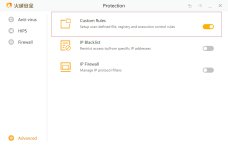

I have the same processes, tnx, but how to test the HIPSIf you wrote your own custom rules, remember to enable this button on Protection.
View attachment 212098
Depends on how you configure it, but hips work. On default settings i'm not sure because i run no Av in default settings.
In testing it works. (hips)
Configure it correct and then run stuff and check logs hips stop stuff and ask for permission to accept or deny stuff.
I thought on default that at least .exe would be queried ?
If you wrote your own custom rules, remember to enable this button on Protection.
View attachment 212098
Thanks Jerry I will give this a go when I have the time to.
Last edited:
I wonder could @Terry Ganzi, @Jerry.Lin or some other knowledgeable person here mind sharing they`re precise set-up for a customised HIPS.??
Regards Eck
Regards Eck

Hi Eck how are you? i made some rules and combined them with Chinese user(they have some smart and knowledgeable users) rules.
The hips don't have memory protection, hook protection and ... but 100% free+no adware+bb and signature+ very powerful FW. very good tool to combine with exploit guard(to get memory protection and such)
you can dl my custom rules from Yandex disk. after you dl go to advacned->costume rules and import it.

The hips don't have memory protection, hook protection and ... but 100% free+no adware+bb and signature+ very powerful FW. very good tool to combine with exploit guard(to get memory protection and such)
you can dl my custom rules from Yandex disk. after you dl go to advacned->costume rules and import it.
Last edited:
I`m fine Sunshine and how`s you ?
Yes this is a good find. Do I need Yandex browser to view the download ?
I take it the firewall bit is an add-on for windows firewall ?
Very good out bound control, sigs not too bad and it`s as light as a feather. Works on XP as well.
Thanks for the reply
Regards Eck
Yes this is a good find. Do I need Yandex browser to view the download ?
I take it the firewall bit is an add-on for windows firewall ?
Very good out bound control, sigs not too bad and it`s as light as a feather. Works on XP as well.
Thanks for the reply
Regards Eck
Whay Hey!
The HIPS work!
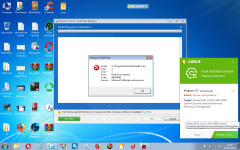
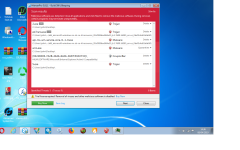
Regards Eck
The HIPS work!
Regards Eck
Seems HIPS dosent work for me
Go to Menu(top right) Preferences, HIPS, Host Reinforcement and tick everything. Don`t forget to enable the "Custom" setting in Advanced.
Regards Eck
Thank youGo to Menu(top right) Preferences, HIPS, Host Reinforcement and tick everything. Don`t forget to enable the "Custom" setting in Advanced.
Regards Eck
Tick every box on this page and hips alerts will come.
Last edited:
I'd like to try this ,how is it overall?Thks
I'd like to try this ,how is it overall?Thks
If you like tweaking then this is for you, but if you don't then it is like any other no new inventions here.
Looking for very high detection rates by sig's not here either. But tweaked correctly it becomes powerful.

So any real scenario test yet ? Vs the AV, hips, firewall etc
have ad´s ? telemetry?
I tested it tweaked it was awesome, most testers will test this at default setting which is not that great or in other words not that impressionable.

Clean failed
Trojan/Generic!EFB4845FE2BE78F6
.exe
Signature: 2019-04-08 10:57
Started at: 2019-04-08 19:52
Duration: 00:00:06
Object(s): 154
File(s): 94
Threat(s): 1
Cleaned: 0
Virus Details
Path: C:\Users\xxxxxx\Desktop\2\2\2019-03-01-Emotet-binary-used-to-generate-infection-traffic.exe, Detection: Trojan/Generic!EFB4845FE2BE78F6, Detection ID: efb4845fe2be78f6, Result: Clean failed
Trojan/Generic!EFB4845FE2BE78F6
.exe
Signature: 2019-04-08 10:57
Started at: 2019-04-08 19:52
Duration: 00:00:06
Object(s): 154
File(s): 94
Threat(s): 1
Cleaned: 0
Virus Details
Path: C:\Users\xxxxxx\Desktop\2\2\2019-03-01-Emotet-binary-used-to-generate-infection-traffic.exe, Detection: Trojan/Generic!EFB4845FE2BE78F6, Detection ID: efb4845fe2be78f6, Result: Clean failed
I'm good thanks.no you can dl it with any browser.Yes this is a good find. Do I need Yandex browser to view the download ?
no it's not an add-on and I think it uses Windows Filtering Platform(not sure about it)I take it the firewall bit is an add-on for windows firewall ?
Recently browsing
Members who viewed this thread in the last 5 minutes
You may also like...
-

-
S
New Update McAfee R135
-

-

-
