

The MalwareTips app
Your community, one tap away.
Open MalwareTips from your Home Screen or desktop. Follow discussions, find answers and pick up where you left off.
- Home Screen access
- Optional push alerts
- Your community
You're ready to explore.Explore what's new
Installation instructions
iPhone & iPad
- Open MalwareTips in Safari and tap Share. You may need to open the Page Menu first.
- Choose Add to Home Screen. If it is not listed, use Edit Actions to add it.
- Keep Open as Web App enabled if shown, then tap Add.
Android
- Open MalwareTips in Chrome or another browser that supports app installation.
- Open the browser menu and look for Install app, Install and create shortcut, or Add to Home screen.
- Choose Install and confirm. Wording varies by browser.
Desktop
- Chrome: use the install icon in the address bar, or the menu under Cast, save and share.
- Edge: open the menu, then More tools, Apps and Install this site as an app.
- Safari on Mac: choose Share or File, then Add to Dock. Firefox on Windows: look for the web apps button in the address bar.
If you cannot find an install option, update your browser or use its bookmark option to keep MalwareTips close.
Keep up with your conversations
After installation, open the app and sign in. Enable push notifications in Preferences if you want alerts. On iPhone and iPad, push requires a Home Screen web app and iOS or iPadOS 16.4 or later.
Sign in to manage notificationsInstallation is optional. Your notification settings stay under your control.
You are using an out of date browser. It may not display this or other websites correctly.
You should upgrade or use an alternative browser.
You should upgrade or use an alternative browser.
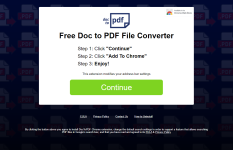
I never saw this in my life
-
 Thread starter
Marko_Srb
Thread starter
Marko_Srb
- Start date
- 13 Replies
- 2,464 Views

Hi , Marko_Srb...! Welcome to MalwareTips ..! 
AdwCleaner
Download AdwCleaner from here and save it to your desktop.
---------------------------------------------------------------------------------------------------------------------------------------------------------------------------------
Malwarebytes Anti-Malware
You may have Malwarebytes Anti-Malware installed but if not, you can download it from here:
In your next reply, please include:
AdwCleaner
Download AdwCleaner from here and save it to your desktop.
- run AdwCleaner by clicking on Scan Now
- when it has finished, leave everything that was found checked, (ticked), then click on Clean and Repair
- if it asks to reboot, allow the reboot
- on reboot, click on View Log File; please attach the content of the log to your next reply.
---------------------------------------------------------------------------------------------------------------------------------------------------------------------------------
Malwarebytes Anti-Malware
You may have Malwarebytes Anti-Malware installed but if not, you can download it from here:
- run the program
- click on the ‘Dashboard’ to make sure everything is up to date, (it is not necessary to upgrade to the premium version of MBAM)
- click on the ‘Scan’ tab, (directly below the Dashboard tab)
- select the Custom Scan option
- at the bottom, click on Configure Scan
- in the right window, place a checkmark next to the drive letter of your USB device
- click the Scan Now button
- Threat Scan will begin
- when the scan has completed and if malware was found, click the Quarantine Selected button to allow MBAM to quarantine what was found
- if prompted to restart the computer, close all other programs and click Yes to restart your computer
- once you are back at your desktop, open MBAM once more
- click on the ‘Reports’ tab
- double-click on the most recent Scan Report
- click on Export, then Copy to Clipboard
In your next reply, please include:
- AdwCleaner log
- Mbam.txt
Hi , Marko_Srb...! Great ..! I am sorry for the late answer ...! Would you do a new scan for me with:
Re-scan with FRST
In your next reply, please include:
I am sorry for the late answer ...! Would you do a new scan for me with:Re-scan with FRST
- Double-click FRST.exe/FRST64.exe to run it.
- Press the Scan button.
- When finished, it will produce logs called FRST.txt and Addition.txt in the same directory the tool was run from.
- Please copy and paste the logs in your next reply.
In your next reply, please include:
- FRST.txt
- Addition.txt

Hi , Marko_Srb...!
Farbar Recovery Scan Tool - Fix
Please download the attached file * fixlist.txt * to the same folder where the Farbar tool is running from.
The location is listed in the 3rd line of the FRST.txt log you have submitted.
Run FRST and click Fix only once and wait.
The Computer will restart when the fix is completed.
It will create a log (Fixlog.txt) please post it to your reply.
In your next reply, please include:
Farbar Recovery Scan Tool - Fix
Please download the attached file * fixlist.txt * to the same folder where the Farbar tool is running from.
The location is listed in the 3rd line of the FRST.txt log you have submitted.
Run FRST and click Fix only once and wait.
The Computer will restart when the fix is completed.
It will create a log (Fixlog.txt) please post it to your reply.
In your next reply, please include:
- Fixlog.txt
Attachments
Let me know how the computer is doing...?
+
Scanning with SecurityCheck by glax24
In your next reply, please include:
+
Scanning with SecurityCheck by glax24
- Download SecurityCheck by glax24 from here and remember the tool on the desktop.
- Run the program right-click the administrator name
- Wait for the scan to finish. It will open in a text file named SecurityType.txt. Copy the contents of this file to your next post
- You can find this file in the root of the system disk in a folder called SecurityCheck, C: \\ SecurityCheck \\ SecurityCheck.txt
In your next reply, please include:
- SecurityType.txt
Please follow the directions here to uninstall Malwarebytes. and Reinstall if wanted.
Uninstall and reinstall Malwarebytes using the Malwarebytes Support Tool
Uninstall and reinstall Malwarebytes using the Malwarebytes Support Tool

Marko_Srb
New Member
actually the same thing is happening again ( thing for what I opened this topic). When I try to use this website Movies & TV Shows Online in HD with Subtitles | TOPEUROPIX it is redirecting me to that picture (1st post) or this website:
 doctopdftech.com
it didnt happen for few days I thought your programs fixed it but its still there
DocToPDF
doctopdftech.com
it didnt happen for few days I thought your programs fixed it but its still there
Hi , Marko_Srb...!
Please follow the steps of the following instruction:
Resetting Google Chrome to clear unexpected issues
Please follow the steps of the following instruction:
Resetting Google Chrome to clear unexpected issues
Recently browsing
Members who viewed this thread in the last 5 minutes
You may also like...
-

-
 Serious Discussion What would you say to the tech fellas who repudiate Avast/AVG?
 -

-

-
