

The MalwareTips app
Your community, one tap away.
Open MalwareTips from your Home Screen or desktop. Follow discussions, find answers and pick up where you left off.
- Home Screen access
- Optional push alerts
- Your community
You're ready to explore.Explore what's new
Installation instructions
iPhone & iPad
- Open MalwareTips in Safari and tap Share. You may need to open the Page Menu first.
- Choose Add to Home Screen. If it is not listed, use Edit Actions to add it.
- Keep Open as Web App enabled if shown, then tap Add.
Android
- Open MalwareTips in Chrome or another browser that supports app installation.
- Open the browser menu and look for Install app, Install and create shortcut, or Add to Home screen.
- Choose Install and confirm. Wording varies by browser.
Desktop
- Chrome: use the install icon in the address bar, or the menu under Cast, save and share.
- Edge: open the menu, then More tools, Apps and Install this site as an app.
- Safari on Mac: choose Share or File, then Add to Dock. Firefox on Windows: look for the web apps button in the address bar.
If you cannot find an install option, update your browser or use its bookmark option to keep MalwareTips close.
Keep up with your conversations
After installation, open the app and sign in. Enable push notifications in Preferences if you want alerts. On iPhone and iPad, push requires a Home Screen web app and iOS or iPadOS 16.4 or later.
Sign in to manage notificationsInstallation is optional. Your notification settings stay under your control.
You are using an out of date browser. It may not display this or other websites correctly.
You should upgrade or use an alternative browser.
You should upgrade or use an alternative browser.
Advanced Plus Security imuade's Security Configuration 2019
-
 Thread starter
imuade
- Start date
- 97 Replies
- 31,602 Views
Thread details
- Last updated
- Nov 23, 2019
- Windows Edition
- Home
- Security updates
- Allow security updates and latest features
- User Account Control (UAC)
- Notify me only when programs try to make changes to my computer
- Real-time protection
- Windows Defender
- Device firewall
- Microsoft Defender Firewall
- Custom security settings
- Windows Defender tweaked by ConfigureDefender (everything ON, cloud protection set to Block)
- Periodic malware scanners
- HitmanPro
- AdwCleaner
- Malware sample testing
- I do not participate in malware testing
- Browsers and extensions
- Chromium portable (launched by chrlauncher) with:
- Blocksi Web Filter
- Close & Clean
- Dark new tab
- ublock origin
- Windows Defender Browser Protection
- Maintenance tools
- Dism++
- Explzh
- FastStone viewer
- Geek uninstaller
- NVT SysHardener
- Privacy Eraser
- RAPR
- SUMo
- File and photo backups
- Lazesoft Recovery Suite Home Edition
- System recovery
- Lazesoft Recovery Suite Home Edition
- Usage and exposure
- Logging into my bank account
- Visiting familiar websites
- Computer specs
- MSI cubi i3 5005U

Gandalf_The_Grey
Level 86
Verified
Honorary Member
Top Poster
Content Creator
Well-known
Forum Veteran
Nice change, don't see it in your config yet 
You could set UAC to always notify. that setting stopped some UAC bypasses.
You could change 7-Zip for Bandizip. Bandizip keeps the mark of the web when extracting archives..
You could set UAC to always notify. that setting stopped some UAC bypasses.
You could change 7-Zip for Bandizip. Bandizip keeps the mark of the web when extracting archives..

+! with @Gandalf_The_Grey. Nice setup!

Update 28/07/2019
Replaced Comodo Antivirus with Avast Free Antivirus (@Evjl's Rain 's tweaks - thanks friend)
Replaced Comodo Antivirus with Avast Free Antivirus (@Evjl's Rain 's tweaks - thanks friend
)
Last edited:

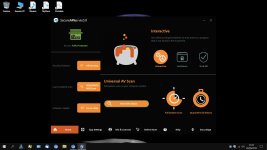
First feedback after a couple of days of use.
SAP is very light on my system, even lighter than Avast.
Only yesterday, after installing the latest Windows updates KB4517211 ( OS Build 18362.387 ), the Application Whitelisting Service spiked for a while (maybe it was updating the whitelist with the new Windows files).
APEX does register in Windows Security Center, but the status is unavailable and I got a lot of errors "Event ID 17 - Security Center failed to validate caller with error DC040780" (like, one every minute)
@sap
Is there any way to avoid these errors?
Last edited:
Gandalf_The_Grey
Level 86
Verified
Honorary Member
Top Poster
Content Creator
Well-known
Forum Veteran
How did you setup Bloksi?Update 06/10/2019
Back to Blocksi Web Filter since I got some problems with Bitdefender Trafficlight (I have seen several people saying the same).
Added Windows Defender Browser Protection too
got some problems with Bitdefender Trafficlight (I have seen several people saying the same).
I wonder if it has to do with GDPR because no issues I'm aware of in U.S.
I set it to warn about malware, unethical and unrated websites. The reason why I prefer to warn instead of blocking is that the block page advertises blocksi routerHow did you setup Bloksi?
It could beI wonder if it has to do with GDPR because no issues I'm aware of in U.S.

F
ForgottenSeer 823865
Why not just 7zip? stick to the basics.Replaced Bandizip with Explzh (Bandizip becoming ad-supported is a no-go for me)
Because it doesn't keep the mark of the web upon extractionWhy not just 7zip? stick to the basics.
F
ForgottenSeer 823865
ah yes, true.Because it doesn't keep the mark of the web upon extraction
MalwareTips community
Join the discussion
Create a free account to reply to this thread, ask your own questions and get help from the community.
- Reply and ask questions
- Get alerts when someone answers
- Free malware removal help
Join 75,678 members who help each other for free, since 2010.
Recently browsing
Members and guests who viewed this thread in the last 5 minutes
You may also like...
-
 Advanced Plus Security Victor M Fedora Cosmic Linux config
-

-
-
-
 Advanced Plus Security Ebocious's Yoga 6 New Security Config