New Update Inquiry on Chrome privacy extension

Status
Not open for further replies.

generalwu

Level 5
Thread author
Verified
Well-known
Jan 25, 2016
219
520
370
Singapore
Hi All,

Recently I was browsing Reddit and I came across this thread that was discussing about privacy extension (Link: here).

I was thinking what's the different between the following extension:
  • Adguard (Ad blocker)
  • Disconnect (Block trackers)
  • Privacy Badger (Block trackers)
  • Bitdefender Trafficlight (Block/monitor trackers?)
According to this Reddit user (_-_Alexander_-_) and I quote, "Disconnect is another blocker, my understanding is Disconnect has filters that uBlock and AdGuard does not." so does that mean they're all the same but with different filters?

Do anyone has any experiences with this?

Currently I'm using Adguard & Disconnect and was thinking of downsizing the amount of extension that I have with my browser (Removing Disconnect or Trafficlight totally).

Any advise?

Thanks. :cool:
 
....Take a look at Ublock Origin, you can use all the filters of the mentioned extensions if you wish.

I second that !

An hour spent digging around in all the options that uBlock Origin provides is an hour well spent IMO.
Along with NoScript , it gives all the browser protection I have ever needed ....

.... other people may disagree of course :)
 
Hello,
I moved a few times myself !

Firefox + ublock0, FF+Adguard, Chrome+ub0+avira bs... and now, just Chrome+ub0

If you use Chrome, and have not unchecked Google Safebrowsing, you have a layer of filtering againt malware.

ub0 is super light if you don't put too many rules.

I'm blocking javascript for certain website with the native permission of Chrome (when you click just before the url)

And I'm using Vanilla Cookie Manager to keep only the cookies I want to keep (everything else is trashed after exiting Chrome).
 
The past few days i am using Adguard and Disconnect on Cent and FF.
They really good together and i have seen pages load a bit faster.
I have also tried ubO and other adblockers along with Disconnect but at some point i see some conflict.
So i removed the adblocker and returned to Adguard with Disconnect.
Just to be clear these are the only extensions that i have on my browsers ( i am fighiting hard with my self not to remove Dis:D )
 
In my opinion users here are using mainly uBO or Adguard in integration mode
you can also use Disconnect filters in uBO and Adguard

with well configured uBO you will have great protection
but for easy use I would recommend Adguard

in your case I would remove Disconnect and add Disconnect filters to Adguard

you can find Disconnect and other useful filters here FilterLists
 
I just noticed that I recommended NoScript earlier , which is an extension for Firefox ..... Doh !

I've tried ScriptSafe in Chrome-based browsers and it's not a direct equivalent .

I'm blocking javascript for certain website with the native permission of Chrome (when you click just before the url)

I think that is a better way to go , but I would prefer Javascript to be blocked by default , then allowed on a per site basis .
That is effectively how I have NoScript set up in FF anyway .

Disconnect
- I read good things about it , I liked the concept and tried it , but I found it to be less than I expected
....probably just me :)
 
Thanks all of you for your inputs, as I'm lazy I would probably go with Adguard and Disconnect then. :cool:
Probably will take my time to study how to import custom list into Adguard when I'm free.

Also I'm using Chromebook so FF is not an option. :confused:

Too bad they don't have a same extension as NoScript in Chrome, I used it when I'm using FF back in the days, especially the allow per site feature.

How about Bitdefender Trafficlight? Any comments on that?

Thanks. :)
 
  • Like
Reactions: frogboy
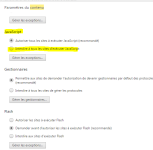
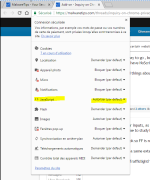
On chrome you have this native handy feature:
(sorry for the french screen copy)

You can deny by default,
Capture.PNG
than allow per site,
Capture2.PNG
 
Is there an easy way to describe how Adguard works system-wide? I installed it one time but couldn't really see how it functioned like uBlock or ScriptSafe so I removed it. Why is an ad blocker for the whole system needed?
 
Last edited:
Is there an easy way to describe how Adguard works system-wide? I installed it one time, but I couldn't really see how it functioned like uBlock or ScriptSafe so I removed it. Why is an ad blocker for the whole system needed?
in case you want to use a browser that doesn't have a proper plugin i guess.
couldn't find a reason either.
 
Is there an easy way to describe how Adguard works system-wide? I installed it one time but couldn't really see how it functioned like uBlock or ScriptSafe so I removed it.

it will filter ads and other elements before browser will load them, you can try it to see it with uBO, go to site with ads which are blocked by adguard and go to uBO logger (if possible try to use same filters in adguard and uBO), now reload that site with adguard disabled you will see additional (hopefully) blocked log entries

AtlBo said:
Why is an ad blocker for the whole system needed?

It can filter other application and browsers that don't have extensions, e.g. steam, modern apps, ...
 
  • Like
Reactions: AtlBo
Thanks for the answers. So it's like blocking via hosts then...blocking universally IPs?
 
  • Like
Reactions: frogboy
Adguard is using more filters, the rest of the extensions use only one.
Take a look at Ublock Origin, you can use all the filters of the mentioned extensions if you wish.

Do you happen to know which filterlist(s) would replace Privacy Badger? I am using uBlock Origin with Google Chrome. Thanks.
 
  • Like
Reactions: AtlBo
Do you happen to know which filterlist(s) would replace Privacy Badger? I am using uBlock Origin with Google Chrome. Thanks.
If you're just looking to block ads and trackers then the default selected lists (uBO's own filters, EasyList, EasyPrivacy and Peter Lowe's) will serve you perfectly well.
 
Status
Not open for further replies.