Introducing SiriusGPT: The First Real-Time GPT / LLM AI based Antimalware Solution

  • Thread starter Thread starter danb
  • Start date Start date
  • Featured
Hi @danb
Got a simple question on SiriusGPT paid subscriber.
I was reading the documentation and come across some options that appear to be missing these are highlighted below, can you clarify where these options are as I am unable to find them.

View attachment 292488
Yes, both of those features are automatically handled within Sirius now, so I should remove those from the list. For example, the Analysis Type is now part of our iterative analysis process, so it happens automatically without the users input. Same with the Reanalyze feature, it is automatic as well now too.
 
The blocked items are logged in the Windows Event Viewer / Windows Logs / Application, although with SiriusGPT there are very, very few blocks. All through the last 1-2 months of development I was running SiriusGPT and only had 1 block the entire time, and it was on a build script. It actually kind of scared / surprised me, it was funny. Having said that, we might add a feature in SiriusGPT what will extract the Sirius blocked events so the user can click within Sirius to review the blocks.
From this update I thought it would be good idea to have a custom event view for SiriusGPT.
Some apps autogenerate these like HitmanPro and GlassWire so this might be an option for your product installer, it would aid investigations of blocked applications or errors.

Can you comment on the following error?
1761841864066.png
 
From this update I thought it would be good idea to have a custom event view for SiriusGPT.
Some apps autogenerate these like HitmanPro and GlassWire so this might be an option for your product installer, it would aid investigations of blocked applications or errors.

Can you comment on the following error?
View attachment 292510
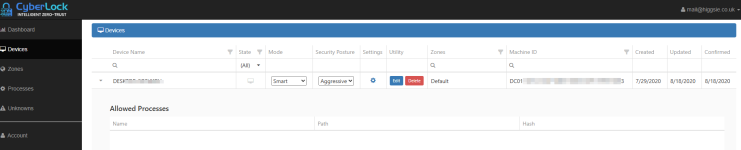
Interesting... it is saying that you have reached the maximum number of devices for your account. I am surprised that SiriusGPT is still running if this is the case. Are you running as a Trial, or did you register SiriusGPT? Either way, you can log in to your account at www.cyberlock.global and go to the devices tab and delete the old device. Then you can click on the License expires: link at the bottom left of SiriusGPT and it should update the license. If not, please let me know, thank you!
 
Interesting... it is saying that you have reached the maximum number of devices for your account. I am surprised that SiriusGPT is still running if this is the case. Are you running as a Trial, or did you register SiriusGPT? Either way, you can log in to your account at www.cyberlock.global and go to the devices tab and delete the old device. Then you can click on the License expires: link at the bottom left of SiriusGPT and it should update the license. If not, please let me know, thank you!
I uninstalled Cyberlock as I had issues after the latest release, will update your other thread on that issue. I then installed SiriusGPT and registered, I did then do a disk restore using Macrium Reflect could this restore used up a licence? I have logged onto www.cyberlock.global and it only shows my one device?

1761851432361.png
 

Attachments

  • 1761851334444.png
    1761851334444.png
    46.3 KB · Views: 87
  • Like
Reactions: Sorrento and danb
I uninstalled Cyberlock as I had issues after the latest release, will update your other thread on that issue. I then installed SiriusGPT and registered, I did then do a disk restore using Macrium Reflect could this restore used up a licence? I have logged onto www.cyberlock.global and it only shows my one device?

View attachment 292512
Forgot to add this image, SiriusGPT doesn't show expired, it shows it will expire on 29th Oct 2027 as only just purchased a new 2 year licence extension yesterday.

1761853348325.png
 
I uninstalled Cyberlock as I had issues after the latest release, will update your other thread on that issue. I then installed SiriusGPT and registered, I did then do a disk restore using Macrium Reflect could this restore used up a licence? I have logged onto www.cyberlock.global and it only shows my one device?

View attachment 292512
Sounds great... you might need to delete the old device so that the Machine ID matches. We used to use a different Machine ID for CyberLock, but it would change when the hardware changed, so we are now using a different Machine ID and it is the same for all of our products now, thank you!
 
@danb - Regarding the requests related to the SiriusGPT product, please can you take a look at the following:

  1. Light Mode Option - Could you provide an option to switch between light mode, system colour settings and dark mode? I find dark mode difficult to work with, but it seems to be the default trend across most applications.
  2. Token Recrediting - At present, it looks like token credits are reset to 50,000 only when the PC is rebooted daily. For users who don’t restart their machines every day, tokens could be depleted quickly. Would it be possible to implement background logic that automatically refreshes tokens based on the user’s time zone or system settings, without requiring a reboot?
  3. Token Depletion Behaviour - What happens once all tokens are consumed? Does the system continue to allow unrestricted access, or could you introduce a fallback mechanism that leverages WhiteListCloud as a backup?

Got some other thoughts but will post another day, as got to do my day time job :(
 
Hi @danb

Additional Question/Query:
Based on the screenshot, it appears that SiriusGPT initiated a check against DuckDuckGo when I launched the installer for a new application. Alongside routine software updates managed through UCheckUI and UniGetUI, I’m concerned that this process may cause my tokens to be consumed at a rapid rate.

Could you clarify whether SiriusGPT first consults a central repository to verify if a file has already been checked before invoking the LLM? If such a mechanism exists, does it then perform a lighter-weight validation rather than a full check?
1762422127177.png
 
  • Like
Reactions: danb
Hi @danb

Additional Question/Query:
Based on the screenshot, it appears that SiriusGPT initiated a check against DuckDuckGo when I launched the installer for a new application. Alongside routine software updates managed through UCheckUI and UniGetUI, I’m concerned that this process may cause my tokens to be consumed at a rapid rate.

Could you clarify whether SiriusGPT first consults a central repository to verify if a file has already been checked before invoking the LLM? If such a mechanism exists, does it then perform a lighter-weight validation rather than a full check?
View attachment 292722
First, thank you for the suggestions above! Yes, we have a database that stores all of the WLC and Sirius results so we can just grab the results instead of analyzing the same file each time, and when the file (by hash) has already been analyzed, then tokens are not deducted. The only time tokens are deducted is when there is a new file that has not been analyzed by Sirius before. That is why 50,000 per day should be way more than enough for anyone.
 
now that Cyberlock 8.45 is integrated with siriusGPT but without snapshot scan (correct?), can siriusLLM (portable) be installed alongside CL to run snapshot scans without conflicts? :unsure:
 
  • Like
Reactions: danb
now that Cyberlock 8.45 is integrated with siriusGPT but without snapshot scan (correct?), can siriusLLM (portable) be installed alongside CL to run snapshot scans without conflicts? :unsure:
Yes, they work great together. I am currently running DefenderUI Pro + SiriusLLM and it works really well too, although I usually run CyberLock + SiriusLLM. Sometimes when I want to keep everything as simple as possible, I just run SiriusGPT + DefenderUI Free. I tried to design our products so they are modular and offer different features so that you can create the combo that works best for you.
 
Yes, they work great together. I am currently running DefenderUI Pro + SiriusLLM and it works really well too, although I usually run CyberLock + SiriusLLM. Sometimes when I want to keep everything as simple as possible, I just run SiriusGPT + DefenderUI Free. I tried to design our products so they are modular and offer different features so that you can create the combo that works best for you.
Hi Dan, is the following matrix correct?


CyberLockDefenderUIDefenderUI ProWDAC LockdownSiriusGPTSiriusLLM
CyberLockN/AComplementaryConflictComplementary ConflictComplementary
DefenderUIComplementaryN/AConflictComplementaryComplementaryComplementary
DefenderUI ProConflictConflictN/AConflictConflictComplementary
WDAC LockdownComplementaryComplementaryConflictN/AComplementaryComplementary
SiriusGPTConflictComplementaryConflictComplementaryN/AConflict
SiriusLLMComplementaryComplementaryComplementaryComplementaryConflictN/A

It might be a good idea to include something on you main page but perhaps a bit snazzier :)
 
Hi Dan, is the following matrix correct?


CyberLockDefenderUIDefenderUI ProWDAC LockdownSiriusGPTSiriusLLM
CyberLockN/AComplementaryConflictComplementaryConflictComplementary
DefenderUIComplementaryN/AConflictComplementaryComplementaryComplementary
DefenderUI ProConflictConflictN/AConflictConflictComplementary
WDAC LockdownComplementaryComplementaryConflictN/AComplementaryComplementary
SiriusGPTConflictComplementaryConflictComplementaryN/AConflict
SiriusLLMComplementaryComplementaryComplementaryComplementaryConflictN/A

It might be a good idea to include something on you main page but perhaps a bit snazzier :)
Thank you for creating this, that is really helpful! I think everything is correct, but I will have to look at each line very carefully to be sure. We have a decision tree that I need to update and post, it will help as well.
 
The easiest way to think of this is that CyberLock, DefenderUIPro, WDAC Lockdown and SiriusGPT cannot be installed together, you can only install one of the four.

Then from there, if you want to add SiriusLLM or DefenderUI Free, it will work great.