Advice Request Is there a “white list” / “ignore list” for Avast on android?

Please provide comments and solutions that are helpful to the author of this topic.

Kenipitolo

New Member
Thread author
Jan 30, 2022
5
0
2
Avast on pc has an “ignore list” it calls it the exception list. They show you how to access it on their site but the example they show is about the pc version of avast. On android I cant find this list. Does this feature(ignore list) exist on android or is it only for pc? Can you add an app or file on ignore list on avast for android?
 
Last edited:
Yes. You can choose to ignore apps/files when they're detected.
Tap the hamburger button in the top-left hand corner of Avast's main window and scroll down to "Ignored issues" to find the list.
 
Yes. You can choose to ignore apps/files when they're detected.
Tap the hamburger button in the top-left hand corner of Avast's main window and scroll down to "Ignored issues" to find the list.
I found the “ignored issues” in “protection” under settings. By your example, if you choose to ignore an app or file will you get a warning from avast “this is a bad app” the next time you do a scan? What I’m asking is can you tell Avast to not scan an app? So for example you download an app that avast thinks is bad and you don’t want avast to scan the app because it will always say its a bad app and u will keep getting warnings. Another example, you have 20 apps and avast scans all of them, you want 1 app to not be scanned. Can you do something in avast so it scans 19 apps instead of 20, basically exclude one app from the scan? Sorry for the long text I don’t want to confuse you thats why I give few examples. Thanks.
 
if you choose to ignore an app or file will you get a warning from avast “this is a bad app” the next time you do a scan?
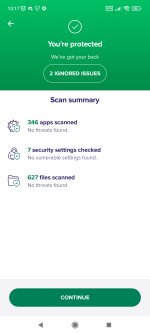
No. You'll just get a button saying "X ignored issue(s)" at the end of a scan, like so:
IMG_20220131_131750.jpg
As far as I can tell you can't exclude apps/files from scanning unless Avast detects them.
 
  • Like
Reactions: Gandalf_The_Grey
As far as I can tell you can't exclude apps/files from scanning unless Avast detects them.
By this you mean, you can’t manually disable/exclude scanning for a particular app or file?

If Avast detects a “malicious app/file” the only thing you can do is just ignore it and after that it will show up like in the picture above you sent “x ignored issues” ?
 
Well it’s basically the same thing right?
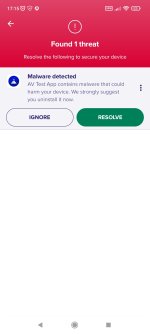
Not really, as an unresolved issue is far more pronounced than an ignored issue:

IMG_20220131_171510.jpg

By this you mean, you can’t manually disable/exclude scanning for a particular app or file?
If Avast detects a “malicious app/file” the only thing you can do is just ignore it and after that it will show up like in the picture above you sent “x ignored issues” ?

Basically you can just ignore apps and files if Avast detects them as malicious?
Yes to all three.
 
If you ignore this “unresolved issue” would it appear later in ignored issues
Yes.

Also unresolved issue is basically a warning for malware?
It's a warning for any Avast recommendations you choose to not resolve or ignore. So malware, insecure device settings (no lock screen, rooted device), and recommended Avast settings that aren't enabled (file scanning, web blocking, etc.).
 
Last edited:

You may also like...