

The MalwareTips app
Your community, one tap away.
Open MalwareTips from your Home Screen or desktop. Follow discussions, find answers and pick up where you left off.
- Home Screen access
- Optional push alerts
- Your community
You're ready to explore.Explore what's new
Installation instructions
iPhone & iPad
- Open MalwareTips in Safari and tap Share. You may need to open the Page Menu first.
- Choose Add to Home Screen. If it is not listed, use Edit Actions to add it.
- Keep Open as Web App enabled if shown, then tap Add.
Android
- Open MalwareTips in Chrome or another browser that supports app installation.
- Open the browser menu and look for Install app, Install and create shortcut, or Add to Home screen.
- Choose Install and confirm. Wording varies by browser.
Desktop
- Chrome: use the install icon in the address bar, or the menu under Cast, save and share.
- Edge: open the menu, then More tools, Apps and Install this site as an app.
- Safari on Mac: choose Share or File, then Add to Dock. Firefox on Windows: look for the web apps button in the address bar.
If you cannot find an install option, update your browser or use its bookmark option to keep MalwareTips close.
Keep up with your conversations
After installation, open the app and sign in. Enable push notifications in Preferences if you want alerts. On iPhone and iPad, push requires a Home Screen web app and iOS or iPadOS 16.4 or later.
Sign in to manage notificationsInstallation is optional. Your notification settings stay under your control.
You are using an out of date browser. It may not display this or other websites correctly.
You should upgrade or use an alternative browser.
You should upgrade or use an alternative browser.
Troubleshooting Is there anyway to get rid of Internet Explorer permanently?
-
 Thread starter
dragonmew
Thread starter
dragonmew
- Start date
- 10 Replies
- 3,102 Views


Internet Explorer is built-in to Windows, so it can never be completely removed. You can disable / turn off IE from the Windows Features panel, located in Control Panel > Program and Features. This will uninstall IE components, but make sure you have another browser installed, yet you'll be browser-less.
You should see a windows as such:
> Uncheck Internet Explorer
> OK and reboot your PC
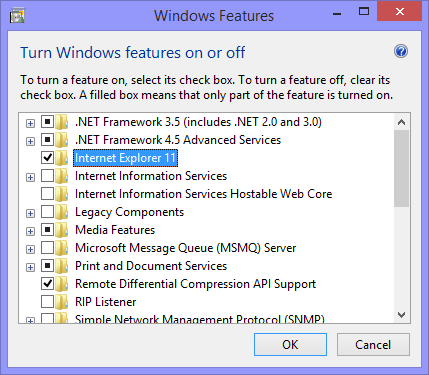
You should see a windows as such:
> Uncheck Internet Explorer
> OK and reboot your PC
Upvote
0

No,it is impossible to uninstall it on Windows OS.If you have IE9 after uninstalling it will revert to IE8,IE 8 uninstalled will revert to IE 7 or 6 and so on................i dnt use internet explorer is there anyway to uninstall it permanently?
Upvote
0
@Kent You're partially correct, but you cannot downgrade IE lower than what the OS was shipped with, unless it was installed via Windows Update (ie. Windows 7 SP1 supports IE11)
- Windows Vista shipped with IE7
- Windows 7 shipped with IE8
- Windows 8 shipped with IE10
- Windows 8.1 shipped with IE11
Upvote
0


Hmmm...interesting here. I personally do not use IE. Will try it after I make a system image.
Yeah you will need time to track down some files and registries in order to remove it completely.
Trial and error .

Upvote
0

I seriously think it isn't a good idea uninstalling IE. Why do you want to uninstall it? IE was built and integrated into Windows itself and to remove it, like some people have mentioned, you have to go about cleaning up its traces all around your system (such as in the registry etc. ) That can be pretty dangerous if you don't know what you are doing and you can cause system instability.
Upvote
0

RodneyHustle
New Member
I seriously think it isn't a good idea uninstalling IE. Why do you want to uninstall it? IE was built and integrated into Windows itself and to remove it, like some people have mentioned, you have to go about cleaning up its traces all around your system (such as in the registry etc. ) That can be pretty dangerous if you don't know what you are doing and you can cause system instability.
Thats a good tip. Just wanted to add something to it. From personal experience, my mother in law had a nasty spyware on her desktop that was damn near impossible to remove. It took uninstalling Chrome, (my mother in laws favorite browser), to finish removing it. I wouldn't have had anything to download Chrome again if I would have removed it. It would be wise to have it as a backup in case you need it sometime. Its not going to hurt to disable it since you don't use it. Hope this helps a little.
Upvote
0
Recently browsing
Members who viewed this thread in the last 5 minutes
You may also like...
-

-

-
 Troubleshooting Trying to get OSRS to run Post MD block
 -
-