

The MalwareTips app
Your community, one tap away.
Open MalwareTips from your Home Screen or desktop. Follow discussions, find answers and pick up where you left off.
- Home Screen access
- Optional push alerts
- Your community
You're ready to explore.Explore what's new
Installation instructions
iPhone & iPad
- Open MalwareTips in Safari and tap Share. You may need to open the Page Menu first.
- Choose Add to Home Screen. If it is not listed, use Edit Actions to add it.
- Keep Open as Web App enabled if shown, then tap Add.
Android
- Open MalwareTips in Chrome or another browser that supports app installation.
- Open the browser menu and look for Install app, Install and create shortcut, or Add to Home screen.
- Choose Install and confirm. Wording varies by browser.
Desktop
- Chrome: use the install icon in the address bar, or the menu under Cast, save and share.
- Edge: open the menu, then More tools, Apps and Install this site as an app.
- Safari on Mac: choose Share or File, then Add to Dock. Firefox on Windows: look for the web apps button in the address bar.
If you cannot find an install option, update your browser or use its bookmark option to keep MalwareTips close.
Keep up with your conversations
After installation, open the app and sign in. Enable push notifications in Preferences if you want alerts. On iPhone and iPad, push requires a Home Screen web app and iOS or iPadOS 16.4 or later.
Sign in to manage notificationsInstallation is optional. Your notification settings stay under your control.
You are using an out of date browser. It may not display this or other websites correctly.
You should upgrade or use an alternative browser.
You should upgrade or use an alternative browser.
Solved Is this something new in Microsoft Defender?
- Thread starter rashmi
- Start date
Microsoft Defender
11 Replies
1,955 Views

Hey, that's something new for me as well. Here's a log from the FullEventLogView:
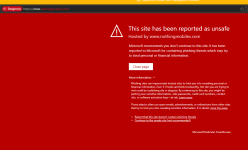
alphaMountain Web Protection is also reporting the 1-year-old domain as Phishing.
This is from Andy Ful's "Defender security log":Your IT administrator has caused Microsoft Defender Exploit Guard to block a potentially dangerous network connection.
Detection time: 2026-04-18T06:16:45.006Z
User: S-xxx
Destination: https://www[.]nothingmobiles[.]com
Process Name: firefox.exe
Response from Edge:Event[0]:
Time Created : 2026-04-18 xxx
ProviderName : Microsoft-Windows-Windows Defender
Id : 1126
Message : Your IT administrator has caused Microsoft Defender Exploit Guard to block a potentially dangerous network connection.
Detection time: 2026-04-18T06:16:45.006Z
User: xxx
Destination: https://www[.]nothingmobiles[.]com
Process Name: firefox.exe
alphaMountain Web Protection is also reporting the 1-year-old domain as Phishing.
Last edited:

I definitely am not. Although I notice that all the non-default hardenings of Windows/Defender (via Andy Ful's tools) tend to refer to the IT admin, which in this case would be "me."are you on a managed work PC? The Windows security message indicates that you contact you IT admin.
That would perhaps explain it. You probably have the system wide network protection feature enabled on configure Defender.I definitely am not. Although I notice that all the non-default hardenings of Windows/Defender (via Andy Ful's tools) tend to refer to the IT admin, which in this case would be "me."

Yes, that's correct. This is from Microsoft Defender's Network Protection. It works systemwide under most circumstances outside of Edge (Edge already has SmartScreen). I do not use this with Defender because it's unnecessarily CPU heavy and not very effective. In cases where products like Avast, Bitdefender, ESET, Kaspersky etc. don't even use 1% CPU, it can use 10-20% on my system under relatively heavy load like torrenting or steam download.That would perhaps explain it. You probably have the system wide network protection feature enabled on configure Defender.
I once asked ChatGPT about this CPU usage issue and it told me that it's based on an IPS tech from the early 2000 named Microsoft Forefront or something like that and not many optimization has been done to mordenize it unlike AV products with web protection.

Andy Ful
From Hard_Configurator Tools
Verified
Honorary Member
Top Poster
Developer
Well-known
Forum Veteran
Microsoft Defender Network Protection is useful if you do not use another one. It cannot be replaced by the AV web protection if the web protection means the web browser protection. Network protection can block connections of applications, LOLBins (CMD, PowerShell, Mshta, etc), even if the connection is initiated via code injection to benign processes.
Network Protection is also different from system-wide NextDNS, CloudFlare, etc. It can block connections via IP.
It is true that in some cases (like downloads via torrents), Network Protection can consume a lot of CPU resources.
Network Protection is intended to protect an already compromised system (can block C2 connections), especially in businesses.
Network Protection is also different from system-wide NextDNS, CloudFlare, etc. It can block connections via IP.
It is true that in some cases (like downloads via torrents), Network Protection can consume a lot of CPU resources.
Network Protection is intended to protect an already compromised system (can block C2 connections), especially in businesses.
Last edited:
I forgot to verify the logs; I also use @Andy Ful's H_C, CD, and FH with recommended settings. The information is there in the CD logs, and I also have the following details, but I am unsure if there was a Windows Security alert for it.This is from Andy Ful's "Defender security log":
Event[16]:
Time Created: 4/18/2026 3:22:42 AM
ProviderName: Microsoft-Windows-Windows Defender
Id: 1126
Message: Your IT administrator has caused Microsoft Defender Exploit Guard to block a potentially dangerous network connection.
Detection time: 2026-04-17T21:52:42.672Z
User: xxx
Destination: https://ublockorigin.pages.dev
Process Name: firefox.exe
Yap, got another alert, like you had in the OP.I am unsure if there was a Windows Security alert for it.
Destination: https://ublockorigin[.]pages[.]dev

Not blocked for me in Chrome, but blocked in Edge (Windows 11).
are you on a managed work PC? The Windows security message indicates that you contact you IT admin.
When you change policies of Windows Updates in GP, you get the same message.I definitely am not. Although I notice that all the non-default hardenings of Windows/Defender (via Andy Ful's tools) tend to refer to the IT admin, which in this case would be "me."
I believe this applies to MD too.

Blocked by ControlD native list.
Recently browsing
Members who viewed this thread in the last 5 minutes
You may also like...
-
 Serious Discussion Did Microsoft Defender change the way it responds to file downloads?
 -

-

-
-
