Kaspersky 2016 Suggestion/Info

  • Thread starter Thread starter Deleted member 2913
  • Start date Start date
Status
Not open for further replies.
I still haven't try UnChecky along side KL Installation Assistant, so better to try and check if incompatibilities...

You use Install Assistant. Did you updated Java anytime with Kaspersky installed & Install Assistant enabled? Ask toolbar/additional stuff during Java install was checked or unchecked?

Is there any list of software that Install Assistant protect against?
 
  • Like
Reactions: Logethica
KIS 2016 latest on Win 10 64 Pro
Default settings but enabled PUP detection

I am getting alert for malicious detection but no alert on PUP detection. On PUP detection, Win 10 Notification Icon fills up but no alert, is this the way Kaspersky PUP detection works?

Application Control Settings - Change trust group for unknown apps - If I set it to manual, will I get alert to select restriction for unknown?
 
PUP detection, if heur and/or signature detection is orange detection, and usually will ask the user before delete (even sometimes in default and not interactive mode).

About Application Control settings changed to manually -> Low/High Restricted or UnTrusted, since 2014 They cut custom features related to notifications, so if You in Interactive Mode want to be warned about an application went moved to restricted group, should restore in Settings -> Additional -> Notifications -> Restore All Hidden Notifications, BUT!!!!!!! ... You will get tens of warnings in a Browser Safe Mode session for example, because We can't now control/disable all those extra notifications with a custom setting, pity but that's the reality...
 
I dont want to use Interactive Mode as KIS is on my family system & guess interactive mode will generate quite a few alerts & will be too much for them.

If in File Antivirus, I select "Disinfect, if not possible, delete" then any/all PUP detection will be auto-quarantined or PUP detection will still work the way mention in my last post?
 
  • Like
Reactions: Logethica
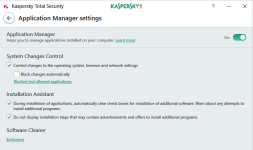
I forgot to say about "Installation Assistant" that You won't (my experience) any warning, just if Kaspersky know the installed will surpass or hide the bundled PUP/Adware/PUA checkboxes/Windows... but probably will appear in Reports.
 
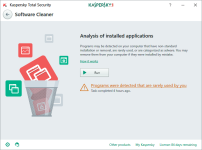
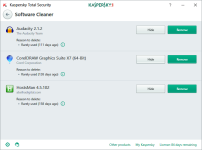
In KTS2017 that Module has been renamed to "Application Manager" and is connected with a new feature "SoftWare Cleaner" which pretends to delete applications not unwanted or rarely used, but in this section may appear legal applications:

a.png b.png c.png
 
I forgot to say about "Installation Assistant" that You won't (my experience) any warning, just if Kaspersky know the installed will surpass or hide the bundled PUP/Adware/PUA checkboxes/Windows... but probably will appear in Reports.
Any FPs chances with Install Assistant i.e wrongly unchecking/surpassing any program related stuffs?
 
I wonder why in my country the last version available from purchase or update is the 16.0.0.614(g) :rolleyes:
- (f) version is said as "progressive patch" => never seen :'(
- 16.0.1.445 => only seen it on unofficial "French" website (or on some other countries) :(
 
Last edited:
The installer I used is named as "kis16.0.1.445en-in_full", is it fine & latest?

And KIS about screen shows 16.0.1.445(c), hope its stable version & latest too?
 
Last edited by a moderator:
@harlan4096 Do you have any idea if there is a list of changes from 2016 to 2017 versions? Thanks.
 
  • Like
Reactions: Logethica
Current there is no an specific list of changes/new features for Kaspersky 2017, usually We get that info when it is released... but if You have been testing 2017 betas, You can have a closer idea...
 
  • Like
Reactions: Logethica and SHvFl
Status
Not open for further replies.