

Advice Request Kaspersky Exclusion?

Please provide comments and solutions that are helpful to the author of this topic.

ncage

Level 3
Thread author
Verified
Forum Veteran
May 20, 2017
115
361
167
IL
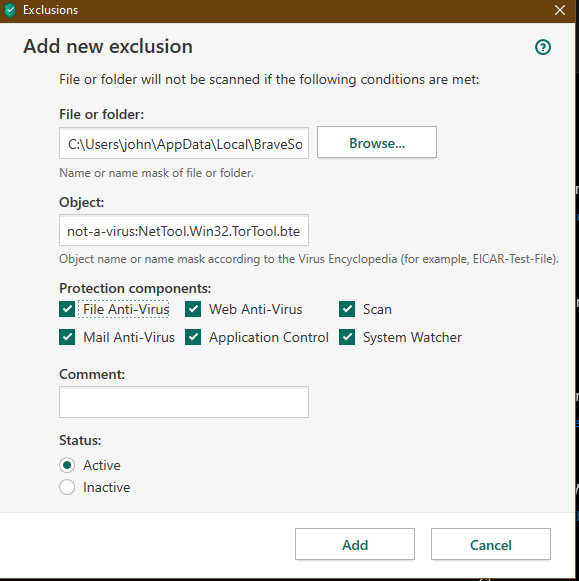
OK i use the brave browser which comes with a Tor component. Kaspersky keeps warning me:
1593364115726.png


So i'm in the process of setting an exclusion. I wish i knew which kaspersky module keeps picking it up because I would like to only exclude that portion especially considering if you are browsing on Tor you want to be ultra safe rather than exclude it from everything. Any know which module(s) i need to exclude?
 
Because of the “object” restriction, it sounds like you might be okay leaving all of these checked because it’s just whitelisting that one specific signature?

Or is that just a description field?
 
I've had a similar issue in the past what ever I excluded eventually KIS would still do it's own thing - A small business operated by a close relative use some very rare & specialist tools to do with power calculation etc were flagged as malicious & whatever I did KIS had it's way in the end, long after I left - Eventually I installed ESET on the PC they ran these tools on & just used this PC - I contacted support to see if I was missing something, seems I wasn't, this was a year ago so things might have changed? KIS still the best IMO.
 
I've had a similar issue in the past what ever I excluded eventually KIS would still do it's own thing - A small business operated by a close relative use some very rare & specialist tools to do with power calculation etc were flagged as malicious & whatever I did KIS had it's way in the end, long after I left - Eventually I installed ESET on the PC they ran these tools on & just used this PC - I contacted support to see if I was missing something, seems I wasn't, this was a year ago so things might have changed? KIS still the best IMO.
Something similar, Application Control is blocking java.exe on my laptop from accessing a legit .jar file ... And I get no alert for it, even when "Perform recommended actions automatically" is disabled.
The file is not blacklisted, is 'Trusted', has all permissions, and is of course static. Not changed since a few months.
Setting to exclusions (as a Trusted Application) in main settings, setting an exception in AC window, explicitly setting all System Watcher options to prompt — nothing works.
After some email exchanges with the support, they forwarded it to the Moscow HQ tonight where they concluded it's a bug.