Gandalf_The_Grey
Level 86
Verified
Honorary Member
Top Poster
Content Creator
Well-known
Forum Veteran
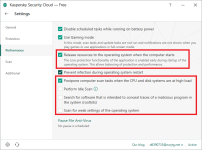
Probably notdid you try all performance tweaks for KFA?
I use it on an 8-year old celeron laptop and it works great
Open MalwareTips from your Home Screen or desktop. Follow discussions, find answers and pick up where you left off.
If you cannot find an install option, update your browser or use its bookmark option to keep MalwareTips close.
After installation, open the app and sign in. Enable push notifications in Preferences if you want alerts. On iPhone and iPad, push requires a Home Screen web app and iOS or iPadOS 16.4 or later.
Sign in to manage notificationsInstallation is optional. Your notification settings stay under your control.
Probably notdid you try all performance tweaks for KFA?
I use it on an 8-year old celeron laptop and it works great
here is what I did for those PCs. KFA doesn't have "scan for weak settings..."Probably notCan you give me more information?
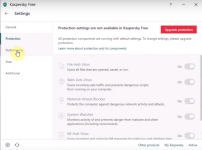
Thanks and bookmarkedhere is what I did for those PCs. KFA doesn't have "scan for weak settings..."
for KSCF, I also use scan "on execution" in file anti-virus
I hate scan for rootkit and idle scan because they are useless and never detect anything. They randomly cause high CPU usage and freeze the weak PC (rootkit scan)
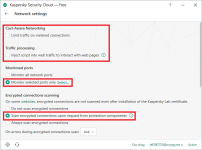
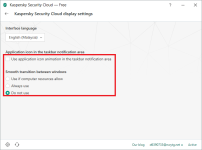
Does cloud edition have virus definitions or is it pure cloud? What are the settings that I can change in cloud edition and do I need to have a My Kaspersky account?In the 2nd You can tweak the main protection modules, and also has some extra features... and to activate You need to do via "My Kaspersky" service.
Thank you! Is the activation then permanent or I need to activate it every year like that was the case with some antiviruses? Once it's activated can I delete the account, or do I need to have it like with Bitdefender Free?Signature + KSN it's the same as the other products KIS/KTS/KAV/KFA...
Yes, You need account in "My Kaspersky" to activate it...
KSCloudF has some extra settings to protect typed password...
Can these settings be changed in cloud edition?It's tough deciding between KFA and KSC Free. The second has slightly more bloat, but you can tweak more settings. So in theory you can get more protection and/or performance. Don't understand why they keep 2 free versions alive, but both are great and recommended.

Yes, you can change those settings in the cloud edition.Thank you! Is the activation then permanent or I need to activate it every year like that was the case with some antiviruses? Once it's activated can I delete the account, or do I need to have it like with Bitdefender Free?
Can these settings be changed in cloud edition?
View attachment 205313
I really hope bloatware can be uninstalled.
Also this extra setting in Performance options:Signature + KSN it's the same as the other products KIS/KTS/KAV/KFA...
Yes, You need account in "My Kaspersky" to activate it...
KSCloudF has some extra settings to protect typed password...
Members who viewed this thread in the last 5 minutes