Serious Discussion Kaspersky\VPN\KSOS 2021MR15 betas

What's new in the latest version of the application​

The latest version of the application introduces the following new features and improvements:

  • You can now search the functionality of the application.
  • Improved Smart Home Monitor. The user's main router can now be monitored for open ports.
  • Improved Wi-Fi Analyzer. The user interface now displays tips on reading the graph that illustrates the current state of your Wi-Fi network.
  • Kaspersky Premium now includes additional identity theft protection functionality provided by our partner Pango.
  • The user's rights are now checked before displaying the list of files available for deletion.
  • A new warning is displayed when deleting system files in the Large Files section.
  • Reports of the Network Attack Blocker component now include MAC addresses of devices in addition to their IP addresses.
  • Terminology in license notifications is now compliant with the requirements of Nexway.
  • The Kaspersky application now complies with regulations governing the collection and processing of personal data in Vietnam.
  • Now you can resize the security news window. This functionality is not always available.
  • Problems with resizing the main window of the application have been resolved. The application now remembers the size of the screen in case of a restart.
  • Kaspersky Free lets you see the functionality of paid versions for awareness purposes. To use this functionality, you must switch to Kaspersky Plus or Kaspersky Premium.
  • Now you can gain trial access to functionality of a higher-tier Kaspersky package. It is a limited-time offer for evaluation purposes. This functionality is not always available.
  • Improved text of the notification that suggests installing Kaspersky Password Manager. The installation status of the application is also displayed.
  • The main window of Kaspersky Free displays a suggestion to switch to a paid version of Kaspersky for a limited-time evaluation.
Update, added source (harlan4096):

 
Last edited by a moderator:

What's new in the latest version of the application​

The latest version of the application introduces the following new features and improvements:

  • You can now search the functionality of the application.
  • Improved Smart Home Monitor. The user's main router can now be monitored for open ports.
  • Improved Wi-Fi Analyzer. The user interface now displays tips on reading the graph that illustrates the current state of your Wi-Fi network.
  • Kaspersky Premium now includes additional identity theft protection functionality provided by our partner Pango.
  • The user's rights are now checked before displaying the list of files available for deletion.
  • A new warning is displayed when deleting system files in the Large Files section.
  • Reports of the Network Attack Blocker component now include MAC addresses of devices in addition to their IP addresses.
  • Terminology in license notifications is now compliant with the requirements of Nexway.
  • The Kaspersky application now complies with regulations governing the collection and processing of personal data in Vietnam.
  • Now you can resize the security news window. This functionality is not always available.
  • Problems with resizing the main window of the application have been resolved. The application now remembers the size of the screen in case of a restart.
  • Kaspersky Free lets you see the functionality of paid versions for awareness purposes. To use this functionality, you must switch to Kaspersky Plus or Kaspersky Premium.
  • Now you can gain trial access to functionality of a higher-tier Kaspersky package. It is a limited-time offer for evaluation purposes. This functionality is not always available.
  • Improved text of the notification that suggests installing Kaspersky Password Manager. The installation status of the application is also displayed.
  • The main window of Kaspersky Free displays a suggestion to switch to a paid version of Kaspersky for a limited-time evaluation.
Is it officially released now?
 
The ability to open the app in full-screen mode, and for it to remember that, makes it easier to use the UI. More settings panels are shown to help reduce the amount of scrolling, i.e. Security shows two more settings panels compared to normal mode on my notebook.
 
 
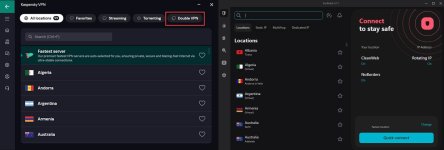
Am I the only one who feels like someone was sneaking a peek from someone else...))))))
 

Attachments

  • img_vpn1.jpg
    img_vpn1.jpg
    308.3 KB · Views: 391
 
 
Got same issue in W11 after the update over 21.14... with ShellView tool appears as active, but does no show in context menu...
Same here, both notebooks I did the update over 21.14, no contextual scan option. Both are Windows 11 64-bit Pro. On my Windows 10 64-bit Pro desktop PC, it is showing in the context menu.
 
I had a problem with the scan disappearing from the context menu when installing the new version over the old version
The solution was to remove kaspersky from the Programs and Features and not keep the settings or do something similar to a clean install

Screenshot_46.png
 
Last edited by a moderator:

You may also like...