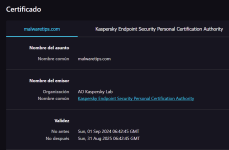
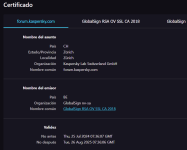
Yes, have it enabled but with KES... as I told, still some sites show K. cert info:



Open MalwareTips from your Home Screen or desktop. Follow discussions, find answers and pick up where you left off.
If you cannot find an install option, update your browser or use its bookmark option to keep MalwareTips close.
After installation, open the app and sign in. Enable push notifications in Preferences if you want alerts. On iPhone and iPad, push requires a Home Screen web app and iOS or iPadOS 16.4 or later.
Sign in to manage notificationsInstallation is optional. Your notification settings stay under your control.

Will the new solution speed up web browsing? Or no noticeable results?Yes, have it enabled but with KES... as I told, still some sites show K. cert info:
View attachment 287589
View attachment 287590

Thank you very much for your help! I will be curious to see how it will look in the new version.
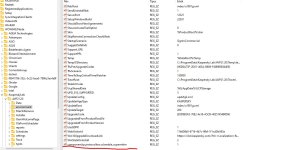
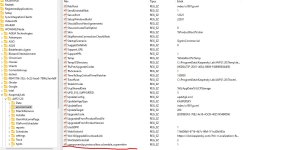
Can you help me with this? How exactly do you do it? I have reached the enviroment value, but how do I proceed from there?
How to enable SuperMITM:
- Disable self-defense
- Unload the product
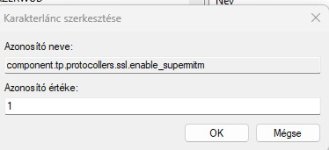
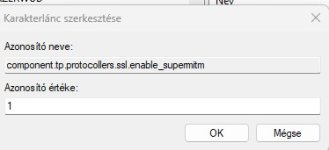
- In the registry, in the branch HKEY_LOCAL_MACHINE\SOFTWARE\WOW6432Node\KasperskyLab\AVP21.20\environment add the string value component.tp.protocollers.ssl.enable_supermitm = 1
- Launch the product
- Enable self-defense and reboot the PC
Is that right?What do You mean?
Did You follow the steps?
Thanks Bro!Yes, looks so.
One thing I don't understand. What does Super MITM mean in this case? MITM is a form of attack. Can you explain that?Yes, looks so.
Yes, there is still a KFree, not the same as K. Standard, last one is a paid version.Hi Is there still a free version (not trial) of Kaspersky standard?
One thing I don't understand. What does Super MITM mean in this case? MITM is a form of attack. Can you explain that?
I have a link for standard wrong one ,anyone have the recent free version?ThanksYes, there is still a KFree, not the same as K. Standard, last one is a paid version.

I have a link for standard wrong one ,anyone have the recent free version?Thanks
Kaspersky Free is a limited free version of Kaspersky application. Using the free version of the application gives you high-quality protection supplemented by advanced features and a user interface fully reworked for ease of use.
You can activate the application by logging into your My Kaspersky account from the device on which you are installing the application. Kaspersky Free does not work if your device is not connected to your account. You can create an account in the account connection window during application activation or on My Kaspersky website. You can also use credentials from other Kaspersky resources to sign in to your account.
 support.kaspersky.com
Where are you from?I have a link for standard wrong one ,anyone have the recent free version?Thanks
Members who viewed this thread in the last 5 minutes