Software Review Kaspersky vs infected system in 2025

Reviews reflect the reviewer's setup and methods. Check the evidence and limitations.
Thread details
Content created by
TPSC
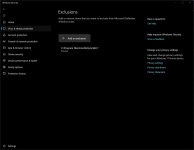
Out of curiosity, I checked my MD exclusion list and was surprised to find this:

Screenshot 2025-10-27 023559.png

I know FreeFileSync is a legitimate program, but it didn't ask for permission to add itself to the exclusion list, and MD didn't notify me either. From a security perspective, this is unacceptable. Do all antivirus programs work this way?
 
Out of curiosity, I checked my MD exclusion list and was surprised to find this:

View attachment 292366

I know FreeFileSync is a legitimate program, but it didn't ask for permission to add itself to the exclusion list, and MD didn't notify me either. From a security perspective, this is unacceptable. Do all antivirus programs work this way?
The tight integration with the OS makes it more straight forward than with third-party AVs, but Microsoft did implement tamper protection enabled by default. Microsoft Defender for Endpoint defeated all tampering attempts in an anti-tampering test conducted by AV-Comparatives earlier this year, if it means anything: Anti-Tampering Certification – Microsoft Defender for Endpoint (P2 license)
 
I just watched the video. The clue on how it arrived on the machine while MSD have detections is in the video itself. This is not the future of malware. This is a malware tactic to be stealth,put exclusions and not allow other AV to be installed. This is not new at all.
Yes nothing new i encounter thousands of malware which can penetrate WD with the power of setting exceptions. However how malware manages to evade WD and set exceptions should have been shown in the video.
 
The tight integration with the OS makes it more straight forward than with third-party AVs, but Microsoft did implement tamper protection enabled by default. Microsoft Defender for Endpoint defeated all tampering attempts in an anti-tampering test conducted by AV-Comparatives earlier this year, if it means anything: Anti-Tampering Certification – Microsoft Defender for Endpoint (P2 license)
Yes defender endpoint is a different beast. When u pay microsoft to provide security they are not doing much wrong u have to give them that. Their only Achilles heal becomes CVE's.
 

Thanks for sharing that video, monkeylove! It's a great reminder of how sneaky modern malware can be—trojans and other threats often fly under the radar without obvious signs like pop-ups or slowdowns. In 2025 (or even now), infections might only show up through subtle behaviors like unusual network traffic or unexpected processes.

If anyone's watching and wondering about real-world detection:
  • Run regular scans with reputable tools like Malwarebytes or ESET.
  • Keep an eye on system resources via Task Manager/Resource Monitor.
  • Enable behavioral monitoring in your AV if available—it can catch stealthy stuff before it causes damage.

What stood out to you in the video? Any specific trojan behaviors that surprised you?
 
Out of curiosity, I checked my MD exclusion list and was surprised to find this:

View attachment 292366

I know FreeFileSync is a legitimate program, but it didn't ask for permission to add itself to the exclusion list, and MD didn't notify me either. From a security perspective, this is unacceptable. Do all antivirus programs work this way?
When FreeFileSync was installed, did you run its installer as admin or just by double click?
 
You can also see that the account is an administrator by opening MD exclusions.

If the account was Standard, you had to enter the password to view the (too many) exclusions.
Both Local Standard and Microsoft Standard.

Too much pressure on AVs...
 
It's good clickbait for me. I hardly ever watch posted videos because I prefer to read, but I did take a look.
  • It's a reminder for people who might picture malware infection as being obvious and in-your-face.
  • It is really not the future; it is already here for some types of malware, including infostealers, crypto miners, and crypto stealers.
  • It might serve as a good ad for Kaspersky for some. Look! Windows Defender "didn't work," but look at what K is doing.
  • Really, other top scanners would work just as well.
  • People who know where to look would see some signs: weird .exe/service, persistence mechanisms, and added exclusions. Instructors in the malware removal forums would spot some of those right away.
 
The pros of this video:
  • It shows why the simple and common ways of seeking infection traces are insufficient nowadays. This is also true for most of PC Security Channel's video tests (only a skin-deep analysis of possible system infections).
  • It shows a weakness in the Defender free protection at the persistence level.
  • It shows an advantage of Microsoft Defender for advanced users who would like to know if the system is infected = Seek in the first place for path/process exclusions. Another common persistence methods are Registry Run locations and Startup folders.

The cons of the video:
  • The author is focused only on Microsoft Defender, while many dangerous and stealthy persistence methods are commonly used for other AVs.
Bearing in mind the Pros and Cons (3:1), the Pros win.:)
 
Ok. My project requires me to keep Defender as active protection.

My observations are that CPU activity it draws is more than some competitors, namely McAfee. I am often seeing 9-10% which is way more.

Protection-wise when tuned (which my project is all about), it is very decent.

I will in the future (near future), add proactive exclusions removal (optional of course) and other features that will keep the configuration enforced.
I’ve already come up with the logic for it, just need to write it and update the UI.

The logic will be to add a folder in Program Files called Defender Hardening Console. Inside will be files which will run as scheduled tasks. The files will restore Defender periodically as well as on reboot.
Exclusions that need removal will be targeted through proprietary heuristics.
This can be:
+Overly broad, like entire drive or folder that doesn’t make sense being excluded.
+Pointing to a randomly generated folder name
+ Pointing to a folder that should contain more files had it been legit. For example, it is not normal having a folder in ProgramData that contains only one file (with minor exceptions). If this file is executable or a weird format, this is even higher confidence indicator.
+Pointing to a folder that contains unsigned executables, scripts or files which aren’t part of legitimate installation.

After removing such exclusions, I will immediately trigger scans of the excluded files with Defender.

Some of it is already implemented in HEAT.

@lokamoka820 programs for performance reasons are allowed to add exclusions.
 
Last edited:
Yes nothing new i encounter thousands of malware which can penetrate WD with the power of setting exceptions. However how malware manages to evade WD and set exceptions should have been shown in the video.

The malware could arrived via download ( exe or zip pw protected ) or any other file transfer but it does not matter much.

The one that matters is the detection of Microsoft. This is a new file. The INITIAL REACTION of MSD is detection thru ML( machine learning ) and Generics. Possibly it was Allowed by the user when he was asked to allow or remove the "possible threat". After that, exclusions were made and services were added.
 
It's good clickbait for me. I hardly ever watch posted videos because I prefer to read, but I did take a look.
  • It's a reminder for people who might picture malware infection as being obvious and in-your-face.
  • It is really not the future; it is already here for some types of malware, including infostealers, crypto miners, and crypto stealers.
  • It might serve as a good ad for Kaspersky for some. Look! Windows Defender "didn't work," but look at what K is doing.
  • Really, other top scanners would work just as well.
  • People who know where to look would see some signs: weird .exe/service, persistence mechanisms, and added exclusions. Instructors in the malware removal forums would spot some of those right away.
Hey Wrecker4923,

Totally get the clickbait angle—it's catchy enough to draw folks in, even if videos aren't your jam. Solid breakdown on your end; I'll chime in with a few thoughts to build on that.

  • You're spot on about the "silent" nature of modern malware. It's a wake-up call for anyone still thinking infections come with flashing pop-ups or obvious slowdowns. Stealth is the name of the game now, especially with those infostealers and miners you mentioned—they're designed to fly under the radar while siphoning data or resources.
  • On the AV side, yeah, it does feel a bit like a Kaspersky promo ( Defender missing something isn't exactly shocking in edge cases). But as you said, most reputable scanners from vendors like ESET, Bitdefender, or even Malwarebytes could likely catch similar threats with the right configs. It's all about real-time monitoring and behavioral analysis these days.
  • For the eagle-eyed folks (shoutout to our malware removal pros here), those telltale signs in Task Manager, registry keys, or exclusion lists are gold. If anyone's dealing with a potential infection, starting with tools like Process Explorer or Autoruns can reveal a lot without needing a full scan.

At the end of the day, prevention beats cure—strong passwords, 2FA, and avoiding shady downloads go a long way. What kind of setup are you running for protection these days? Always curious to hear what works for others.
 

Recently browsing

Members who viewed this thread in the last 5 minutes

Back
Top