KAV\KIS\KTS: 19.0.0.1088 TR RU + English fix

Status
Not open for further replies.
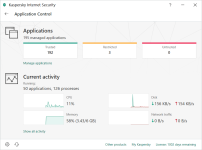
same issue i was having in my VM, it seems either KSN integration isn't working or something, but every single thing gets put to untrusted

remember @harlan4096 i told you about this

Well no big deal... the software seems to be placed in the right category after installing and I do not download software I don't trust.

Anyway I decided to return to the 2018 version until this is corrected.
 
Last edited:
So far I had to turn off KTS to install Sumo.

Directory Opus required me to manually move all temp files to low restricted from Untrusted...

The only tweak I applied was to turn off automatically trusting signed software. Categories are set to automatically be set by the cloud

View attachment 186327

Interesting ......

I turn off automatically trusting signed software like you + turn on TAM (Win. 10 64bit)

So fine so far ,,, same as version 2018 , GUI is smother and faster than 2018.
 

Attachments

  • 2018-04-16_05h53_16.png
    2018-04-16_05h53_16.png
    67.7 KB · Views: 741
I'm not getting those issues with that setting disabled, but I understand that is paranoid one and may break some installations, so in these cases just low the security -> enabling it and changing temporally -> Unknown applications to Automatically, and for sure should did the trick... this is the price You have to pay making those strong paranoid tweaks, They are working for me, but probably not suitable for most of the users :)

Anyway a few minutes ago I just installed Auslogics BoostSpeed 9 (taken from a Giveaway in this forum), with these settings:

And it installed successfully without any breaking...

But in general, if You are in Interactive Mode, during installations, You should get a warning from K2019, in this warning there is an option usually to select: Trust this application, apply the selection, this way it will be sent to Trusted in that moment...
 
Last edited:
it might be related to internet connection / vpn then maybe?
cause if the connection to KSN isn't available i would assume it puts it to untrusted since there is no rule on it?
 
Not using a VPN and KSN shows as connected.
 
Does this version have a better automatic categorization regarding restricted groups? Or it will always send an unknown application (including undetected ransomware, as I've already tested) to Low Restricted if you choose "Select trust group automatically"?
 
Does this version have a better automatic categorization regarding restricted groups? Or it will always send an unknown application (including undetected ransomware, as I've already tested) to Low Restricted if you choose "Select trust group automatically"?
so far i have seen things being put to untrusted if UDS caught it, i doubt they would put random things to untrusted for no reason.
 
I guess They move to Low Restricted an application, taking into account several criteria, but probably, some of them are:

- Digitally signed? if so => trusted certificate?
- Unknown application in KSN?
- And probably also the number of users in KSN who have it (reputation) and in which restriction group.
 
Last edited:
I manually configure Application control to put all unknown software into the untrusted catagory and if I know the software is safe I manually move it. I also unck 'Trust Digitally signed' I'd rather have to move a safe app from untrusted than risk an infection or even a PUP/PUA. I love KIS for how well it can be tweaked.
 
I manually configure Application control to put all unknown software into the untrusted catagory and if I know the software is safe I manually move it. I also unck 'Trust Digitally signed' I'd rather have to move a safe app from untrusted than risk an infection or even a PUP/PUA. I love KIS for how well it can be tweaked.

Exactly
 
  • Like
Reactions: ZeroDay
how to install KFA 2019 TR:
KAV(KIS)19.0.0.1088_***_full.exe /s /pPRODUCTTYPE=kfa

kaspersky free
/pPRODUCTTYPE=kfa

kaspersky av
/pPRODUCTTYPE=kav

kaspersky internet security
/pPRODUCTTYPE=kis

kaspersky total security
/pPRODUCTTYPE=pure

/s - silent install
0 - disable
1- enable

optional options
Code:
/pJOIN_KSN=0 /pHIDE_UPGRADE_TAB=1 /pHIDE_EOL_PAGE=1 /pOEM_WELCOME_PAGE_FIRST_START_AT_REBOOT=0 /pOEM_WELCOME_PAGE_FIRST_START_AT_DAY=0 /pOEM_WELCOME_PAGE_START_AT_EACH_REBOOT=0 /pOEM_WELCOME_PAGE_START_AT_EACH_DAY=0 /pOLA_FORM_SCHEDULER_FIRST_START_AT_REBOOT=0 /pOLA_FORM_SCHEDULER_FIRST_START_AT_DAY=0 /pOLA_FORM_SCHEDULER_START_AT_EACH_REBOOT=0 /pOLA_FORM_SCHEDULER_START_AT_EACH_DAY=0

230434t00mua4v0app0z4d.jpg
 
how to install KFA 2019 TR:
KAV(KIS)19.0.0.1088_***_full.exe /s
/pPRODUCTTYPE=kfa

kaspersky free
/pPRODUCTTYPE=kfa


kaspersky av
/pPRODUCTTYPE=kav


kaspersky internet security
/pPRODUCTTYPE=kis

kaspersky total security
/pPRODUCTTYPE=pure


/s - silent install
0 - disable
1- enable


optional options
Code:
/pJOIN_KSN=0 /pHIDE_UPGRADE_TAB=1 /pHIDE_EOL_PAGE=1 /pOEM_WELCOME_PAGE_FIRST_START_AT_REBOOT=0 /pOEM_WELCOME_PAGE_FIRST_START_AT_DAY=0 /pOEM_WELCOME_PAGE_START_AT_EACH_REBOOT=0 /pOEM_WELCOME_PAGE_START_AT_EACH_DAY=0 /pOLA_FORM_SCHEDULER_FIRST_START_AT_REBOOT=0 /pOLA_FORM_SCHEDULER_FIRST_START_AT_DAY=0 /pOLA_FORM_SCHEDULER_START_AT_EACH_REBOOT=0 /pOLA_FORM_SCHEDULER_START_AT_EACH_DAY=0

View attachment 186635
now that is nasty, even for my taste
 
Very astute technique to extract from a full/complete installer, the KFA installer (y):giggle: since They didn't provide during beta testing a KFA beta in English, only in Russian en Chinese, and usually They delay the KFA release, that may do the trick to get KFA 2019 :LOL:
 
:unsure: No official patch A for K2019 in KL forum neither public beta testing for it... but is not the 1st time They deliver a fast patch without previous public beta testing to fix something or to give support for something...
 
Last edited:
Status
Not open for further replies.

You may also like...